iOS 15 FaceTime Guide: New Features, SharePlay, Screen Share, Updates - MacRumorsOpen MenuShow RoundupsShow Forums menuVisit ForumsOpen Sidebar
Skip to Content

iOS 15 FaceTime Guide: New Features, SharePlay, Screen Share, Updates

Apple in iOS 15 is making major changes to the FaceTime app, introducing a whole range of new features that turn ‌FaceTime‌ into the ultimate hub for interacting with friends, family, coworkers, and more.

ios 15 facetime guide
Our ‌FaceTime‌ guide outlines everything that's new in the ‌FaceTime‌ app in iOS 15 and iPadOS 15, and many of these features are also in macOS Monterey and can even be used in tvOS 15. We've also included detailed how tos and tutorials so you can dive right into ‌FaceTime‌ after upgrading.

SharePlay (Added in iOS 15.1)

SharePlay is ‌FaceTime‌'s biggest new feature, and it's basically a way for you to do more on ‌FaceTime‌ calls with your friends and family. You can watch TV together, listen to music, and share your screen. SharePlay is was introduced in iOS 15.1, iPadOS 15.1, tvOS 15.1, and macOS Monterey 12.1 after being delayed from the initial launch versions of the software.
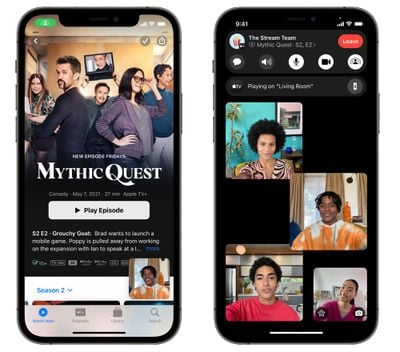
facetime shareplay screenshots mythic quest
SharePlay makes the ‌FaceTime‌ experience a whole lot better because it can be used for screen sharing, watching movies and TV together, or listening to music with Apple Music. Third-party app developers can also build SharePlay into their apps, so there are a whole range of new ‌FaceTime‌ games and experiences.

Watch Movies and TV

When you're on a ‌FaceTime‌ call, you can choose to stream movies or TV shows and everyone on the call will see the same synced playback and controls. You can watch on the iPhone or iPad, or swap over to the Apple TV to watch on the big screen while you continue your call.

facetime shareplay tv show
As you chat and watch, the volume will automatically adjust so that you can hear everyone talking without missing the show.

You can ‌FaceTime‌, watch content, and also do other things on your iPhone for the ultimate multitasking experience.

Listen to Music

If you play an ‌Apple Music‌ song while on a ‌FaceTime‌ call with friends, everyone can hear what's playing and can contribute to a shared music queue. The SharePlay music interface offers up synced playback controls, and everyone can see what's coming up next.
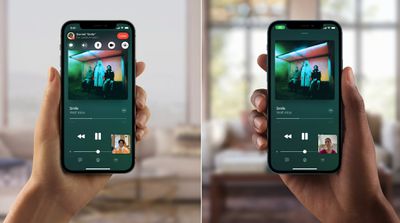
facetime music sharing
You can listen to music over your iPhone, or send it over to the HomePod while remaining on the ‌FaceTime‌ call.

Share Your Screen

Apple has long allowed screen sharing over Messages on the Mac, and this year, that functionality is coming to the iPhone and ‌iPad‌ too. You can share your iPhone's screen with everyone on the call, which is useful when you're planning a vacation, choosing a movie, browsing through a photo album, and more.

facetime screen share

SharePlay Messages

If you're on a ‌FaceTime‌ call but want to send a quick link or image over to the group, you can access your group Messages chat right from the call.

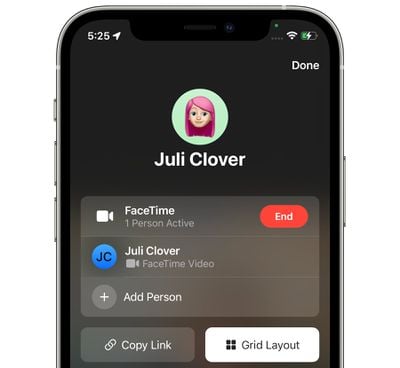
Apple changed how ‌FaceTime‌ works in iOS 15, so you can create something more akin to a Zoom link, but for ‌FaceTime‌. You can make a ‌FaceTime‌ link that other people can tap to join your ‌FaceTime‌ call.

facetime create web link
Links let you schedule ‌FaceTime‌ calls in advance and then share the links with others so everyone can join the meeting or group chat at the appropriate time. ‌FaceTime‌ integrates directly with the Apple Calendar app.

To create a link, just open up the ‌FaceTime‌ app and then tap the "Create Link" option next to "New ‌FaceTime‌." You can share the link in a text message, another messaging service, an email, or AirDrop it, and people can click it to join in.

FaceTime on PCs and Android Devices

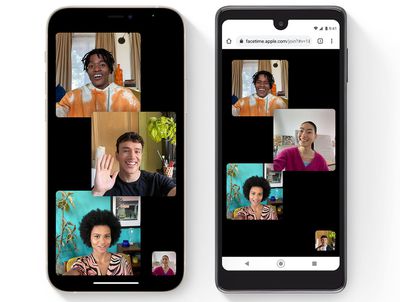
Apple created ‌FaceTime‌ links because there's a new option to join ‌FaceTime‌ calls on the web, which means PC and Android users can participate in ‌FaceTime‌ for the first time.

facetime android
An iPhone, Mac, or ‌iPad‌ user needs to create a ‌FaceTime‌ link, but once created, anyone can tap it to join. To join from the web, Chrome or Edge browsers are required. ‌FaceTime‌ from the web works on-on-one or in Group ‌FaceTime‌ calls.

Spatial Audio

‌FaceTime‌ supports Spatial Audio in iOS 15, so if you're chatting with multiple people and their pictures are in different spots on your screen, it sounds like their voices are coming from the right spot on your device.
facetime spatial audio
Apple says that individual voices are meant to sound like they're coming from the direction in which each person is positioned on the screen, which is meant to make conversations flow more naturally.

Spatial Audio requires an iPhone with the A12 Bionic or later.

Grid View

‌FaceTime‌ in iOS 15 has a new Grid View, which puts ‌FaceTime‌ on par with other videoconferencing apps. You can organize everyone into the same-size tiles, and the person speaking is automatically highlighted.

facetime grid view

Portrait Mode

‌FaceTime‌'s Portrait Mode blurs out the background behind you and puts the focus on you. An A12 Bionic chip or later is required for this feature.

facetime portrait mode

Microphone modes

There are two microphone modes in iOS 15. Voice Isolation is designed to minimize background noises to focus on your voice, while Wide Spectrum makes sure the ambient noise is audible, something that's ideal for group calls.

Mute Alerts

If you're on a ‌FaceTime‌ call and you start talking while muted, you'll see an alert on your iPhone that lets you know the mute button is on.

Zoom

While using the rear-facing camera on a ‌FaceTime‌ call, there's an option to zoom in on what's on the screen.

Guide Feedback

Have questions about ‌FaceTime‌ in iOS 15, know of a feature we left out, or want to offer feedback on this guide? Send us an email here.


Related Forum: iOS 15

Popular Stories

Apple TV 4K HomeView HomePod Mini tweaked

New Apple TV 4K, HomeView, and HomePod Mini: 16 Details Just Leaked

Sunday October 11, 2026 12:56 pm PDT by
Just two days before Apple's "Welcome home" experience in New York, Bloomberg's Mark Gurman has leaked several details about the new products set to be unveiled, including an all-new smart home hub, a HomePod mini 2, and a new Apple TV 4K. Here is an all-in-one summary of the details shared by Gurman:Apple's home hub with a touch-enabled display will be named HomeView, seemingly confirming a ...
Apple HomeView lineup feature1

Apple Announces 'HomeView' Smart Home Hub

Tuesday October 13, 2026 6:00 am PDT by
Apple today announced the "HomeView," an all-new kind of smart home hub featuring a 7-inch Liquid Retina display and Siri AI. Apple's senior vice president of Worldwide Marketing Greg Joswiak said: Apple HomeView is designed to be shared by everyone in the home yet feel completely personal to each user. It recognizes your face to shift from a household screen to your own experience,...
Apple TV 4K 4th Generation feature4

New Apple TV 4K Announced With A19 Chip, Updated Siri Remote, More

Tuesday October 13, 2026 6:08 am PDT by
Apple today announced the fourth-generation Apple TV 4K, with key features including an A19 chip, Siri AI support, an updated Siri Remote that has Find My support with Precision Finding, built in far-field microphones, support for surround sound with four HomePods in front and rear pairs, and more. The A19 chip in the new Apple TV 4K delivers up to 50% faster CPU performance and up to twice...

Top Rated Comments

I7guy Avatar
69 months ago
Contrary to the recent "survey", I think this is a solid update and look to see what is in store as ios 15 proceeds through the development cycle.

Score: 12 Votes (Like | Disagree)
69 months ago

Wow FaceTime now has features Zoom has had for 5 years now.

Innovative company
So Apple just shouldn't have done any of this, since another company has done it already? That's a pretty weird thing to take away from these updates...


Bottom line: lots of fluff. Just slowly adding things that they should have done 5 years ago.
Very few things there that many people will find find actually useful.
Just because you don't find these things useful doesn't mean other's won't. I know a fair number of people who simply don't like Zoom, and prefer FaceTime. A lot of these features interest them.
Score: 11 Votes (Like | Disagree)
UndefinedxJoker Avatar
69 months ago
Apple needs to update FaceTime and all of their other apps separately from OS updates. Almost all of the iOS 15 “features” are just updates to their core apps which could and should have been added throughout this past year.

Instead we get a horrible OS update that barely adds any OS level features.
Score: 6 Votes (Like | Disagree)
PBG4 Dude Avatar
69 months ago

This sharing business sounds abysmal, a sort of premonition of the apocalypse where humans no longer live real lives. Maybe it’s just me, but I like to focus on a movie when I watch it. The last thing I’d want to see is a bunch of remote people watching it at the same time.
I think these updates would have been a home run last year when everyone was sequestered in their houses. Not sure that’s a popular plan this year. The last thing I want to do this year is stay inside and hang with people remotely.
Score: 4 Votes (Like | Disagree)
GtrDude Avatar
69 months ago
Bottom line: lots of fluff. Just slowly adding things that they should have done 5 years ago.
Very few things there that many people will find find actually useful.
Score: 4 Votes (Like | Disagree)
PlainviewX Avatar
69 months ago
Only took Facetime a decade to get a grid view.
Score: 3 Votes (Like | Disagree)
Latest Stories
Apple Pledged $25 Million to Trump's White House Ballroom
21 minutes ago
Touchscreen MacBook Pro Could Launch on November 6
2 hours ago
New Withings Users Must Pay $99/Year for Apple Health Syncing
2 hours ago
Meta and Apple Bring Muse Spark Open AI Model to Mac Studio
3 hours ago
iPad Mini 8: Apple Has Tested Both 60Hz and 120Hz ProMotion Displays
4 hours ago
Apple TV 4K 2022 vs. 2026 Buyer's Guide: All Differences Compared
5 hours ago
Apple CEO John Ternus on Early Foldables: 'Kind of Cheap and Crappy'
6 hours ago
Greg Joswiak Says Apple Isn't Focused on Making AI for 'Lunatic Fringe'
6 hours ago
Amazon Offers $120 Discount on AirPods Max 2, $50 Off AirPods Pro 3
7 hours ago
Apple CEO John Ternus Featured on Cover of TIME Magazine: 'New Era'
8 hours ago
Apple Announces Deadline to 'Get Ready' to Pre-Order the iPhone Duo
8 hours ago
MKBHD is 'Not Convinced' About Apple's New HomeView, Here's Why
8 hours ago
Apple's Wall-Mounted HomeView Ships Without a Power Adapter
9 hours ago
Rare Apple-1 With Steve Jobs Letter Sells for $1.15 Million
9 hours ago
Apple Now Inviting Media to October 28 'Launch Experience'
10 hours ago
iPhone Duo's A20 Pro Chip Benchmarked Ahead of Launch
21 hours ago
10 HomeView Features You Might Have Missed
22 hours ago
Apple Becomes Second Company to Close Above $5 Trillion
23 hours ago
Which Apple Home Devices Get Siri AI, and When
1 day ago
Apple's Long-Delayed HomeView Was Already Being Tested in 2024
1 day ago
Apple Intelligence Coming to China in December With iOS 27.3
1 day ago
Apple Invites App Updated With Two New Features
1 day ago
OpenAI Says Ex-Employee Showed Its Device Plans to Apple
1 day ago
Discover the Best Cases and Screen Protectors for Your New iPhone Duo
1 day ago
Apple Store Near Los Angeles Closed Due to 'Events Beyond Our Control'
1 day ago
No, HomePod Mini 1 Won't Support Siri AI as CNET Reported
1 day ago
iPhone Duo Compromises: Everything You Have to Give Up
1 day ago
Apple HomeView Has These 15 Apps, Some CarPlay Apps and Widgets Also Supported
1 day ago
iPhone Duo: Apple Charging $49 for New Cover Layer, $229 for Battery
1 day ago
iPhone Duo: Skipping AppleCare+ Could Be $1,499 Mistake
1 day ago

🔗 Related Apple News & Rumors

Stay updated with the latest Apple ecosystem news and verified rumors