How to Watch Movies / TV Shows Together Over FaceTime - MacRumorsOpen MenuShow RoundupsShow Forums menuVisit ForumsOpen Sidebar
Skip to Content

How to Watch Movies / TV Shows Together Over FaceTime

by

In iOS 15.1 and iPadOS 15.1, FaceTime received some major enhancements, including the ability for you to share your screen with other people on a video call.

facetime shareplay tv show
Officially called SharePlay, this screen sharing feature also lets you watch streamed movies and TV shows together. When you're on a ‌‌FaceTime‌‌ call, everyone on the call will see the same synced playback and video controls.

The following steps explain how it's done. Note that both parties need to be using ‌FaceTime‌ on an Apple device that supports iOS 15.1 or iPadOS 15.1 for SharePlay to work. SharePlay is not compatible with the browser version of ‌FaceTime‌ available to non-Apple device users, and isn't yet available for macOS Monterey.

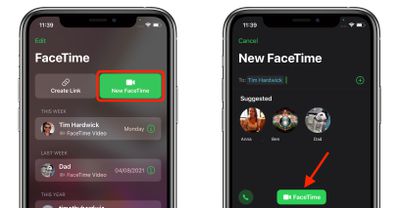
  1. Launch the FaceTime app on your iPhone or iPad and initiate a call.
    FaceTime

  2. When the call has connected, tap the SharePlay button at the top-right corner of the screen in the new control panel.
  3. Tap Share My Screen in the dropdown. After a three-second countdown, screen sharing will initialize.
    FaceTime

  4. Now navigate to the TV app or another streaming app, select something to watch, then press Play.
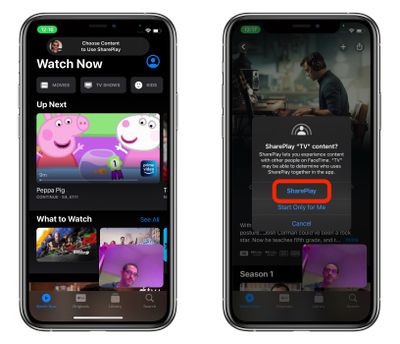
  5. Select SharePlay when the prompt asks you if you want to SharePlay content. Other people on the call will also be asked whether they want to join SharePlay with you.
    FaceTime

That's all there is to it. The video will stream to other people on the call. As you chat and watch the stream together in sync, the volume will automatically adjust so that you can hear everyone talking without missing the show, and if you fast forward or rewind the video, other people on the call will be notified.

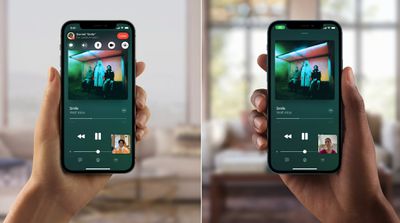
Did you know that you can also listen to music together using SharePlay? Simply launch Apple Music and choose a song for everyone to hear it at the same time.
facetime music sharing
Anyone on the call can contribute to the shared music queue. The SharePlay music interface will display synced playback controls, and everyone will be able to see what's coming up next.


Related Forum: iOS 15

Popular Stories

iOS 27 and FaceTime Feature

iOS 27 Improves FaceTime in Three Ways, Including Dual Capture

Thursday June 11, 2026 6:27 am PDT by
iOS 27 includes three enhancements for FaceTime, with the most notable one being a dual camera feature on some newer iPhone models. On the iPhone 17, iPhone 17 Pro, iPhone 17 Pro Max, and iPhone Air, a Dual Capture feature allows you to record video of yourself and what is in front of you at the same time. Starting with iOS 27, this feature is now supported in the FaceTime app on these...

Apple Acquires Award Winning App Play Feature

Apple Acquires Award-Winning App 'Play'

Monday June 29, 2026 7:39 am PDT by
In February, Apple notified the European Commission that it would be acquiring certain assets from and have the right to hire certain employees from Rabbit 3 Times, the company behind the award-winning app design tool Play. The notification was published on the European Commission's website this week, following a four-month waiting period. Play was a Mac and iPhone app that allowed designers ...
American Express Gold Apple Pay Feature

American Express Announces New Apple Pay Feature

Tuesday June 30, 2026 10:27 am PDT by
American Express today announced that you can now redeem Membership Rewards points when checking out with Apple Pay on the web and in apps on the iPhone and iPad. When checking out with Apple Pay on iOS 18 or iPadOS 18 or later, tap on your eligible American Express card (Platinum, Gold, Green, and others) and select the Membership Rewards points option. You can use points to cover all or...

🔗 Related Apple News & Rumors

Stay updated with the latest Apple ecosystem news and verified rumors