How to See Links, Attachments, and Photos From a Messages Conversation - MacRumorsOpen MenuShow RoundupsShow Forums menuVisit ForumsOpen Sidebar
Skip to Content

How to See Links, Attachments, and Photos From a Messages Conversation

by

ios 7 messages iconApple overhauled several features in its stock Messages app in iOS 13, introducing an enhanced search function, new Memoji customization options, and more.

Apple also improved the conversation information screen available to you in individual message threads, allowing you to find shared media quickly and easily. Keep reading to learn how to access this information section on your iPhone or iPad.

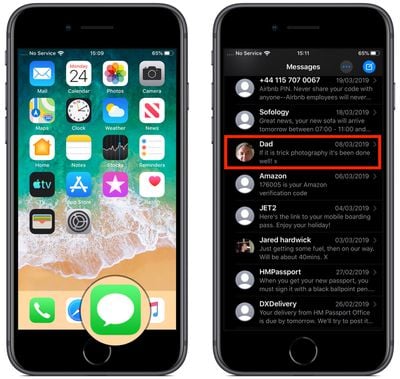
  1. Launch the Messages app on your iOS device.
  2. Tap on an existing message thread in the Messages list.
    how to access conversation thread details in Messages ios 2

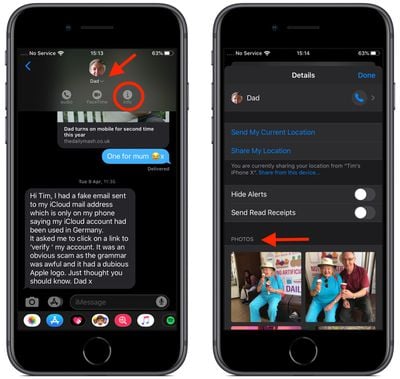
  3. Tap the chevron beside the contact's name at the top of the screen to reveal additional options.
  4. Tap the Info icon (the circled "I").
  5. You should see the Info or "Details" panel, which includes options at the top to send or share your current location with the contact, as well as a toggle to Hide Alerts for new messages in this thread.
    how to access conversation thread details in Messages ios 1

  6. The section below these options has been overhauled in iOS 13, offering a more organized look at the kind of media that has been shared in the thread. Subsection previews appear for photos, videos, links, attachments, and locations, any of which you can tap to access further sharing options via the Share Sheet icon (the square with an arrow pointing out).
  7. Tap Show All below a media kind preview to reveal the complete collection for the thread.
Did you know that iOS 13 also includes new Animoji and Memoji stickers for use in Messages?

Related Forum: iOS 13

Popular Stories

ios 27 messages

Apple Intelligence Introduces Contextual Call and Messages Features

Monday June 8, 2026 12:49 pm PDT by
Apple today announced a set of new communication-focused Apple Intelligence features, including contextual suggestions in Messages and a Call Context tool that surfaces relevant information from Mail when a user phones a business. The new Messages features offer one-tap suggestions based on the content of a conversation. If a contact asks for photos, Messages can surface a suggestion to...
ios 27 messages

14 Ways Apple Is Improving Messages in iOS 27

Wednesday June 10, 2026 4:01 am PDT by
Apple at this year's WWDC emphasized that its approach to iOS 27 development was to add fewer newer features and instead make existing features better. Examples of that approach can be seen across the operating system, but it is arguably most obvious in the changes coming to Messages. That's not to say there's nothing original coming to Messages in iOS 27. For instance, one new Apple...
American Express Gold Apple Pay Feature

American Express Announces New Apple Pay Feature

Tuesday June 30, 2026 10:27 am PDT by
American Express today announced that you can now redeem Membership Rewards points when checking out with Apple Pay on the web and in apps on the iPhone and iPad. When checking out with Apple Pay on iOS 18 or iPadOS 18 or later, tap on your eligible American Express card (Platinum, Gold, Green, and others) and select the Membership Rewards points option. You can use points to cover all or...

🔗 Related Apple News & Rumors

Stay updated with the latest Apple ecosystem news and verified rumors