iOS 26: How to Use the New Music Pins Feature - MacRumorsOpen MenuShow RoundupsShow Forums menuVisit ForumsOpen Sidebar
Skip to Content

iOS 26: How to Use the New Music Pins Feature

by

If you've ever found yourself scrolling endlessly through your iPhone's music library to find that one album you play every morning or the workout playlist that gets you pumped, then you should find iOS 26's new Music pins feature a welcome addition to the app.

pin apple music app ios
Basically, Apple Music lets you pin your most frequently accessed songs, playlists, albums, and artists directly to the top of your Library tab, making them readily accessible with a single tap.

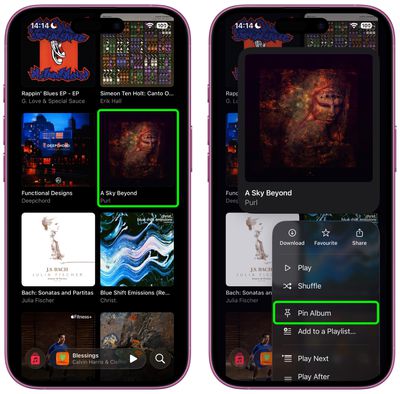
Pinning keeps your musical essentials within easy reach, and it couldn't be easier to use. In the Music app, simply navigate to the song, album, artist, or playlist that you want to pin, then long press on the item and choose the Pin option from the popup menu.
music
To unpin an item from the top of your Library tab, it's pretty much the same action – long press it and choose the Unpin option from the popup menu.

Download Pinned Items?

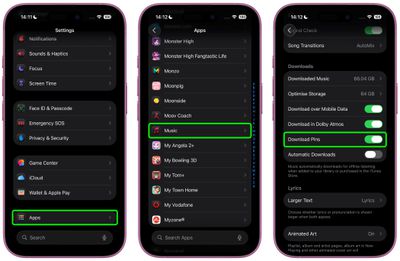
The first time you use Music pins, iOS 26 will ask if you want to download pinned items automatically for offline listening. You can adjust this setting anytime by navigating to Settings ➝ Apps ➝ Music and toggling Download Pins.
settings
Music pins aren't the only new Music addition in iOS 26. The app now has an AutoMix feature to create seamless DJ-style transitions between songs, plus there's also lyrics translation and lyrics pronunciation, making it easier to appreciate music from all over the world. Note that iOS 26 is currently in beta and will be released in the fall.


Top Rated Comments

11 months ago
Neat.

Now let me add songs to Music from the Files app.
Score: 11 Votes (Like | Disagree)
11 months ago
Nice. I hope it appears in CarPlay as well. I can generally find a moment to root through my phone generally for stuff to listen to, but in the car I need very quick access to key playlists/etc.


Score: 11 Votes (Like | Disagree)
RUQRU Avatar
11 months ago
I would be nice if it allowed Radio Stations to be pinned also.
Score: 5 Votes (Like | Disagree)
bradriley Avatar
11 months ago

I would be nice if it allowed Radio Stations to be pinned also.
It’s baffling you can’t even pin the Apple’s own Apple Music stations. Do Apple employees even use their own platforms???
Score: 4 Votes (Like | Disagree)
jamie j. Avatar
11 months ago
Sadly this is useless to me because it requires you to turn on library sync. The last time I did this, it deleted all of the high quality recordings I had out of my iTunes. Had to turn it off and then do a restore from a backup. I refuse to turn on library sync. Also, why do I have to? I just want the pinned playlists on my iPhone. It doesn't need to sync with anything else.

If anyone has a workaround for this, I'd love to hear it.
Score: 4 Votes (Like | Disagree)
11 months ago
The post should mention that you can control what happens when you tap a pinned item as well in the app and in the widget. You long press the icon in the Pinned section and select Tap Action where you can pick to play, shuffle or go to the playlist.

Attachment Image
Score: 3 Votes (Like | Disagree)

Popular Stories

iphone 17 pro black feature

iPhone 18 Pro's Camera Upgrade Will Cost Apple 50% More

Friday May 29, 2026 3:44 am PDT by
The iPhone 18 Pro and iPhone 18 Pro Max's all-new variable aperture lens will cost Apple 50% more than the camera unit used in current models, according to supply chain analyst Ming-Chi Kuo. Variable aperture has been one of the most persistent iPhone camera rumors of the past few years. Kuo first flagged the feature in late 2024, and it has since been corroborated by multiple reports and...
HomePod mini and Apple TV Sage

New Apple TV and HomePod Mini Are 'Nearly Ready' to Launch, New Siri Remote Also Rumored

Sunday May 31, 2026 8:47 am PDT by
New models of the Apple TV 4K and HomePod mini are "nearly ready to go," according to the latest word from Bloomberg's Mark Gurman. Both devices have been ready "for months," but Apple is holding off on launching them until the more personalized version of Siri is available, he said. "I am told the hardware for the next Apple TV set-top box and HomePod mini has been done for months and...
iphone 18 pro color dummies

First Look at iPhone 18 Pro Color Options Revealed by Dummy Models

Friday May 29, 2026 4:50 am PDT by
Leaker Sonny Dickson today shared images of iPhone 18 Pro dummy models in the device's four rumored colors, offering the first real-world look at what to expect from the lineup visually. Corroborating previous rumors, the dummies show the iPhone 18 Pro Max in Light Blue, Black, Silver, and Dark Cherry. Dickson said "Cherry will probably be the next hit, orange did very well." Cosmic Orange...

🔗 Related Apple News & Rumors

Stay updated with the latest Apple ecosystem news and verified rumors