

Use Edge Light for Better Video Calls in macOS - MacRumorsOpen MenuShow RoundupsShow Forums menuVisit ForumsOpen Sidebar
Skip to Content

Use Edge Light for Better Video Calls in macOS

by

Apple in macOS Tahoe 26.2 introduced Edge Light, a clever new feature that turns your Mac's display into a virtual ring light during video calls. Instead of fumbling with external lighting equipment, your Mac can now illuminate your face automatically when you're sitting in a dark room.
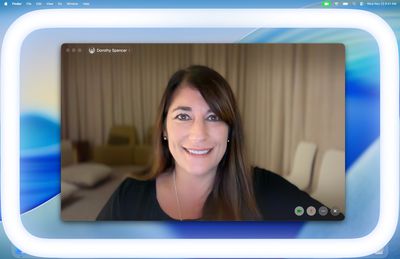
apple edge light macos tahoe 26 2
Basically, Edge Light adds a soft glow around the edges of your display to brighten your face during video conferences. But it's far from just a simple screen border effect. Edge Light uses your Mac's Neural Engine to analyze your face, size, and position in the frame to deliver accurate lighting, while the Image Signal Processor fine-tunes brightness to match your environment.

The feature is even aware enough to know when your cursor approaches the display edge. When it does, Edge Light automatically recedes, allowing you to still access on-screen content without it interfering.

What You'll Need

Edge Light works on any Mac with Apple silicon (M1 or later). It's compatible with all video conferencing apps and even extends to external cameras and the Apple Studio Display when connected to an Apple silicon Mac.

How to Turn On Edge Light

Once you've updated to macOS Tahoe 26.2 or later, enabling Edge Light takes just a couple of clicks:

  1. Open a supporting video call app (FaceTime, Zoom, or WebEx, for example).
  2. Click the green video conferencing menu bar item at the top of your screen.
  3. Select Edge Light from the drop-down menu.
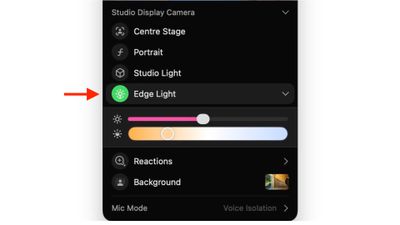
edge light

To adjust the lighting intensity and color temperature, click the down chevron next to Edge Light. You'll see two sliders that let you customize the brightness and warmth of the effect to suit your preferences.

If you own a Mac released in 2024 or later, you can turn on automatic Edge Light activation. Once enabled, your Mac will detect when you're in a dimly lit environment and turn the feature on without any manual input. Simply look for the automatic toggle in the video call dropdown menu, immediately below the expanded Edge Light options.


Top Rated Comments

8 months ago
It’s nice to have but it made such little difference to me I ended up turning it off.
Score: 24 Votes (Like | Disagree)
Jseeker Avatar
8 months ago
I used it on a Zoom meeting last weekend, and asked the other participants if they could see any difference when I turned it on then off again. They were unable to detect any lighting difference. So it seems useless? That said - and this is important and I will text this next time - I didn't adjust its brightness.

FYI - I'm using a Mac mini and studio display.

Score: 8 Votes (Like | Disagree)
8 months ago
Looks useless
Score: 6 Votes (Like | Disagree)
turbineseaplane Avatar
8 months ago

Wake me up when Apple Intelligence can make me beautiful on video calls /s
We are about to wake up @ProbablyDylan in the year 2364


Attachment Image

Attachment Image

Attachment Image
Score: 5 Votes (Like | Disagree)
CheesePuff Avatar
8 months ago

I used it on a Zoom meeting last weekend, and asked the other participants if they could see any difference when I turned it on then off again. They were unable to detect any lighting difference. So it seems useless? That said - and this is important and I will text this next time - I didn't adjust its brightness.
FYI - I'm using a Mac mini and studio display.
yup made zero difference for me on my M3 iMac
Score: 5 Votes (Like | Disagree)
Kylo83 Avatar
8 months ago

Is the light brighter on a miniLED Mac?
No which makes it useless
Score: 5 Votes (Like | Disagree)

Popular Stories

Apple Event Logo

Apple Working on All-New Operating System

Wednesday July 29, 2026 11:39 am PDT by
Apple is developing an all-new operating system that is essentially a mix of tvOS, watchOS, and iOS, according to Bloomberg's Mark Gurman. In a report this week, he said the operating system will feature a grid of icons, widgets, and apps, along with customizable clock faces. The new software platform is intended for Apple's long-rumored smart home hub. With built-in facial recognition,...
imac video apple feature

Apple Made Its Second-Biggest Acquisition Ever This Year

Wednesday July 29, 2026 12:03 pm PDT by
Apple this year acquired Israeli startup Q.ai for close to $2 billion, according to the Financial Times. That would make this Apple's second-biggest acquisition ever, after it paid $3 billion for the popular headphone maker Beats in 2014. This is also the largest known Apple acquisition since the company purchased Intel's smartphone modem business and patents for $1 billion in 2019. Q.ai...
Dynamic Island iPhone 18 Pro Feature

iPhone 18 Pro: Twelve Changes Coming to Apple's Next Flagship

Thursday July 30, 2026 3:43 am PDT by
We're less than two months out from the launch of Apple's premium next-generation smartphone lineup, and while we're not expecting a dramatic change in terms of functionality, there are still several enhancements rumored to be coming to the iPhone 18 Pro and iPhone 18 Pro Max. One thing worth noting is that Apple is reportedly planning a major change to its iPhone release cycle this year,...

πŸ”— Related Apple News & Rumors

Stay updated with the latest Apple ecosystem news and verified rumors






































