

On Apple Watch Ultra, Apple Watch SE, and Apple Watch Series 6 and later, the redesigned Compass app can be used to create Compass Waypoints and then find the distance and direction between them. Here's how it works.
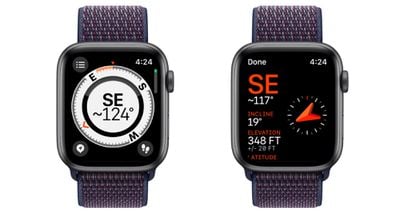
In watchOS 9, the Compass app has been redesigned and now has an adaptive watch face showing your bearing at the center. If you scroll the Digital Crown, you can also view your incline, elevation, and coordinates in the inner ring of the compass.
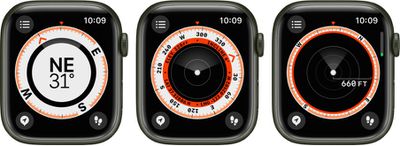
The location of any Waypoints you create will be shown within the Compass ring. The following steps show you how to mark and display Compass Waypoints.
How to Mark and Display Waypoints
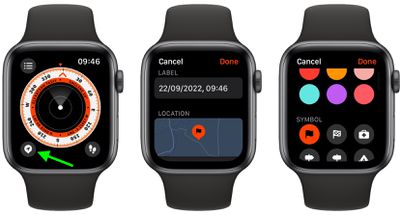
- In the Compass app, tap the waypoint icon in the bottom-left corner of the screen to add a waypoint.
- Customize the waypoint as desired, including information such as label, color, or symbol (home, for example), then tap Done.

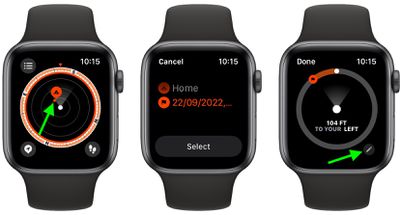
- To view a Compass Waypoint, tap a waypoint on any of the three Compass screens, turn the Digital Crown to select a waypoint from the list, then tap Select. (Note the distance and direction to the waypoint – "Arrived" or "2.5 miles to your right," for example.)
- Tap the pen icon near the bottom of the screen to show the waypoint on a map, along with its coordinates.
All the waypoints you've created can be found by tapping the three-lines icon in the top-left of any Compass screens. Simply scroll down below the co-ordinates to find them listed, along with an option to add a bearing.
How to Delete Waypoints
- Tap the three-lines icon in the top-left of any Compass screen.
- Scroll down to the list of waypoints and swipe left across the one you want to delete.
- Tap the red X button that appears.
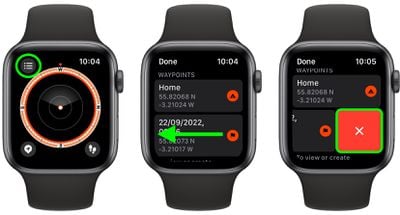
You can also tap into a waypoint and scroll to the bottom of its screen to find a Delete Waypoint button. You can also opt to hide a waypoint here instead of deleting it: Simply toggle off the switch next to Show Waypoint.
Add a Compass Waypoint to your Watch Face
Using the Compass Waypoint complication, you can tap your Apple Watch face to quickly navigate to waypoints you've created, the last waypoint you viewed in the Compass app, or your parked car.
- Select a watch face that offers complications, and with the watch face showing, touch and hold the display, then tap Edit.
- Swipe left to the end to highlight the complication slots, then tap one to select it.
- Scroll to "Compass Waypoints," then either tap one of the first three listed waypoints to add it as a complication, or tap More, then tap a waypoint, Last Viewed Waypoint, or Parked Car Waypoint.
- Press the Digital Crown to save your changes, then tap the face to switch to it.
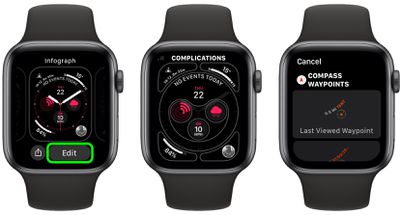
Once you've added the complication, you can tap it to show the waypoint in the Compass app.
Did you know that you can track your route and then retrace your steps using the Backtrack feature? See our dedicated article on Backtrack to learn how.













































