iOS 14.5 is now available, and a key new feature is the ability to unlock an iPhone with Face ID while wearing a mask, so long as you are wearing an Apple Watch. Read on to learn how this feature works.

FaceID Masked Blue copy
Apple introduced its ‌Face ID‌ facial recognition system in November 2017 with the launch of the ‌iPhone‌ X, offering users an even simpler way to unlock their smartphone than traditional fingerprint recognition.

Following the now-mainstream usage of face masks, however, Apple's biometric feature has been handicapped, leaving many users having to enter their passcode to unlock their device when in public spaces.

Fortunately, Apple has responded to this change in our everyday lives by introducing a new feature that allows ‌iPhone‌ users wearing an Apple Watch to unlock their smartphone via ‌Face ID‌ through a partial face scan, when they're wearing a mask.

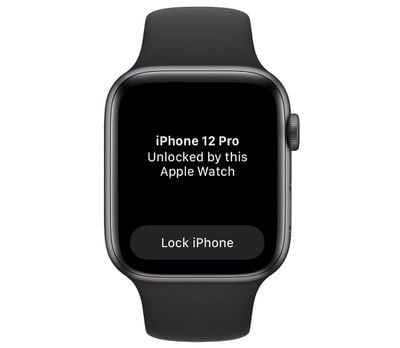
The process is similar to how it works when unlocking a Mac with an Apple Watch. When the unlock happens, the user receives a haptic buzz and a notification on the Apple Watch informing them that the unlocking procedure has been successful. However, bear in mind that you can only use your Apple Watch to unlock your ‌iPhone‌ while wearing a mask – it can't be used for authenticating Apple Pay or App Store purchases.

Before you can take advantage of the new feature, you'll need to make sure that you're running iOS 14.5 on your ‌iPhone‌ and watchOS 7.4 on your Apple Watch. You can update your ‌iPhone‌ by going to Settings -> General -> Software Update. To update your Apple Watch after installing iOS 14.5, launch the Watch app on your ‌iPhone‌, tap the My Watch tab at the bottom of the screen, then select General -> Software Update.

What You'll Need

  • ‌iPhone‌ X or later with ‌Face ID‌
  • Apple Watch Series 3 or later
  • iOS 14.5 or later installed on ‌iPhone‌
  • watchOS 7.4 or later installed on Apple Watch

How to Set Up Unlock iPhone With Apple Watch

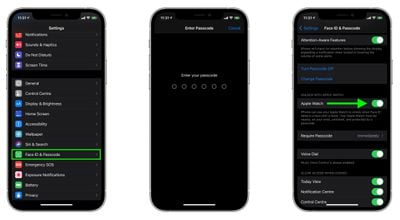
  1. Launch the Settings app on your ‌iPhone‌.
  2. Select Face ID & Passcode.
  3. Enter your ‌iPhone‌'s passcode.
  4. Scroll down to the section labeled "Unlock With Apple Watch" and toggle the switch next to Apple Watch to the green ON position. (If the option is greyed out, you need to update the version of watchOS on your Apple Watch.)
    settings

How to Unlock Your iPhone With Apple Watch

To use your Apple Watch to unlock your ‌iPhone‌, your watch needs to be nearby, on your wrist, unlocked, and protected by a passcode. If you haven't set up a passcode yet, launch the Watch app on your ‌iPhone‌, select Passcode -> Turn Passcode On, then enter the passcode you want to use (you'll have to do so twice to confirm.)
watch
The first time you attempt to unlock your ‌iPhone‌ with Apple Watch when wearing a mask, your ‌iPhone‌ will ask you to enter your passcode. Once you've done that, all subsequent attempts to unlock your ‌iPhone‌ when wearing a mask will be swift and seamless, with each successful unlock accompanied by a short haptic buzz on your wrist. You'll need to re-enter your passcode if you remove your watch and the first time you set it up each day.


Related Roundups: Apple Watch 11, Apple Watch SE 3
Related Forums: Apple Watch, iOS 14

Top Rated Comments

alexandr Avatar
62 months ago
i will be wearing a mask around the house today just to take advantage of this feature!
Score: 25 Votes (Like | Disagree)
alexandr Avatar
62 months ago

I feel like Apple is penalizing people who don’t have or can’t afford an Apple Watch, especially during a pandemic.
no, they are making life a bit easier for those who own one.
Score: 15 Votes (Like | Disagree)
DekuBleep Avatar
62 months ago
Omg I love unlocking my phone with my Apple Watch while I am wearing a mask so much.
Score: 12 Votes (Like | Disagree)
Radeon85 Avatar
62 months ago
Works flawlessly, better late than never.
Score: 10 Votes (Like | Disagree)
Toratek Avatar
62 months ago
The very best feature of this, for me, is that it works with a full-face motorcycle helmet. That makes long-term value of the feature really relevant to me- because sooner or later we won’t be wearing masks anymore, if sanity prevails at the current vaccination rate (at least in the USA).

Before this I would have to either remove my armored gloves and punch in the code, or remove my helmet and balaclava. This is MUCH better.
Score: 9 Votes (Like | Disagree)
TheYayAreaLiving ?️ Avatar
62 months ago
love this feature
Score: 8 Votes (Like | Disagree)

Popular Stories

Aston Martin CarPlay Ultra Screen

Apple's CarPlay Ultra to Expand to These Vehicle Brands Later This Year

Sunday February 1, 2026 10:08 am PST by
Last year, Apple launched CarPlay Ultra, the long-awaited next-generation version of its CarPlay software system for vehicles. Nearly nine months later, CarPlay Ultra is still limited to Aston Martin's latest luxury vehicles, but that should change fairly soon. In May 2025, Apple said many other vehicle brands planned to offer CarPlay Ultra, including Hyundai, Kia, and Genesis. In his Powe...
Apple Logo Black

Apple's Next Launch is 'Imminent'

Sunday February 1, 2026 12:31 pm PST by
The calendar has turned to February, and a new report indicates that Apple's next product launch is "imminent," in the form of new MacBook Pro models. "All signs point to an imminent launch of next-generation MacBook Pros that retain the current form factor but deliver faster chips," Bloomberg's Mark Gurman said on Sunday. "I'm told the new models — code-named J714 and J716 — are slated...
iOS 26

iOS 26.3 and iOS 26.4 Will Add These New Features to Your iPhone

Tuesday February 3, 2026 7:47 am PST by
We are still waiting for the iOS 26.3 Release Candidate to come out, so the first iOS 26.4 beta is likely still at least a week or two away. Following beta testing, iOS 26.4 will likely be released to the general public in March or April. Below, we have recapped known or rumored iOS 26.3 and iOS 26.4 features so far. iOS 26.3 iPhone to Android Transfer Tool iOS 26.3 makes it easier...
Apple MacBook Pro M4 hero

New MacBook Pros Reportedly Launching Alongside macOS 26.3

Sunday February 1, 2026 5:42 am PST by
Apple is planning to launch new MacBook Pro models with M5 Pro and M5 Max chips alongside macOS 26.3, according to Bloomberg's Mark Gurman. "Apple's faster MacBook Pros are planned for the macOS 26.3 release cycle," wrote Gurman, in his Power On newsletter today. "I'm told the new models — code-named J714 and J716 — are slated for the macOS 26.3 software cycle, which runs from...
iOS 26 Home Feature

Apple Gives Final Warning to Home App Users

Tuesday February 3, 2026 8:55 am PST by
In 2022, Apple introduced a new Apple Home architecture that is "more reliable and efficient," and the deadline to upgrade and avoid issues is fast approaching. In an email this week, Apple gave customers a final reminder to upgrade their Home app by February 10, 2026. Apple says users who do not upgrade may experience issues with accessories and automations, or lose access to their smart...