

Stop iPad Screen From Automatically Dimming - MacRumorsOpen MenuShow RoundupsShow Forums menuVisit ForumsOpen Sidebar
Skip to Content

Stop iPad Screen From Automatically Dimming

by

If you've ever been reading, following instructions, or watching video on your iPad only to have the screen dim at the most inconvenient moment, you're not alone.
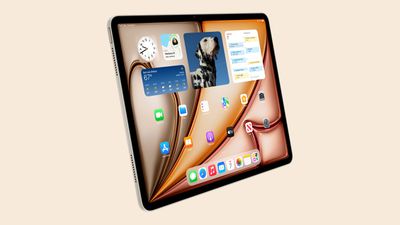
ipad air design starlight
Automatic dimming helps preserve battery life, but it can be frustrating when you need your screen to stay bright and active. Fortunately, you can prevent your iPad screen from dimming automatically, and all it involves is a change in settings.

The following steps show you how it's done.

  1. Open the Settings app on your iPad.
  2. Tap Accessibility.
  3. Select Display & Text Size.
  4. Scroll down to the bottom and toggle off the switch next to Auto-Brightness.
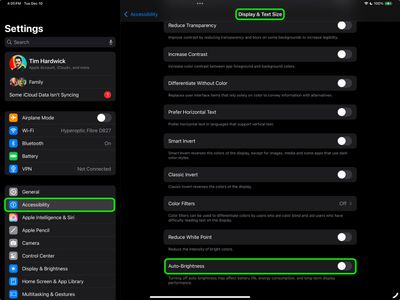
settings

Now that you have disabled Auto-Brightness, which relies on the ambient light sensor to make adjustments, you'll have to use the manual route the next time that you want change the brightness of the screen.
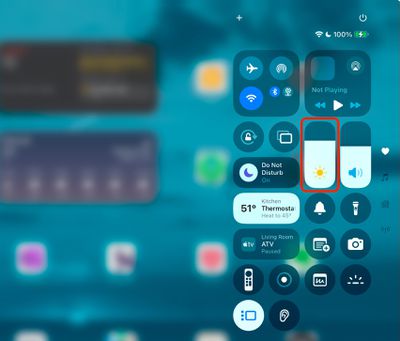
control center
The easiest way to do this is to invoke the Control Center by swiping down diagonally from the top right-hand corner of your iPad. Then drag the brightness slider with your finger to adjust it to your preference. Alternatively, you can adjust the brightness slider found in Settings ➝ Display & Brightness.

Night Shift

If your screen tends to look dimmer at nighttime, it's possible that the Night Shift feature is enabled. Designed to reduce eye strain during the evening hours, Night Shift automatically adjusts the colors of the iPad display to make them look warmer. If this is something you'd prefer not to see, go to Settings ➝ Display & Brightness, then tap Night Shift, and disable the schedule by turning off the switch.
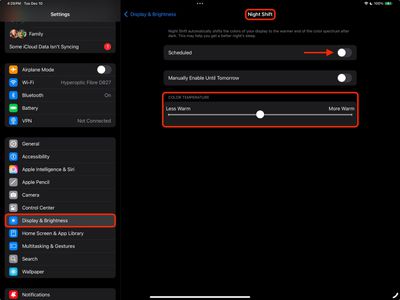
settings
You can also optionally change the Color Temperature of the screen on the fly using the slider, which makes it Less Warm or More Warm.


Popular Stories

Four iPhone 18 Pro Colors Mock Feature

iPhone 18 Pro and iPhone Ultra: Pre-Orders and Release Date

Thursday July 30, 2026 6:12 am PDT by
Apple has yet to reveal when the iPhone 18 Pro and iPhone Ultra will be announced and released, but the dates usually follow a familiar pattern. Labor Day is September 7 this year. The last time the holiday fell on that day was in 2020, but the iPhone event that year was delayed until October due to the COVID-19 pandemic. So, the last time Labor Day was on September 7 in a normal year was in ...

Apple Event Logo

Apple Working on All-New Operating System

Wednesday July 29, 2026 11:39 am PDT by
Apple is developing an all-new operating system that is essentially a mix of tvOS, watchOS, and iOS, according to Bloomberg's Mark Gurman. In a report this week, he said the operating system will feature a grid of icons, widgets, and apps, along with customizable clock faces. The new software platform is intended for Apple's long-rumored smart home hub. With built-in facial recognition,...
Dynamic Island iPhone 18 Pro Feature

iPhone 18 Pro: Twelve Changes Coming to Apple's Next Flagship

Thursday July 30, 2026 3:43 am PDT by
We're less than two months out from the launch of Apple's premium next-generation smartphone lineup, and while we're not expecting a dramatic change in terms of functionality, there are still several enhancements rumored to be coming to the iPhone 18 Pro and iPhone 18 Pro Max. One thing worth noting is that Apple is reportedly planning a major change to its iPhone release cycle this year,...

🔗 Related Apple News & Rumors

Stay updated with the latest Apple ecosystem news and verified rumors







































