What iPhone's Dynamic Island Does and How to Use It - MacRumorsOpen MenuShow RoundupsShow Forums menuVisit ForumsOpen Sidebar
Skip to Content

What iPhone's Dynamic Island Does and How to Use It

by

When the iPhone 14 Pro models were announced in 2022, Apple surprised many with its innovative integration of software functions with the pill-shaped cutout at the top of the screen. Apple calls this area of the display the "Dynamic Island," and has since extended the feature to all iPhone 15 and newer models – including the iPhone 18 Pro. This article explains what ‌Dynamic Island‌ does, how it works, and how you can interact with it to perform actions.
iphone 18 pro dynamic island live activity

What Is Dynamic Island and How Does It Work?

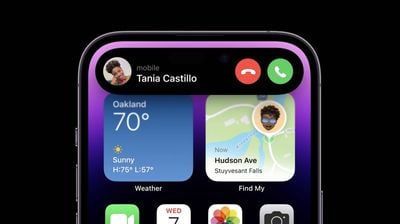
Apple's ‌Dynamic Island‌ is an alternative to the old notch first introduced on the iPhone X. The ‌Dynamic Island‌ incorporates a pill-shaped cutout and a hole punch cutout to house the TrueDepth camera hardware. These cutouts appear as one contiguous, longer pill shape when the iPhone is in use, and Apple integrates software functions around the pill.
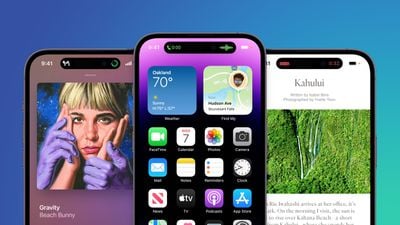
iphone 14 pro blue image
On newer iPhone models like the iPhone 17, iPhone Air, and ‌iPhone 18 Pro‌, display pixels around the ‌Dynamic Island‌ merge it into one pill-shaped area that changes size and shape to accommodate various types of alerts, notifications, and interactions, turning it into a kind of front-and-center information hub.

Which iPhone Models Feature Dynamic Island?

All of Apple's flagship models beginning with the iPhone 15 series have a ‌Dynamic Island‌, with the only exception being its entry-level iPhone 17e, which retains a notch.

What Can Dynamic Island Do?

Here's a breakdown of the many functions ‌Dynamic Island‌ can fulfill.
iPhone 14 Pro Dynamic Island 3

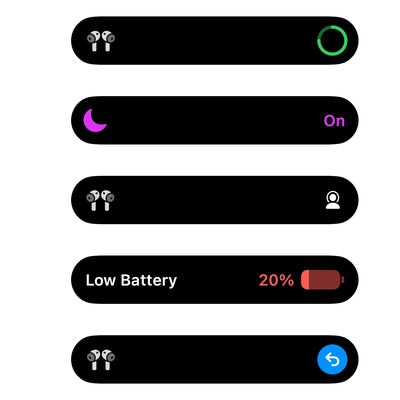
Dynamic Island: Display Outputs and Alerts

  • Apple Pay transaction confirmations
  • Privacy indicators when microphone or camera is in use
  • AirDrop file transfers
  • AirPods connection status and battery life
  • iPhone charging status and battery life
  • Low battery alerts
  • Silent mode turned on or off
  • Face ID unlocking
  • Carkey locking/unlocking
  • Apple Watch unlocking
  • NFC interactions
  • AirPlay connections
  • Focus mode changes
  • Shortcut actions
  • Airplane mode/no data alerts
  • SIM card alerts
  • Accessories connect
  • Find My alerts
  • Flashlight on indicator

Dynamic Island: Background Activities

  • Upcoming and turn-by-turn Maps directions
  • Incoming phone call and duration of call
  • Time remaining of playing song
  • Active timers
  • Live Activity sports scores
  • SharePlay sessions
  • Screen Recording
  • Voice memo recordings
  • Personal Hotspot connection

New Dynamic Island on iPhone 18 Pro
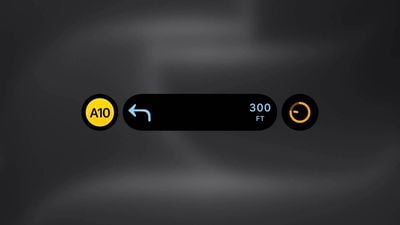
three live activities
The ‌iPhone 18 Pro‌ and ‌iPhone 18 Pro‌ Max have a new, narrower ‌Dynamic Island‌ that allows for more information to be displayed around the pill-shaped cutout. This means ‌iPhone 18 Pro‌ users can see up to three Live Activities simultaneously. Until now, the ‌‌Dynamic Island‌‌ has only supported a maximum of two simultaneous Live Activities.

Can I Interact With Dynamic Island?

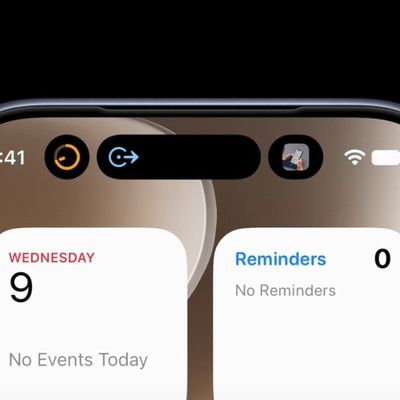
It's possible to interact with certain types of content displayed in the ‌Dynamic Island‌. For example, if it's showing something related to an app's background activity, you can tap the ‌Dynamic Island‌ to switch straight into the associated app.

In certain circumstances, such as when media is playing, you can also long press the ‌Dynamic Island‌ to bring up a widget containing playback controls.
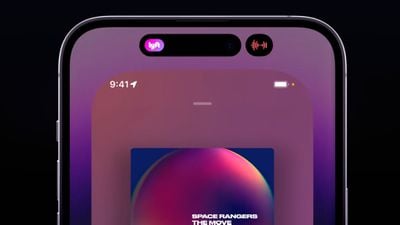
dynamic island split
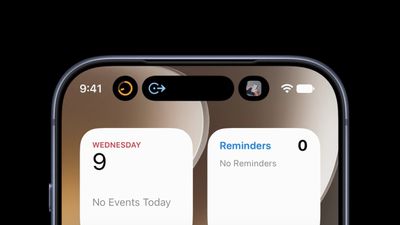
The ‌Dynamic Island‌ is also capable of displaying multiple background activities at once, such as when a timer is counting down and when you're listening to music. When that happens, the island splits into a larger pill-shaped area and a smaller circular area, so you can see and interact with both activities. You can swap between them and tap into them, just like you can with the standard ‌Dynamic Island‌ interface.

Can I Disable Dynamic Island Animations?

There's currently no way to outright disable ‌Dynamic Island‌ content, however if you're distracted by its animations you can dismiss them by swiping left or right across the ‌Dynamic Island‌, without affecting any related background activity. This will return the pill-shape to its previous inert status.

Final Thoughts

Overall, the ‌Dynamic Island‌ on iPhone models is the type of impressive integration of software and hardware that Apple is known for, and the ability of third-party developers to tap into its potential means it is now more interactive than ever.
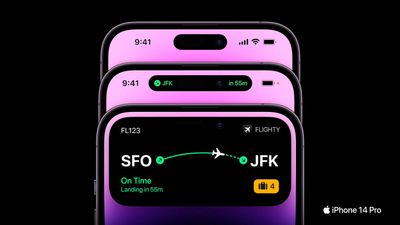
flighty iphone 14 digital island
Note that ‌Dynamic Island‌ also works with Live Activities in third-party apps.
Top Rated Comments

DMG35 Avatar
54 months ago
I think the Dynamic Island is awesome. I love it!!
Score: 10 Votes (Like | Disagree)
TheYayAreaLiving 🎗️ Avatar
54 months ago
Still trying to get used to Dynamic Island. I have to say it continues to surprise me daily now.
Score: 9 Votes (Like | Disagree)
dogstar Avatar
54 months ago
You don't use Dynamic Island, Dynamic Island uses you!
Score: 8 Votes (Like | Disagree)
adammusic Avatar
54 months ago
So much potential. Terrible initial implementation.
Most notifications dont need to expand to a fat dynamic notification. Ex: Shortcuts.

Fat dynamic notifications block time.

When you receive a phone call, sometimes you want to glance at the time, but its blocked.
Tap status bar to scroll back to the top is now a wonky mess.
Island now makes notification center and control center access even smaller and more difficult.
Face id doesnt need to be a popped out square, just give us a small animation inside dynamic island.

Island cuts in to youtube videos in portrait and landscape.
The status bar is just too big now.
If it going to be big and fat, let us add other stuff to status bar and customize.

Tap for widget, long press for app would be better.

Let us make something permanently stay in the island, like apple music player or podcast, for quick access to an app. Or some permanent info in there, day & date maybe. Anything really.

I get it’s early its implementation, but lets not eait 4 years until it’s fixed like everything else apple does.

We want day 1 full baked products, not half.
Score: 7 Votes (Like | Disagree)
54 months ago
Yes, but how do you turn it off?
Score: 6 Votes (Like | Disagree)
SteveJUAE Avatar
54 months ago
I still do not understand why these reviews fail to show how DI behaves in landscape and looks in bright sunlight :(
Score: 6 Votes (Like | Disagree)

Popular Stories

Apple MacBook Pro with PROLED XDR Display Dynamic Island Apple Music

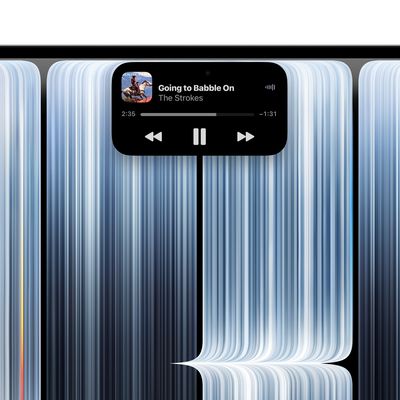
Apple Brings Dynamic Island to Mac for the First Time

Wednesday October 28, 2026 10:28 am PDT by
Apple today introduced the Dynamic Island to the Mac for the first time with its new 14-inch and 16-inch MacBook Pro models, bringing Live Activities, Spotlight, and Siri AI together in an interactive area of the display. The Dynamic Island first launched on the iPhone 14 Pro and iPhone 14 Pro Max in September 2022. It replaced the notch with a smaller TrueDepth camera cutout surrounded by...
iphone 18 pro dynamic island live activity

iPhone 18 Pro's Triple Live Activity Support Comes With a Catch

Monday October 5, 2026 1:25 am PDT by
On iPhone 18 Pro models, Apple slimmed down the cutout where the Dynamic Island lives, allowing the latter to support up to three simultaneous Live Activities. But it turns out there's a catch. As noted by code explorer pdfu, the third Live Activity in iOS 27 is only ever a system activity, such as Now Playing or navigation – it can't be another app. So if you own a new iPhone 18 Pro and...
dynamic island views macos 27%402x

macOS 27 Assets Hint at Dynamic Island for MacBook Pro

Wednesday October 28, 2026 4:28 am PDT by
Ahead of Apple's expected debut of new touchscreen MacBook Pro models, five system assets have been discovered in macOS 27 that bear a strong resemblance to information displayed in the iPhone's pill-shaped Dynamic Island. The new MacBook Pros are expected to feature a Dynamic Island-like cutout for the FaceTime camera, finally doing away with the notch that has been part of the machine's...
Latest Stories
Apple Offers Steps to Fix Daylight Saving Time Bug on Apple Watch
3 hours ago
Apple Watch Ultra 4 Hits All-Time Low Price With Amazon's $99 Discount
22 hours ago
Reminder: Apple's Big Discount on Beats 360 Ear Cushions Ends Today
22 hours ago
Here's a New Tour of Apple's HomeView Software
22 hours ago
Apple Reveals New iPad Mini's Battery Capacity
23 hours ago
Top Stories: Apple's Big MacBook Pro, iPad mini and iMac Updates
1 day ago
'Pluribus' Season 2 Reportedly Starts Production Today
1 day ago
iPhone 18 Pro Sales Surge in China, Offsetting Decline in U.S. and Japan
1 day ago
HomeView Software 27.2: Wallpapers, Control Center, and More
2 days ago
Apple Alerts Stores to iPhone Duo's Display Cracking Issue
2 days ago
iOS 27.3 Will Enable These Apple Intelligence Features in China
2 days ago
Apple Says iOS 27.3 Beta Coming Next Week
2 days ago
Apple's Flash Storage Suppliers Are Finally 'Getting Their Revenge'
2 days ago
14 New Things Your iPhone Can Do in iOS 27.2
2 days ago
iPhone Duo Review: One Week Later
2 days ago
Samsung Mocks iPhone Duo Display Cracks in New Ad Campaign
2 days ago
The MacRumors Show: OLED MacBook Pro, iPad Mini 8, and More
2 days ago
MacBook Pro With Touch Display: 15 More Details Revealed
2 days ago
Russia Places Apple on State Surveillance Registry
2 days ago
Halloween Weekend Brings Discounts on Apple Accessories and Pre-Orders
2 days ago
Apple Has Released More Than 25 New Products in the Past Two Months
2 days ago
Local Code Launches as Free, Private AI Assistant Tool for Mac
2 days ago
Apple Acquires Ascend.io
2 days ago
HomePod Mini 2 Launches Today: All the New Features
2 days ago
AirTag 2 4-Pack Drops to New Low Price of $69.99
2 days ago
Rian Johnson's iPhone Camera App Goes Viral
2 days ago
Where Did All the iPhone Duos Go? Mostly to Apple's Stores
2 days ago
Apple's Touchscreen MacBook Pro Could Ship 1.5M Units in 2027
2 days ago
New Apple TV 4K and iPad Mini: RAM Amounts Revealed
3 days ago
Apple Executive Comments on New iPad Mini Lacking 120Hz Display
3 days ago

🔗 Related Apple News & Rumors

Stay updated with the latest Apple ecosystem news and verified rumors