

 With the release of macOS Catalina 10.15.4, Apple added new Screen Time options to let parents control who their children are able to contact on Mac.
If you're not familiar with Apple's Screen Time functions, they enable users to keep track of their usage and place self-imposed limits on the time they spend using their Mac. Screen Time also serves as a parental control system for parents.
The latest feature addition, Communication Limits, lets parents manage who their children are able to contact through FaceTime, phone calls, Messages, and iCloud Contacts.
The new options allow either just contacts or everyone to be contacted during a child's allotted Screen Time, and there are controls for allowing or preventing people from being added to a group chat when a contact or family member is in the group. There's also a separate setting for communication limits during downtime, which can be set to allow everyone or just specific contacts. Follow the steps below to set your preferences for your child's Screen Time and Downtime on Mac.
How to Set Communication Limits During Allowed Screen Time in macOS
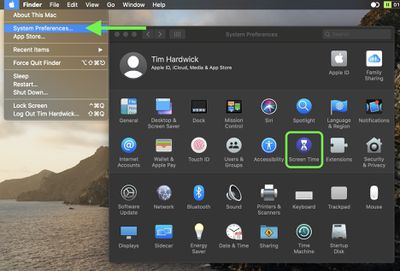
- Launch System Preferences from your Mac's Dock, from the Applications folder, or from the Apple menu bar ( -> System Preferences...).
- Select Screen Time in the preference panel.

- If Screen Time isn't enabled, click Turn On....
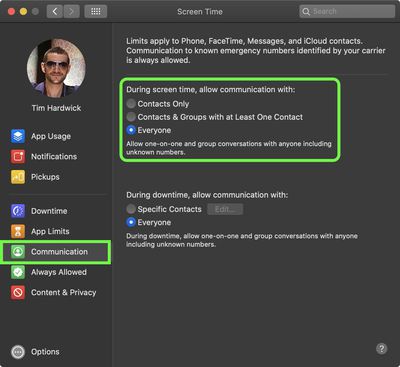
- Select Communication in the sidebar.
- Under During screen time, allow communication with: click the button next to Contacts Only, Contacts & Groups with at Least One Contact, or Everyone.
How to Set Communication Limits During Downtime in macOS
- Launch System Preferences from your Mac's Dock, from the Applications folder, or from the Apple menu bar ( -> System Preferences...).
- Select Screen Time in the preference panel.
- If Screen Time isn't enabled, click Turn On....
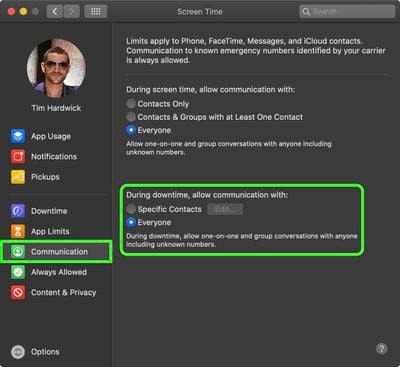
- Select Communication in the sidebar.
- Under During Downtime, allow communication with: click the button next to Specific Contacts, then in the window that appears, use the +/- buttons to add or remove allowed contacts. Alternatively, click Everyone.
Note that calls to emergency numbers are always allowed, and when placed, will turn off communication limits for 24 hours to make sure children are safe and not prevented from communicating with people in the event of an emergency.













































