

With the release of iOS 16.4, iPadOS 16.4, tvOS 16.4, and macOS Ventura 13.3, Apple users can now connect a PS5 DualSense Edge Wireless Controller to iPhone, iPad, Mac, and Apple TV. Keep reading to learn how it works.
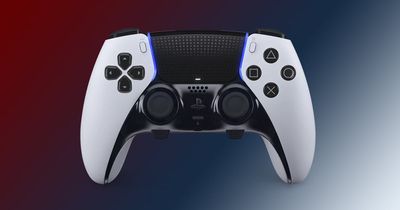
Since iOS 13 and tvOS 13, users have been able to connect popular console controllers to an iPhone or Apple TV to play Apple Arcade games and other iOS games, instead of having to spend extra money on MFi-compatible controllers.
The newest software updates that arrived in March 2023 introduce additional support for the latest PS5 DualSense Edge Controller to be paired with your Apple devices.
The following steps walk you through the process of pairing your DualSense Edge Controller to your Apple device. If you haven't already, you'll need to update your iPhone/iPad to iOS 16.4 (Settings > General > Software Update), your Mac to macOS Ventura 13.3 (System Settings -> General -> Software Update), or your Apple TV to tvOS 16.4 (Settings -> System -> Software Updates).
How to Connect the PS5 DualSense Edge Controller to iPhone and iPad
- Open your iOS device's Settings app and navigate to Bluetooth.
- On your DualSense Edge Controller, press and hold the Share button (next to the D-Pad, with three lines radiating out from the top) and the PS button (in between the thumbsticks) at the same time. Hold them for at least three seconds, until you see the light bar flashing blue.

- On your iPhone/iPad, under "Other Devices," tap on your PS5 DualSense controller.
- Tap Pair.
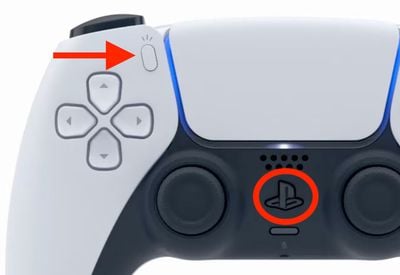
To save battery once you're done using the controller, return to the Bluetooth settings screen and tap the info ("i") icon next to the PS5 controller, then tap Disconnect or Forget this device to remove it from the list.
How to Connect the PS5 DualSense Edge Controller to Mac
- Open System Settings in macOS and select Bluetooth in the sidebar.
- On your DualSense Edge controller, press and hold the Share button (next to the D-Pad, with three lines radiating out from the top) and the PS button (in between the thumbsticks) at the same time. Hold them for at least three seconds, until you see the light bar flashing blue.
- On your Mac, under "Nearby Devices," tap on your PS5 DualSense Edge Controller.
- Tap Pair.
To save battery once you're done using the controller, return to the Bluetooth settings screen and tap the info ("i") icon next to the PS5 controller, then click Disconnect or Forget this device to remove it from the list.
How to Connect the PS5 DualSense Edge Controller to Apple TV
- Open the Settings app on Apple TV and select Remotes and Devices -> Bluetooth.
- On your DualSense Edge controller, press and hold the Share button (next to the D-Pad, with three lines radiating out from the top) and the PS button (in between the thumbsticks) at the same time. Hold them for at least three seconds, until you see the light bar flashing blue.
- On your Apple TV, select the DualSense Controller to pair it, which will be confirmed with a notification on tvOS.
The above steps should work for most wireless console controllers, including the DualShock 4 Wireless controller, the Xbox Wireless controller, the Xbox Series X Controller, and the original PS5 DualSense Controller.












































