

How to Pair a DualShock 4 or Xbox Wireless Controller With iPhone and Apple TV - MacRumorsOpen MenuShow RoundupsShow Forums menuVisit ForumsOpen Sidebar
Skip to Content

How to Pair a DualShock 4 or Xbox Wireless Controller With iPhone and Apple TV

by

With iOS 13 and tvOS 13, Apple users are now able to connect their favorite console controllers to an iPhone or Apple TV. In this guide, we've provided a quick rundown of how to go about pairing the DualShock 4 Wireless Controller and Xbox Wireless Controller to both iOS and tvOS devices.
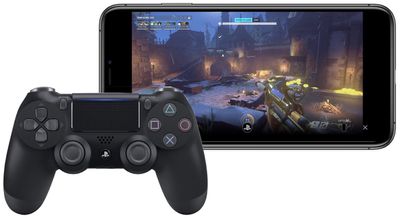
how to controller 5
Previously, MFi controllers were the only solution to playing games on iPhone, iPad, and ‌Apple TV‌. With the new update, console players don't need to spend extra money on another controller to play iOS and tvOS games. PS4 players also have a reason to look into DualShock 4 pairing since Sony's Remote Play iOS app provides streaming of compatible games to the iPhone or ‌iPad‌, which can now be controlled by a DualShock 4.

How to connect the DualShock 4 Wireless Controller to iPhone or iPad

  1. Press and hold the PS logo and Share buttons simultaneously on your DualShock 4 controller until the light bar flashes.
  2. Open your iOS device's Settings app and navigate to Bluetooth.
  3. Under "Other Devices," tap on your DualShock 4 wireless controller.

How to connect the Xbox Wireless Controller to iPhone or iPad

  1. Press the Xbox button to turn on the Xbox Wireless Controller.
  2. Press and hold the Connect button for a few seconds.
  3. Open your iOS device's Settings app and navigate to Bluetooth.
  4. Under "Other Devices," tap on your Xbox Wireless Controller.
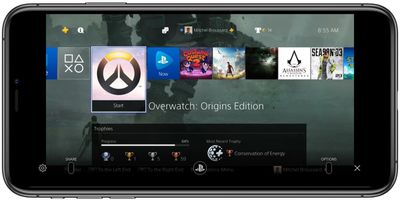
how to controller 3

Sony's Remote Play iOS app controlled via DualShock 4

The steps for pairing controllers with an ‌Apple TV‌ are largely similar to the ones for iOS devices. You can find this information below.

How to connect the DualShock 4 Wireless Controller to Apple TV

  1. Press and hold the PS logo and Share buttons simultaneously on your DualShock 4 controller until the light bar flashes.
  2. Open the Settings app on ‌Apple TV‌ > click Remotes and Devices > Bluetooth.
  3. Select the DualShock 4 Wireless Controller to pair it, which will be confirmed with a notification on tvOS.

How to connect the Xbox Wireless Controller to Apple TV

  1. Press the Xbox button to turn on the Xbox Wireless Controller.
  2. Press and hold the Connect button for a few seconds.
  3. Open the Settings app on ‌Apple TV‌ > click Remotes and Devices > Bluetooth.
  4. Select the Xbox Wireless Controller to pair it, which will be confirmed with a notification on tvOS.

It should be noted that for the DualShock 4, some controller functions will not be functional while connected to an iPhone, ‌iPad‌, or ‌Apple TV‌. These include the touchpad, the central PS button, rumble, motion sensor, and the headphone jack. The light bar will also remain one color and can not be changed.

Both the PS4 and Xbox controllers will stay connected to the iOS/tvOS device you've paired them with until you re-pair them with your console. To reconnect a DualShock 4 with a PS4, you'll need to manually connect the controller with the console via the micro-USB to USB cable each controller comes with. For Xbox, you can press the connect button on the controller and the console at the same time, or use a micro-USB to USB cable.

Related Forum: iOS 13

Top Rated Comments

MisterSavage Avatar
86 months ago

Has anyone successfully paired a PS4 controller to an iPad Pro 11 (2018)?
Yep, I've gamed a lot on mine. Did you hold down the PS button and the share button at the same time before pairing the controller?
Score: 2 Votes (Like | Disagree)
star-affinity Avatar
92 months ago

That hasn't been a big deal for me. I plug it in to the console to charge it anyway.
Aha. I put them on the DualShock 4 Charging Station. The console is hidden behind a wooden frame with a piece of fabric around it – which is what we have to hide all the electronics underneath the TV in the living room – so never really need to connect a controller to the console, plus it's a bit of a hassle in my case.
Score: 2 Votes (Like | Disagree)
92 months ago

A bit sad the connecting the controller back to the console can't be achieved without connecting a cable between them. But maybe good for Sony and Microsoft since it makes me consider getting more controllers just for iOS/tvOS/macOS play. 🤓 Not so good for the environment... 🤔
But you can connect an Xbox controller back easily without a cable....... you press the sync button on the controller until it flashes and then the sync button on the Xbox intil it flashes and boom it’s done. Who says that you need a cable?
Score: 2 Votes (Like | Disagree)
MisterSavage Avatar
92 months ago

It is true you can run it off a USB cable, but I'm not sure how many people have a USB cable running to the sofa.
I bought a really long USB cable on Amazon for that exact scenario but I can see that being the exception and not the norm!
Score: 2 Votes (Like | Disagree)
CaptMarvel Avatar
92 months ago

So... before shelling out $50... any noted differences between controllers? I've heard Microsoft controllers have better battery life?

For me what makes the XBox controller a better choice for this is it has replaceable AA batteries, where the PS4 controller has to be recharged over USB. So if the PS4 battery runs down, you are done playing, where with the XBox you can just swap in some new AAs. I used Eneloop rechargeables and it worked out well for me.
This is false.
The PS4 controller can be used to play while charging via charging cable. Environmentally conscious, this is better than buying batteries to use then discard.


How do I switch from an iPad to an Apple TV for example? Do I have to re-pair every time I switch devices?

My controller automatically connects to the last device it was paired to and if I try to switch devices it fails to connect unless I de enter pairing mode.

Yes. For now, you have to unpair from one device and pair to each time you want to use it on with different device.

Imagine in the next generation systems, Sony, Microsoft and even Nintendo had the W1 chip via Apple...then, I’m sure switching from system to system would be a breeze and be linked to your Apple ID.

One can dream right?
Score: 2 Votes (Like | Disagree)
MisterSavage Avatar
92 months ago
This works remarkably well and is a huge "game" changer. One of my favorite additions with iOS 13.
Score: 2 Votes (Like | Disagree)

Popular Stories

surface laptop ultra

Microsoft Launches $2,599 Surface Laptop Ultra to Take on MacBook Pro

Wednesday October 7, 2026 5:45 pm PDT by
Microsoft today announced launch timing and pricing for the Surface Laptop Ultra that it unveiled earlier this year. The 15-inch Surface Laptop Ultra is priced starting at $2,599, undercutting Apple's $2,999 16-inch MacBook Pro, and it targets the same creator and developer market. Microsoft says it is built for "demanding creative, software development, AI, engineering, and 3D workloads." ...
Black Apple Event Logo

Russia Places Apple on State Surveillance Registry

Friday October 30, 2026 7:58 am PDT by
Apple faces Russian data retention and disclosure requirements after being added to the country's state surveillance registry, Bloomberg reports. Russia's communications regulator, Roskomnadzor, listed Apple and Microsoft on October 2 as "organizers of information dissemination," a classification that carries obligations to preserve communications and make data available to Russian security...
Apple MacBook Pro with PROLED XDR Display family lineup feature

Apple Announces OLED MacBook Pro With Touch Display

Wednesday October 28, 2026 10:11 am PDT by
Apple today announced a new high-end MacBook Pro, which is available in 14-inch and 16-inch sizes. The new device has a PROLED XDR display that supports touch gestures, and a glowing rear Apple logo. Pricing on the MacBook Pro starts at $2,899 for the 14-inch model and $3,399 for the 16-inch model. Apple says the MacBook Pro has the "world's best display in a pro laptop." The PROLED...
Latest Stories
'Pluribus' Season 2 Reportedly Starts Production Today
5 hours ago
iPhone 18 Pro Sales Surge in China, Offsetting Decline in U.S. and Japan
6 hours ago
HomeView Software 27.2: Wallpapers, Control Center, and More
13 hours ago
Apple Alerts Stores to iPhone Duo's Display Cracking Issue
13 hours ago
iOS 27.3 Will Enable These Apple Intelligence Features in China
14 hours ago
Apple Says iOS 27.3 Beta Coming Next Week
14 hours ago
Apple's Flash Storage Suppliers Are Finally 'Getting Their Revenge'
15 hours ago
14 New Things Your iPhone Can Do in iOS 27.2
16 hours ago
iPhone Duo Review: One Week Later
17 hours ago
Samsung Mocks iPhone Duo Display Cracks in New Ad Campaign
18 hours ago
The MacRumors Show: OLED MacBook Pro, iPad Mini 8, and More
19 hours ago
MacBook Pro With Touch Display: 15 More Details Revealed
19 hours ago
Russia Places Apple on State Surveillance Registry
21 hours ago
Halloween Weekend Brings Discounts on Apple Accessories and Pre-Orders
21 hours ago
Apple Has Released More Than 25 New Products in the Past Two Months
22 hours ago
Local Code Launches as Free, Private AI Assistant Tool for Mac
22 hours ago
Apple Acquires Ascend.io
23 hours ago
HomePod Mini 2 Launches Today: All the New Features
23 hours ago
AirTag 2 4-Pack Drops to New Low Price of $69.99
23 hours ago
Rian Johnson's iPhone Camera App Goes Viral
23 hours ago
Where Did All the iPhone Duos Go? Mostly to Apple's Stores
1 day ago
Apple's Touchscreen MacBook Pro Could Ship 1.5M Units in 2027
1 day ago
New Apple TV 4K and iPad Mini: RAM Amounts Revealed
1 day ago
Apple Executive Comments on New iPad Mini Lacking 120Hz Display
2 days ago
Here's a Hands-On Look at HomePod Mini 2's New Two-Tone Colors
2 days ago
Apple Lowers App Store Fees in Taiwan Starting October 31
2 days ago
HomeView Pre-Order Returns to $289.99 on Amazon
2 days ago
Apple Avoids Showing Pinched Fingers on iPad Mini Page in South Korea
2 days ago
Old 'Popcorn Time' App Left Hundreds of Thousands of Macs at Risk
2 days ago
You Can Turn Off the New MacBook Pro's Touchscreen Functionality
2 days ago

🔗 Related Apple News & Rumors

Stay updated with the latest Apple ecosystem news and verified rumors









































