How to Let a Contact Bypass iOS 12's Do Not Disturb Mode Without Adding Them to Your Favorites List - MacRumorsOpen MenuShow RoundupsShow Forums menuVisit ForumsOpen Sidebar
Skip to Content

How to Let a Contact Bypass iOS 12's Do Not Disturb Mode Without Adding Them to Your Favorites List

by

In iOS 12, Do Not Disturb mode conveniently allows you to silence all calls, alerts, and notifications on iPhone or iPad for a given period and reduce the potential for unnecessary distractions.

Aside from new time-limited options in iOS 12's Control Center, Do Not Disturb can be turned on and scheduled ahead of time by going to Settings -> Do Not Disturb. Among these settings, there's also an Allow Calls From option for which you can choose Everyone, No One, or Favorites.
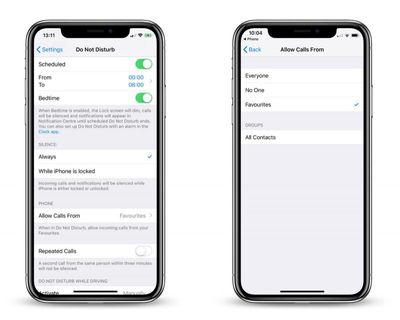
do not disturb allow calls from favorites
Given these last three choices, it would seem fair to assume that the only way to let specific contacts get through to you when Do Not Disturb is on, is to add them to your Favorites list. However, there's another way to let a contact bypass Do Not Disturb mode, and it has nothing to do with enabling the Repeated Calls option.

In fact, the little-known feature described below is arguably more powerful, since it lets you receive only text messages from that contact, or only phone calls from them (or both, if you wish) for just as long as the feature is enabled. Keep reading to learn how it's done.

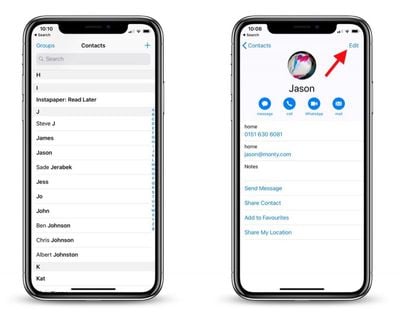
  1. Launch the Contacts app on your iPhone.
    how to enable contacts bypass do not disturb

  2. Tap a contact in the list.
  3. Tap Edit.
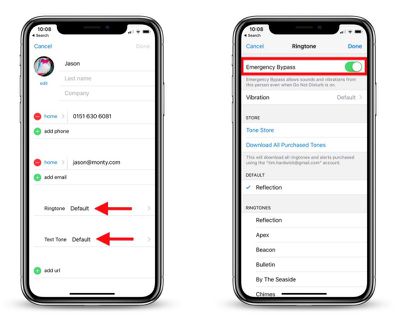
    how to enable contacts bypass do not disturb 2

  4. If you want to let calls come through from this contact when Do Not Disturb mode is active, tap Ringtone and then on the next screen toggle the Emergency Bypass switch to the green ON position.

  5. Tap Done to return to the Contact card.
  6. Similarly, if you want to let text messages come through from the contact, tap Text Tone and then enable Emergency Bypass on the next screen.
  7. Tap Done to return to the Contact card.

  8. Tap Done to finish.

As some readers have noted, enabling Emergency Bypass also allows the contact's call ringtone or message alert to sound even when your iPhone or iPad is muted, so it's best to use the feature selectively, i.e. when you're expecting to hear from that contact.


Related Forum: iOS 12

Top Rated Comments

101 months ago
One caveat to this, if you have your phone's side switch set to silent / vibrate, the sound of the call or text still comes through.
Score: 6 Votes (Like | Disagree)
eternlgladiator Avatar
101 months ago
That is a little known feature and is really handy.

For me the problem I’ve encountered isn’t allowing notifications to get through but absolutely preventing them. I wish there was an ‘absolutely do not disturb’ option. The problem I’ve had is with alarms. Once I had a bedtime alarm set. I woke up well before the alarm and went to an earlier church service. I set my phone to vibrate with DND. Yet, during the worst possible time when it was especially quiet I suddenly hear my gentle bed time alarm song. I was mortified. After this I turn my phone off when I really don’t want to be disturbed.


Why would you want DND to stop alarms? That sounds like a recipe for disaster...

On a side note, I've been wondering how to do this for years. Now I can finally allow texts from my wife to come through while keeping my phone on DND when she's working late.
Score: 6 Votes (Like | Disagree)
101 months ago
One caveat to this, if you have your phone's side switch set to silent / vibrate, the sound of the call or text still comes through.
Yes, and that’s a VERY important caveat.

I learned this the hard way while being in a meeting where my phone was supposed to be completely silent (yes, there are such occasions) and all of the sudden the phone started playing the ringtone. It took a while for me to figure out why the mute switch didn’t do its job.

So, even though this is a great lesser known feature, you should be carefull playing with it!

To sum up, this feature doesn’t only affect the DND setting but also the mute switch—be careful since there’s no way making sure your phone stays silent once you enable this feature (except for turning your phone off)!
Score: 4 Votes (Like | Disagree)
101 months ago
One caveat to this, if you have your phone's side switch set to silent / vibrate, the sound of the call or text still comes through.
Awe man... I was excited about this until I read that it over rides the mute switch as well
Yeah, it's unfortunate that there isn't an option to bypass DND but not the side switch.
Score: 2 Votes (Like | Disagree)
101 months ago
One caveat to this, if you have your phone's side switch set to silent / vibrate, the sound of the call or text still comes through.
My ringtone is set to a *silent* mp3. No matter what happens with incoming calls & texts, it never audibly rings!
Score: 2 Votes (Like | Disagree)
101 months ago
I'm still waiting for a way to send all non-contact phone calls direct to voicemail without ringing (and mute the voicemail notification). That would take care of 99% of unwanted calls.
Score: 2 Votes (Like | Disagree)

Popular Stories

Apple Event Logo

Apple Working on All-New Operating System

Wednesday July 29, 2026 11:39 am PDT by
Apple is developing an all-new operating system that is essentially a mix of tvOS, watchOS, and iOS, according to Bloomberg's Mark Gurman. In a report this week, he said the operating system will feature a grid of icons, widgets, and apps, along with customizable clock faces. The new software platform is intended for Apple's long-rumored smart home hub. With built-in facial recognition,...
Four iPhone 18 Pro Colors Mock Feature

iPhone 18 Pro and iPhone Ultra: Pre-Orders and Release Date

Thursday July 30, 2026 6:12 am PDT by
Apple has yet to reveal when the iPhone 18 Pro and iPhone Ultra will be announced and released, but the dates usually follow a familiar pattern. Labor Day is September 7 this year. The last time the holiday fell on that day was in 2020, but the iPhone event that year was delayed until October due to the COVID-19 pandemic. So, the last time Labor Day was on September 7 in a normal year was in ...
Dynamic Island iPhone 18 Pro Feature

iPhone 18 Pro: Twelve Changes Coming to Apple's Next Flagship

Thursday July 30, 2026 3:43 am PDT by
We're less than two months out from the launch of Apple's premium next-generation smartphone lineup, and while we're not expecting a dramatic change in terms of functionality, there are still several enhancements rumored to be coming to the iPhone 18 Pro and iPhone 18 Pro Max. One thing worth noting is that Apple is reportedly planning a major change to its iPhone release cycle this year,...

🔗 Related Apple News & Rumors

Stay updated with the latest Apple ecosystem news and verified rumors