

How to Customize Favorite Contacts in iOS - MacRumorsOpen MenuShow RoundupsShow Forums menuVisit ForumsOpen Sidebar
Skip to Content

How to Customize Favorite Contacts in iOS

by

2013 08 26 09 38 25  Phone iOS7 App Icon RoundedOn iPhone, Apple has a neat way to organize your favorite contacts and even access them quickly, thanks to its Home screen widget system. In addition to adding one-tap phone calling icons, you can customize whether each contact icon will call, FaceTime, text, or email the person you tap on.

Note that the basic communication preferences stored within each contact card on your iPhone will come into play when customizing your new favorites widget, so be sure to add in any phone numbers and email addresses before you start if you haven't done so already.

Customize Favorites in the Phone App

Follow these steps to navigate through the new way you can customize favorites in the phone app.

  1. Launch the Phone app on your iPhone.
  2. The app should open on the Favorites tab, but if not tap to it.
  3. Tap the "+" button in the top-left corner of the screen.
  4. Search for the contact you want to add and tap it.
    phone app

  5. Choose between Message, Call, Video, or Mail as your shortcut.
  6. To pick a number or email other than the one shown as default, tap the small down arrow to the right of Message, Call, Video, or Mail to pick from any number/email already stored in your phone for this contact.
  7. Return to the Favorites tab and your new quick access contact will be at the bottom of your Favorites list.
  8. Tap Edit in the top-right corner to delete or reprioritize contacts. You can also swipe left on a favorite in your Favorites list and tap Delete to remove it.
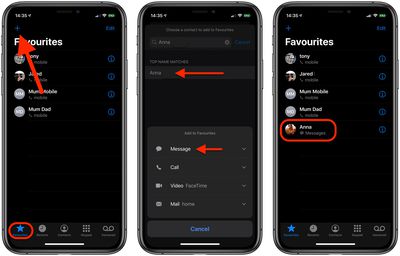
When organizing your new favorite contacts, be sure to note that the first four contacts will receive top billing in the favorites widget, but a total of eight can fit.

Setting Up the Favorites Widget

The favorites list's granular settings allow you to jump into the contacts you only text with, while still accommodating those people you more often speak with on the phone. The personalization doesn't stop there, however. Follow the next few steps to get your favorites widget up and running.

  1. Navigate to the widgets screen by swiping right on your iPhone's main Home screen, Notification Center, or Lock screen.
  2. Scroll all the way down to the bottom of your widgets and tap Edit.
  3. Find Favorites and tap the small green plus button to add it to your widgets.
    widgets

  4. Use the triple bar or "hamburger" icon on the right side of the screen to move favorites further up or down the list.
  5. Hit Done to save your changes.
  6. You'll see your favorite contacts as a widget, with the top four contacts getting premium placement.
  7. Tap the little chevron in the top-right corner of the widget to expand it for a total of eight contacts.
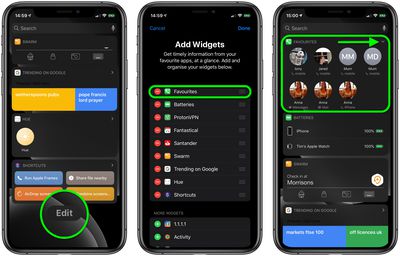
Since the favorites widget can show up to eight contacts, you can return to the phone app to add and rearrange your most important friends, family members, and co-workers to see the changes reflected in the widget.

Your customization options include: adding multiple methods of communication for one person (all four if you contact one person multiple ways frequently), removing the default phone call options for message-focused contacts, and setting your top four most used contacts to save room on the widgets screen, without needing to use the "Show More" option.


Top Rated Comments

insomniac86 Avatar
132 months ago
The widget is a better idea, but it just needs 3D Touch support so you don't have to pin multiple of the same person. It should also keep the functionality to pin the same contact multiple times for people that do not have 3D Touch. Better yet, why not just allow it so that non-3D Touch users can just hold for two seconds to see other choices.
Score: 3 Votes (Like | Disagree)
132 months ago
Ah speed dial is back after 9 years
The Favorites have been in the Phone app for a long time.
[doublepost=1474143244][/doublepost]
Thanks. I've noticed the emergency bypass, but that makes the phone ring, even when you have silent switched on, so only a true emergency option.

So it doesn't just bypass DND but even the silent/vibrate setting and always rings for calls and plays a tone for messages even if the phone is on silent/vibrate?
[doublepost=1474143285][/doublepost]
I thought iOS 10 was going to bring other messaging/calling ways into the fold in this area. For instance, we would have the ability to select What's App instead of iMessage. What am I missing?
Updated calling apps can have their calls show up as normal calls would (rather than as just an app notification).
Score: 2 Votes (Like | Disagree)
132 months ago
Does this then allow all these favourites through the DND feature regardless of the method of contact, or just favourites where phone is selected?
Depends on the setup of your DND, of course!

If you haven't checked out the supplementary new feature in the Contact app buried under the Ringtone toggle option named "Emergency Bypass", one can turn off "Favorites" in DND and still designate one or more people to get through by toggling on that Bypass for each relevant Contact.
Score: 1 Votes (Like | Disagree)
132 months ago
Does this then allow all these favourites through the DND feature regardless of the method of contact, or just favourites where phone is selected?
Score: 1 Votes (Like | Disagree)
insomniac86 Avatar
132 months ago
Yeah Apple software has really gone downhill with its inconsistency. I will say iOS 10 as a whole is pretty dam good though. Whoever designed the new maps app deserves a medal. It's super simple and clutter free. Yet it retains all its power and adds more. That app is an example of something well designed. Knowing my luck they will re-design it in iOS 11 to become a turd. Lol
Score: 1 Votes (Like | Disagree)
chriscl Avatar
132 months ago
As I have an iPhone 6 - no 3d Touch - the "Favourites" widget method is going to be a useful time saver for me.
Score: 1 Votes (Like | Disagree)

Popular Stories

iPhone Duo Display Cracking

Apple Alerts Stores to iPhone Duo's Display Cracking Issue

Friday October 30, 2026 3:20 pm PDT by
In a memo shared with Apple Stores and Apple Authorized Service Providers this week, and later obtained by MacRumors, Apple provided technicians with guidance on how to diagnose and address the iPhone Duo's inner display cracking issue. If a customer reports the issue, Apple advised technicians to inspect the iPhone Duo and repair or replace it in accordance with their standard procedures....
iPad mini OLED feature 1

Apple Executive Comments on New iPad Mini Lacking 120Hz Display

Thursday October 29, 2026 1:47 pm PDT by
While the new iPad mini has an OLED display, the device does not support ProMotion, meaning the display's refresh rate is limited to 60Hz instead of 120Hz. ProMotion support would have allowed for the iPad mini's refresh rate to automatically adjust from 10Hz to 120Hz depending on the content being displayed, but evidently Apple has kept the feature exclusive to the iPad Pro among iPad...
Pinched iPad Mini

Apple Avoids Showing Pinched Fingers on iPad Mini Page in South Korea

Thursday October 29, 2026 11:52 am PDT by
In the U.S. and most other countries, Apple's website shows the new iPad mini being held by pinched fingers, but this is not the case in South Korea. The new iPad mini shown with pinched fingers on Apple's website in the U.S. On its South Korean website, Apple simply shows an image of the iPad mini on its own. The new iPad mini shown without pinched fingers on Apple's website in South Korea ...


Latest Stories
Apple Watch Ultra 4 Hits All-Time Low Price With Amazon's $99 Discount
11 hours ago
Reminder: Apple's Big Discount on Beats 360 Ear Cushions Ends Today
11 hours ago
Here's a New Tour of Apple's HomeView Software
11 hours ago
Apple Reveals New iPad Mini's Battery Capacity
12 hours ago
Top Stories: Apple's Big MacBook Pro, iPad mini and iMac Updates
13 hours ago
'Pluribus' Season 2 Reportedly Starts Production Today
20 hours ago
iPhone 18 Pro Sales Surge in China, Offsetting Decline in U.S. and Japan
21 hours ago
HomeView Software 27.2: Wallpapers, Control Center, and More
1 day ago
Apple Alerts Stores to iPhone Duo's Display Cracking Issue
1 day ago
iOS 27.3 Will Enable These Apple Intelligence Features in China
1 day ago
Apple Says iOS 27.3 Beta Coming Next Week
1 day ago
Apple's Flash Storage Suppliers Are Finally 'Getting Their Revenge'
1 day ago
14 New Things Your iPhone Can Do in iOS 27.2
1 day ago
iPhone Duo Review: One Week Later
1 day ago
Samsung Mocks iPhone Duo Display Cracks in New Ad Campaign
1 day ago
The MacRumors Show: OLED MacBook Pro, iPad Mini 8, and More
1 day ago
MacBook Pro With Touch Display: 15 More Details Revealed
1 day ago
Russia Places Apple on State Surveillance Registry
1 day ago
Halloween Weekend Brings Discounts on Apple Accessories and Pre-Orders
2 days ago
Apple Has Released More Than 25 New Products in the Past Two Months
2 days ago
Local Code Launches as Free, Private AI Assistant Tool for Mac
2 days ago
Apple Acquires Ascend.io
2 days ago
HomePod Mini 2 Launches Today: All the New Features
2 days ago
AirTag 2 4-Pack Drops to New Low Price of $69.99
2 days ago
Rian Johnson's iPhone Camera App Goes Viral
2 days ago
Where Did All the iPhone Duos Go? Mostly to Apple's Stores
2 days ago
Apple's Touchscreen MacBook Pro Could Ship 1.5M Units in 2027
2 days ago
New Apple TV 4K and iPad Mini: RAM Amounts Revealed
2 days ago
Apple Executive Comments on New iPad Mini Lacking 120Hz Display
2 days ago
Here's a Hands-On Look at HomePod Mini 2's New Two-Tone Colors
2 days ago

🔗 Related Apple News & Rumors

Stay updated with the latest Apple ecosystem news and verified rumors









































