

In iOS 17, Apple has enhanced iPhone AirDrop in many ways, and with the release of iOS 17.1, it's just got better, because you will no longer need to within Wi-Fi range of someone to continue a file transfer over AirDrop. Keep reading to learn how it works.
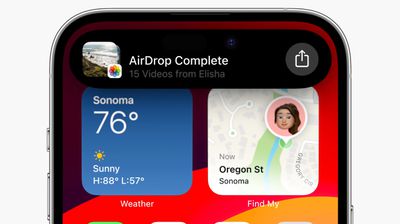
Since its introduction in iOS 7, AirDrop has become the favored means for iPhone users to instantly share photos, videos, documents, and more to nearby Apple devices with relative ease. With the AirDrop screen open, if you're near to another user with a supported Apple device, they will show up on your screen and you can share files with them.
Up until recently, AirDrop required you to stay within close proximity to the other person's device for any transfer to complete. If you left AirDrop range, the transfer failed and the content wouldn't be shared. This is particularly frustrating when you're sending or receiving several large files like video content.
That changes in iOS 17.1, which allows wireless AirDrop file transfers to continue over a cellular connection outside of AirDrop range, so long as both your iPhone and the recipient's iPhone are signed in to an iCloud account.
- How to Prevent Unsolicited AirDrops to Your Apple Device
- How to Use AirDrop on iPhone, iPad, and Mac
- AirDrop Not Working? Here's How to Fix It
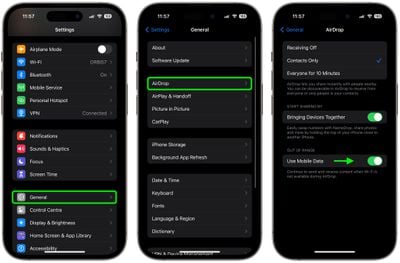
With the new cellular data option enabled, you can continue to send and receive content via AirDrop over a cellular network when Wi-Fi is not available. The transfer still needs to be started over Wi-Fi, but it won't be canceled if you move to a different location outside of range. Here's how to make sure the new option is enabled on your device.
- Open Settings on your iPhone or iPad.
- Tap General.
- Tap AirDrop.
- Under "Out of Range," toggle on the switch next to Use Mobile/Cellular Data.
That's all you need to do. iOS 17.1 and iPadOS 17.1 are available now for all iPhones and iPads that support iOS 17 and iPadOS 17, respectively. Check out our list of everything that's new in the first iOS 17.1 for more new features and changes.













































