

 Since its introduction with iOS 7, AirDrop has become the favored means for iPhone and iPad users to instantly share photos, videos, documents, and more to nearby Apple devices over Wi-Fi and Bluetooth. Using it to transmit content from apps like Photos and Safari couldn't be simpler, thanks to its top-level location in the iOS Share Sheet, accessed via the ubiquitous Share icon.
AirDrop is popular with all sorts of users, from teenagers who use it to flirt or share innocent memes in public places like concerts and festivals, to professionals who AirDrop project materials to each other across the office. Unfortunately, however, the way AirDrop currently works also leaves it wide open to abuse.
Technically, iOS doesn't allow just anyone to share a photo or document to your device unless you actively choose to accept it. The problem with AirDrop though is that it displays a preview of the proposed shared content on your device's screen, whether or not you actually want to see it.
Riders on New York City's subways often report being subjected to unsolicited nude images sent over AirDrop in this way. In fact the problem is so bad that NYC lawmakers introduced a bill last year that would make it illegal "for a person to send an unsolicited sexually explicit video or image to another person with intent to harass, annoy or alarm such other person."
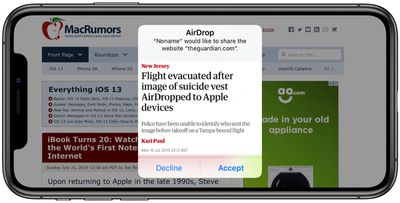
But finding and prosecuting an AirDrop offender would be extremely difficult. The problem is that when someone attempts to send something to you over AirDrop, iOS identifies them by their device's name. However, the name of a device can be changed by its user at a moment's notice, which would make it almost impossible for the average user to know where the AirDropped content came from.
Protecting Yourself From AirDrop Harassment
To protect yourself from receiving unsolicited content in a public place, you could disable AirDrops to your device by turning off Wi-Fi and Bluetooth, but this limits you unnecessarily when you consider that Apple lets you control who can see your device and send you content using AirDrop.
There are two active settings for AirDrop: You can set it to accept shares from anyone, or only from people whose email address or mobile number appears in your contacts. Alternately, you can turn off the feature completely. You can use these settings to ensure that you don't become the unwitting victim of an unsolicited AirDrop share. Keep reading to learn how.
How to Restrict AirDrop in iOS
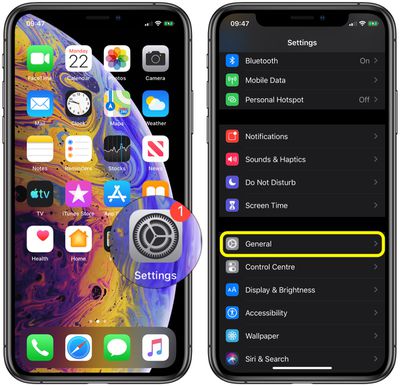
- Launch the Settings app on your iPhone or iPad.
- Scroll down and tap General.

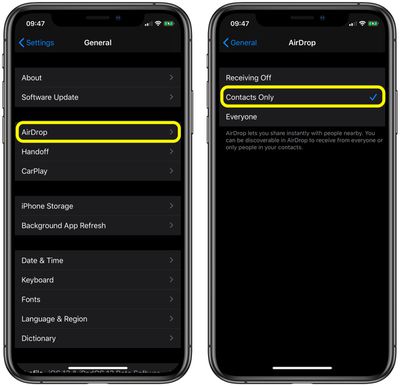
- Tap AirDrop.
- Tap Contacts Only or Receiving Off.
How to Restrict AirDrop via Control Center
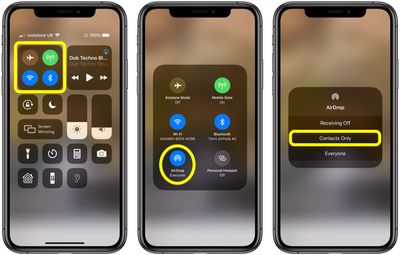
You can also set your AirDrop options in Control Center. Here's how:
- Open Control Center on your device in the following way: On an iPad with a Home button, double-tap the Home button; on iPhone 8 or earlier, swipe up from the bottom of the screen; and on a 2018 iPad Pro or iPhone X/XR/XS/XS Max, swipe down from the upper right of the screen.
- Press firmly or touch and hold the network settings card in the upper-left corner.
- Tap AirDrop.
- Tap Contacts Only or Receiving Off.
How to Restrict AirDrop in macOS
If you've been the victim of AirDrop harassment on a Mac at work (in an open plan office, for instance) here's how to restrict who can share content with you in macOS.
- Open a Finder window on your Mac.
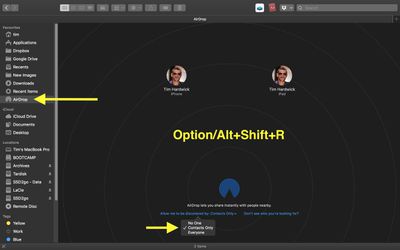
- Select AirDrop from the Finder sidebar (if AirDrop isn't listed, use the keyboard combination Command-Shift-R to open it.
- Click the setting prefaced with Allow me to be discovered by: and select Contacts Only or Receiving Off from the drop-down menu.
If you're a regular user of AirDrop in macOS and regularly open it in Finder, consider adding an AirDrop shortcut to your Dock for one-click access to it from any screen.














































Top Rated Comments
Job done!
https://www.businessinsider.com/teens-using-apple-airdrop-instead-of-snapchat-and-instagram-2015-1
No. It uses a combination of bluetooth and its own local Wifi network. It doesn't require any cellular or existing Wifi networks and you can send huge files like video. Was incredibly useful when traveling overseas where connectivity was spotty and I wanted to share files with others. I can also send/receive a large amount of pictures at their full size and resolution using AirDrop.