How to Get Your iPhone Ready for iOS 18 - MacRumorsOpen MenuShow RoundupsShow Forums menuVisit ForumsOpen Sidebar
Skip to Content

How to Get Your iPhone Ready for iOS 18

by

Apple officially releases iOS 18 and iPadOS 18 on Monday, September 16, bringing a host of new features to existing iPhones and iPads, such as new Home Screen customization options, an overhauled Control Center, a revamped Photos app, Mail improvements, and more.
iOS 18 on iPhone Feature
This article covers some of the things you can do to prepare your ‌iPhone‌ or iPad for Apple's latest mobile operating system, including storage maintenance tips, backup advice, and a few other useful tidbits to consider before upgrading. First though, you'll need to make sure your ‌device is compatible with the new software.

Is My iPhone Compatible With iOS 18?

iOS 18 is compatible with the iPhone XR, and therefore also the iPhone XS and iPhone XS Max models with the same A12 Bionic chip.

In other words, iOS 18 is compatible with the same iPhone models as iOS 17:

  • iPhone 15
  • iPhone 15 Plus
  • iPhone 15 Pro
  • iPhone 15 Pro Max
  • iPhone 14
  • iPhone 14 Plus
  • iPhone 14 Pro
  • iPhone 14 Pro Max
  • iPhone 13
  • iPhone 13 mini
  • iPhone 13 Pro
  • iPhone 13 Pro Max
  • iPhone 12
  • iPhone 12 mini
  • iPhone 12 Pro
  • iPhone 12 Pro Max
  • iPhone 11
  • iPhone 11 Pro
  • iPhone 11 Pro Max
  • iPhone XS
  • iPhone XS Max
  • iPhone XR
  • iPhone SE (2nd generation)
  • iPhone SE (3rd generation)

iPadOS 18 drops support for iPad models with the A10X Fusion chip, therefore iPadOS 18 is compatible with the following iPad models:

  • iPad Pro: 2018 and later
  • iPad Air: 2019 and later
  • iPad mini: 2019 and later
  • iPad: 2020 and later

Note that iOS 18 will come pre-installed on new iPhone 16 models when they launch on Friday, September 20.

Reclaim Device Storage Space

Before you attempt to make the leap to iOS 18, you'll first want to make sure your device has adequate space to download and install the new operating system over the air.

With that in mind, it's worth looking at what apps you currently have installed on your devices and whether you really need them. Swipe through your home screen and check inside your folders to root out any long-forgotten apps that are taking up precious storage space.
settings
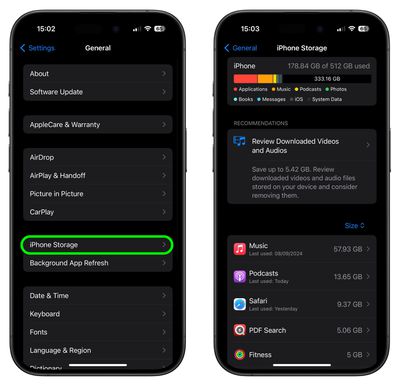
You can delete apps by holding a finger on them and tapping the X that appears at the corner of their icon. Alternatively, go to Settings ➝ General ➝ iPhone/iPad Storage, tap any apps you don't use, and select Delete App. Note that this action can't be undone, but be ruthless – you can always re-install removed apps at a later date if you change your mind.

Check on the size of any social media or messaging apps you have installed, such as Facebook and WhatsApp. These apps can often balloon in size after long periods of activity because of chat history, media caching and the like, so you might want to delete and reinstall them to start afresh.

Also, be sure to heed any personal recommendations on the ‌iPhone‌ Storage screen, like keeping high-resolution photos in iCloud and smaller-size versions on your device, or letting iOS automatically offload any apps you don't use often.

Make an Archived Backup of Your Device on Mac

It's best practice to have a local backup of your device stored on your computer in case something goes awry, or the worst happens and installation of iOS 18 fails. If you need to downgrade shortly after installing a new iOS update, making an archived local backup beforehand is necessary, otherwise you won't be able to revert back to ‌iOS 17/iPadOS 17‌ if things go wrong.

  1. Plug your iPhone into your Mac using the supplied cable.
  2. Allow the accessory to connect by clicking Allow in the dialog prompt.
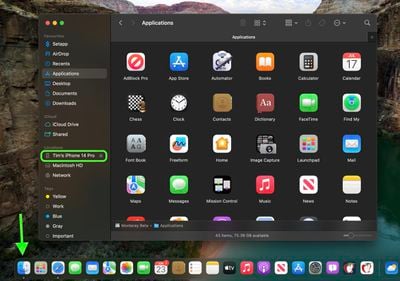
  3. Open a Finder window by clicking the Finder icon in the Dock.
  4. Click your iOS device's name in the sidebar.
    finder

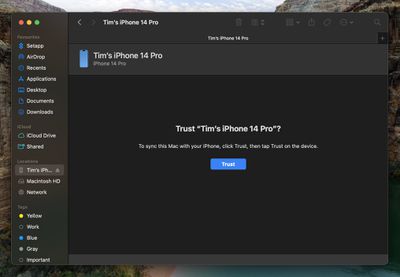
  5. If this is the first time connecting your device to your Mac, click Trust in the Finder window.
    finder

  6. Tap Trust on your device when prompted, then enter your passcode to confirm.
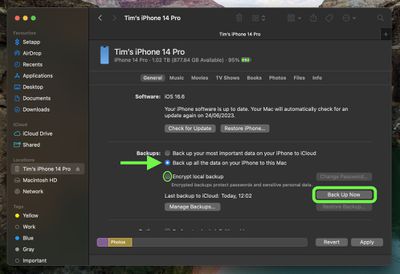
  7. In the General tab, click the circle next to where it says Back up all of the data on your iPad to this Mac.
  8. If you want to encrypt the backup, check the box next to Encrypt local backup, then enter a password to protect your data.
  9. If you don't want to create an encrypted backup, or you've already set up encrypted backups, click Back Up Now. When the backup is finished, you can find the date and time of the last backup in the General tab, just above the Manage Backups button.
    finder

  10. Lastly, archive the backup: Select Manage Backups ➝ Select Backup, then right-click the backup and choose Archive. This protects it from being overwritten by the next local backup or automatically deleted if your Mac is low on storage space.
Remember that this backup will not be overwritten when you manually or automatically back up your iPhone in the future, so you can restore it at any time by using the Restore Backup... option in the same Finder screen.

Make an Archived Backup of Your Device on Windows

The iTunes app is still the main tool for managing a connected iPhone on Windows.

  1. Plug the iPhone into your Windows PC.
  2. In iTunes, click the iPhone button at the top left.
  3. Click Summary.
  4. If you want to encrypt the data, select the Encrypt local backup option and set a password.
  5. Click Back Up Now.
  6. Click Manage Backups.
  7. Right-click the backup you created and choose Archive. This extra step prevents the backup from being overwritten by the next local backup or automatically deleted if the computer runs low on storage space.

Installing iOS 18

When iOS 18 and iPadOS 18 becomes available (likely around 10:00 a.m. Pacific Time/1:00 p.m. Eastern Time on the official release day, based on past releases) as an over-the-air update, make sure your device is fully charged before you start the process over Wi-Fi, as it may take some time to complete.

To check that the update is available, go to Settings ➝ General ➝ Software Update, and wait a moment for your device to contact Apple's servers. If you're in no rush, you can wait for iOS 18 to be delivered to your iPhone when you next plug it into your computer.

Note that the first release versions of ‌iOS 18‌ and ‌iPadOS 18 don't include Apple Intelligence features, with Apple set to introduce the first Apple Intelligence capabilities in an update coming next month.


Related Forums: iOS 18, iPadOS 18

Top Rated Comments

cjsuk Avatar
27 months ago
I am preparing for iOS 18 by turning off automatic updates and watching other people for a few days.

Score: 11 Votes (Like | Disagree)
CharlesShaw Avatar
27 months ago
Years later, when backing an iPhone up to the Mac, I always remember joy of putting the OG iPhone in the included dock.
Score: 9 Votes (Like | Disagree)
turbineseaplane Avatar
27 months ago
Step one:

Charge up your external battery back for the inevitable lower run times until iOS 18.3
Score: 8 Votes (Like | Disagree)
bodonnell202 Avatar
27 months ago

My A10X Fusion iPad Pro really deserves to get iOS 18. From what I can tell, the A12 and A10x are almost equivalent processors. I guess I’ll just be out of date now 🤷🏻‍♂️
Considering the iPad 7th gen which has the A10 and 3GB of RAM is getting iPadOS 18 while the 2nd gen iPad Pros with the A10X and 4 GB of RAM aren't tells me there is no technical reason why the 2nd gen Pros aren't getting the update and they are just dropping devices based on age now.
Score: 6 Votes (Like | Disagree)
Mr_Brightside_@ Avatar
27 months ago
I was today years old when I learned of the archive option.
Score: 4 Votes (Like | Disagree)
27 months ago
My A10X Fusion iPad Pro really deserves to get iOS 18. From what I can tell, the A12 and A10x are almost equivalent processors. I guess I’ll just be out of date now 🤷🏻‍♂️
Score: 4 Votes (Like | Disagree)

Popular Stories

Home Hub Command Center with Dome Base Feature

Apple Smart Home Hub to Feature iMac G4-Style Design

Wednesday September 30, 2026 4:36 am PDT by
Apple's long-rumored smart home hub will have an iMac G4-style design and a host of unique features, Bloomberg's Mark Gurman reports. The smart home hub is said to feature a square 6-inch display, with variants that can be placed on a countertop or mounted on a wall. It features a single FaceTime camera on the front, with microphones and speakers in its connected base. Gurman described the...
HomePod minis on gradient feature 1 1

Three New Apple Smart Home Products Coming on October 13

Wednesday September 30, 2026 4:04 am PDT by
Apple plans to introduce a series of new smart home products on Tuesday, October 13, according to Bloomberg's Mark Gurman. Apple reportedly plans to debut its long-awaited smart home hub device, a new HomePod mini, and a new Apple TV on the date. The new HomePod mini and Apple TV are set to retain their existing designs, but tout faster chips to support Siri AI. The new HomePod mini will...
iPhone Duo Open

iPhone Duo Reportedly Facing Production Problems Ahead of Launch

Tuesday September 29, 2026 6:16 am PDT by
The iPhone Duo is reportedly facing production difficulties ahead of its October launch, with early output expected to be limited. A person said to be close to Foxconn's supply chain told China's Jiemian News that final assembly yields for Apple's first foldable iPhone were only slightly above 60% as of September 17. The source said that, under Apple's current quality standards, it could...
Latest Stories
AT&T Acknowledges iPhone 18 Pro Max Issues: 'Update Immediately'
5 hours ago
New 'AirFly Drive' Accessory Turns Wired CarPlay Into Wireless CarPlay
10 hours ago
Apple Shares Photos Shot on iPhone Duo
12 hours ago
Apple Says iPhone Duo Has Replaceable 'Cover Layer'
13 hours ago
Apple's Smart Home Camera Will Apparently Have 'No Video Recording'
15 hours ago
Apple TV Just Updated Its Selection of 'Bonus' Movies
16 hours ago
iPhone 18 Pro Colors Buyer's Guide: Which Should You Choose?
16 hours ago
Early Prime Big Deal Days: Best Discounts on Accessories, TVs, and More at Amazon
17 hours ago
MacBook Pro With OLED Touch Screen Rumored to Launch in October or November
18 hours ago
Apple's All-New Home Hub Rumored to Launch in These Four Colors
19 hours ago
iPhone 18 Pro Aperture Control Goes Fully Manual in Halide 3.2
20 hours ago
Apple Stores Receive 'Do Not Open' Boxes Ahead of Smart Home Products Launch
20 hours ago
iPhone 18 Pro Sales Jump in China Ahead of iPhone Duo Launch
21 hours ago
Apple TV Still Down for Some Users Following Apple Services Outage
22 hours ago
PSA: Apple Mail on Mac May Stop Syncing Microsoft 365 Accounts Today
22 hours ago
Apple's Smart Home Hub: Everything We Know So Far
1 day ago
Apple's Home Hub Borrows From the iPhone Duo's StandBy Mode
1 day ago
Apple Invites App Updated With Three New Features
2 days ago
Apple Event on October 13?
2 days ago
Apple Watch SE 3 vs. Series 12 Buyer's Guide: Which Should You Buy?
2 days ago
iPad Mini 8 to Offer These 10 New Features
2 days ago
DoorDash Unveils AI Food Ordering Through Apple's Messages App
2 days ago
Amazon Takes Up to $150 Off Select M5 MacBook Air Models
2 days ago
Apple Still Plans to Release a New Full-Sized HomePod
2 days ago
Apple Working to Expand HomeKit
2 days ago
Apple Smart Home Hub to Feature iMac G4-Style Design
2 days ago
Three New Apple Smart Home Products Coming on October 13
2 days ago
Apple Pay Now Available in India With Axis Bank Cards
2 days ago
OpenAI Launches Always-On 'Dots' Agents to Rival Meta's Muse
2 days ago
AirPods 5 Teardown: Batteries Removable, Case Still Tough
2 days ago

🔗 Related Apple News & Rumors

Stay updated with the latest Apple ecosystem news and verified rumors