Create a Groceries List in Your iPhone's Reminders App - MacRumorsOpen MenuShow RoundupsShow Forums menuVisit ForumsOpen Sidebar
Skip to Content

Create a Groceries List in Your iPhone's Reminders App

by

In iOS 17, Apple has added a handy little list function to the Reminders app to help you when you're out to pick up some groceries. Keep reading to learn how to use it and make short work of your trip to the store.
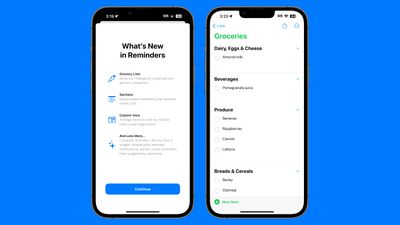
ios 17 reminders app
When you create a list with the new "Groceries" list type (named "Shopping" outside the U.S), you can input various foods and sundries and have them organized automatically by category. The organization makes it easier to find what you need when you're at the grocery store, or out shopping.

The available category types in Reminders include Produce, Breads & Cereals, Frozen Foods, Snacks & Candy, Meat, Dairy, Eggs & Cheese, Bakery, Baking Items, Household Items, Personal Care & Health, and Wine, Beer & Spirits.

Here's how to create a Shopping or Groceries reminder list in iOS 17.

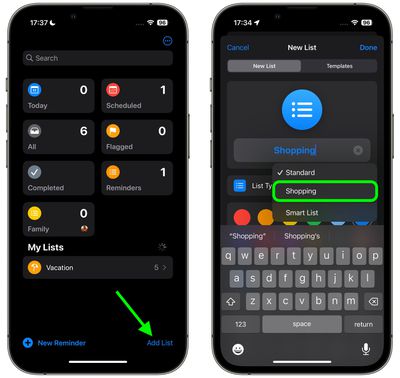
  1. In the Reminders app, tap Add List.
  2. Give your list a name, an optional color and icon, and tap the "List Type" and choose Groceries (or Shopping), then tap Done.
    reminders

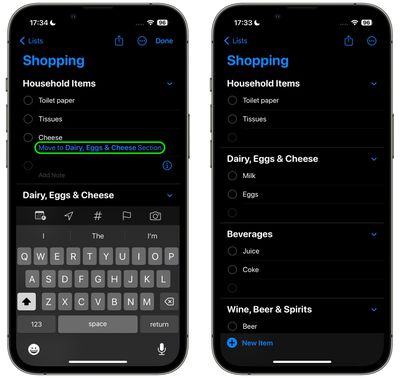
  3. Start populating your Groceries list with items. As you add different category types, the Reminders app will prompt you to move certain items to specific categories. Tap the option in blue to move the item.
  4. When you've finished your list, it should be organized into separate categories, making it easier to find the related items in the same areas of the store.
    reminders

If the ‌‌iPhone‌‌ doesn't recognize where an item should go, it remains uncategorized. Note that it will recognize specific brands and types of food like "Sour Patch Kids," so it is a fairly robust solution for grocery shopping.

You can also create your own categories in the grocery list. Simply tap the three dots in a circle icon and select New Section in the dropdown. You can then tap on the new section to give it an identifying name.


Popular Stories

Apple Event Logo

Apple Working on All-New Operating System

Wednesday July 29, 2026 11:39 am PDT by
Apple is developing an all-new operating system that is essentially a mix of tvOS, watchOS, and iOS, according to Bloomberg's Mark Gurman. In a report this week, he said the operating system will feature a grid of icons, widgets, and apps, along with customizable clock faces. The new software platform is intended for Apple's long-rumored smart home hub. With built-in facial recognition,...

imac video apple feature

Apple Made Its Second-Biggest Acquisition Ever This Year

Wednesday July 29, 2026 12:03 pm PDT by
Apple this year acquired Israeli startup Q.ai for close to $2 billion, according to the Financial Times. That would make this Apple's second-biggest acquisition ever, after it paid $3 billion for the popular headphone maker Beats in 2014. This is also the largest known Apple acquisition since the company purchased Intel's smartphone modem business and patents for $1 billion in 2019. Q.ai...
Four iPhone 18 Pro Colors Mock Feature

iPhone 18 Pro and iPhone Ultra: Pre-Orders and Release Date

Thursday July 30, 2026 6:12 am PDT by
Apple has yet to reveal when the iPhone 18 Pro and iPhone Ultra will be announced and released, but the dates usually follow a familiar pattern. Labor Day is September 7 this year. The last time the holiday fell on that day was in 2020, but the iPhone event that year was delayed until October due to the COVID-19 pandemic. So, the last time Labor Day was on September 7 in a normal year was in ...

🔗 Related Apple News & Rumors

Stay updated with the latest Apple ecosystem news and verified rumors