

iOS 17: How to Auto-Delete Verification Codes in Messages and Mail - MacRumorsOpen MenuShow RoundupsShow Forums menuVisit ForumsOpen Sidebar
Skip to Content

iOS 17: How to Auto-Delete Verification Codes in Messages and Mail

by

Apple in iOS 17 introduced a new feature for Mail and Messages that can automatically delete one-time verification codes after you have used them. Here's how it works on iPhone and iPad.
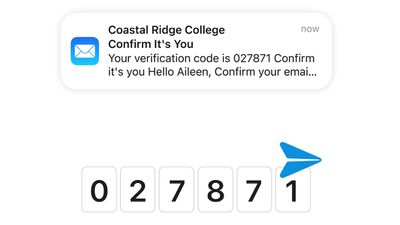
ios 17 mail verification codes autofill
These days, many websites and services use one-time passcodes sent via SMS or over email for verification purposes, but these one-time codes can soon clog up your Mail inbox and Messages app.

Thankfully in ‌iOS 17‌, there's a new option to have those messages auto-delete after the code is autofilled and used to authenticate a login. Apple should ask you if you want to enable this when you use the autofill feature after upgrading to ‌iOS 17‌, but you can toggle it on manually by following these steps.

  1. Open Settings on your iPhone or ‌iPad‌.
  2. Scroll down and tap Passwords (you'll be prompted to use Face ID to authenticate the next screen).
  3. Tap Password Options.
  4. Under "Verification Codes," toggle on the switch next to Clean Up Automatically so that it is in the green ON position.
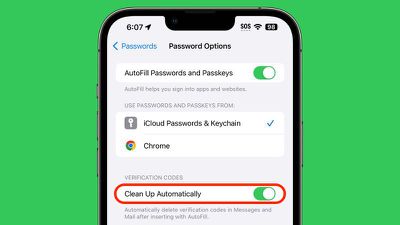
settings

That's all you need to do. Next time autofill uses a received verification code, the associated SMS message or email with be automatically deleted, helping you keep your inboxes clear of unnecessary cruft.

For more information on everything new in iOS 17, be sure to check out our ultimate guide.

Popular Stories

General macOS Mail Feature

Apple Hide My Email Vulnerability Exposes Real Email Addresses

Wednesday July 1, 2026 6:20 am PDT by
A flaw in Apple's Hide My Email service can reportedly allow almost anyone to uncover the real email address behind a generated alias, and Apple has failed to address it for more than a year since it was first reported. 404 Media is withholding the technical specifics of the vulnerability because it remains exploitable, but the publication verified the issue this week using one of its own...

ios 27 messages

Apple Intelligence Introduces Contextual Call and Messages Features

Monday June 8, 2026 12:49 pm PDT by
Apple today announced a set of new communication-focused Apple Intelligence features, including contextual suggestions in Messages and a Call Context tool that surfaces relevant information from Mail when a user phones a business. The new Messages features offer one-tap suggestions based on the content of a conversation. If a contact asks for photos, Messages can surface a suggestion to...
ios 27 messages

14 Ways Apple Is Improving Messages in iOS 27

Wednesday June 10, 2026 4:01 am PDT by
Apple at this year's WWDC emphasized that its approach to iOS 27 development was to add fewer newer features and instead make existing features better. Examples of that approach can be seen across the operating system, but it is arguably most obvious in the changes coming to Messages. That's not to say there's nothing original coming to Messages in iOS 27. For instance, one new Apple...

🔗 Related Apple News & Rumors

Stay updated with the latest Apple ecosystem news and verified rumors









































