How to Grab Screenshots and Video From Apple TV Using Your Mac - MacRumorsOpen MenuShow RoundupsShow Forums menuVisit ForumsOpen Sidebar
Skip to Content

How to Grab Screenshots and Video From Apple TV Using Your Mac

by

Apple doesn't go out of its way to advertise the fact, but it's perfectly possible to connect a Mac to a fourth-generation Apple TV or later and grab screenshots and video output from the set-top box. In this article, we'll show you how it's done.

Note that this method can't be used to record DRM-protected content off the likes of Netflix or iTunes, but it will let you capture your driving skills in Asphalt 8: Airborne, for instance, just as it will allow you to take screenshots for use in troubleshooting, training, blogging, or any other purpose.

screenshot record apple tv on mac
The way to connect a Mac to an Apple TV used to depend on the presence of a USB-C port on the rear of the fourth-generation set-top box to establish a wired connection. But since there's no such port on the latest fifth-generation Apple TV 4K, that's no longer an option for a growing number of users.

However, thanks to macOS High Sierra and tvOS 11, it's now possible to connect your Mac wirelessly to a fourth- or fifth-generation Apple TV on the same Wi-Fi network, and you don't have to download Xcode or any other additional software to do so. Simply follow the steps below, and you should be capturing video and taking screenshots in no time.

How to Grab Images and Video From Apple TV on a Mac

  1. Turn on your Apple TV and your HDMI-connected display.

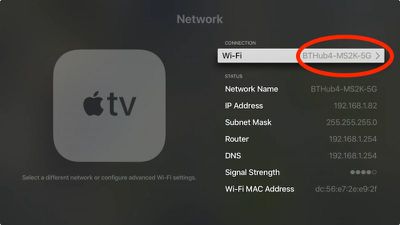
  2. On Apple TV, open Settings and select Network.

  3. Under Connection, make a note of the Wi-Fi network.
    1 Apple TV Network

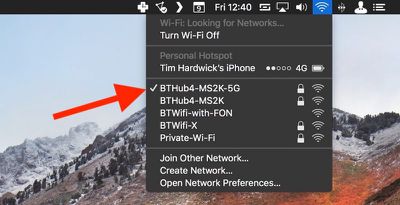
  4. Now click the Wi-Fi menu bar icon over on your Mac to make sure it's connected to the same network.
    1b Mac wireless network

  5. On Mac, launch QuickTime Player from the Applications folder.

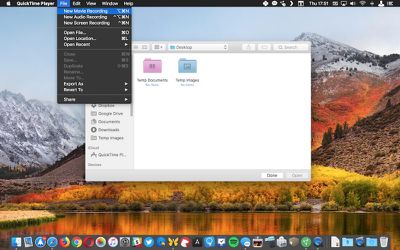
  6. In the QuickTime menu bar, click File -> New Movie Recording to open a new recording window.
    2 Quicktime apple tv video capture

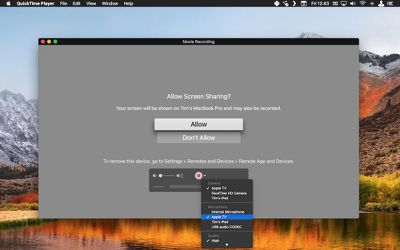
  7. Click the small down arrow to the right of the red record button.

  8. In the dropdown menu, select Apple TV under both the Camera and Microphone sections.
    3 QuickTime Apple TV recording

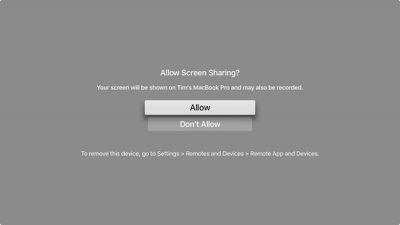
  9. A screen sharing permissions prompt will appear on your Apple TV display. Use your Siri Remote to select Allow.
    4 Apple TV screen sharing

  10. To begin recording video, simply click the red record button.

  11. To take a screenshot of the Apple TV output from your desktop, press the keyboard shortcut Command-Shift-4 and hover the cursor crosshair over the QuickTime Movie Recording window.

  12. Press the spacebar. The crosshair will turn into a camera and the QuickTime window will take on a transparent blue cast to indicate it's selected.

  13. Wait a moment for the QuickTime interface overlay and title bar to disappear, and then click to take your Apple TV screenshot. It will be automatically saved to your desktop by default.5 Apple TV QuickTime screenshot

Note: If you want to try the traditional method of taking Apple TV screenshots, you need to download Apple's Xcode developer utility from the Mac App Store. Bear in mind that it's a hefty 5.5GB download, and you might run into connection issues if you're running a beta version of tvOS.

After installing Xcode 9.2, launch the utility and select Window -> Devices and Simulators from the menu bar, and you should see the screenshot button in the Devices tab once you've successfully connected to Apple TV.


Related Roundup: Apple TV
Buyer's Guide: Apple TV (Don't Buy)

Top Rated Comments

Starflyer Avatar
112 months ago
This is cool! I also think it would be nice to have a motion graphic desktop, like the Apple TV screen savers but as a desktop wallpaper replacement on the Mac.

Here is a Mac screen saver that pulls from the source videos. I've used this for a year.

https://github.com/JohnCoates/Aerial
Score: 2 Votes (Like | Disagree)
TurboPikachu Avatar
109 months ago
good tip...but where are those screenshots stored? How do you get them transferred to a Mac?
They’re automatically stored to your iCloud Photo Library, accessible from Mac, iOS Devices, and PCs.
Score: 1 Votes (Like | Disagree)
acctman Avatar
112 months ago
wow would have never found that feature on my own.
Score: 1 Votes (Like | Disagree)
112 months ago
Very cool tip, thanks MR!
Score: 1 Votes (Like | Disagree)
Xavier Avatar
112 months ago
This is cool! I also think it would be nice to have a motion graphic desktop, like the Apple TV screen savers but as a desktop wallpaper replacement on the Mac.
Score: 1 Votes (Like | Disagree)

Popular Stories

Apple TV Sans Remote Feature

New Apple TV 4K Leaked

Friday September 25, 2026 8:16 am PDT by
MacRumors contributor Aaron Perris has uncovered an image file from Apple for an unreleased Apple TV 4K, suggesting that a new model will finally be released soon. The image is specifically for an "Apple TV 4K (4th generation)" model. Apple TV 4K (4th generation) image (on a gradient) The image reveals that the Apple TV will have the same external design as the current model, with all of its...
Apple iCloud Plus expansion hero

iCloud+ Now Includes Apple TV, Apple Arcade, and Curated Apple Music Stations in Over 100 Countries

Tuesday September 15, 2026 1:43 am PDT by
Apple today announced a new subscription initiative that turns paid iCloud+ subscriptions into a broader services bundle in more than 100 countries. In select countries, Apple says every paid iCloud+ plan, including the cheapest 50GB tier, now includes Apple TV and Apple Arcade "at no additional cost," while family sharing extends the storage, TV and Arcade access to up to five people....
HomePod minis Apple TV and iPad mini Leak Feature

iPad Mini With A20 Pro, New HomePod Mini Colors, and New Apple TV 4K All Just Leaked

Friday September 25, 2026 8:18 am PDT by
The next iPad mini, HomePod mini, and Apple TV 4K models have all leaked, just a few weeks before the devices are expected to be announced. Specifically, MacRumors contributor Aaron Perris discovered a few of Apple's official images of the devices, confirming their existence and some new features that are planned. The most notable iPad mini details revealed in today's leak include an A20 Pro ...
Latest Stories
Apple TV Still Down for Some Users Following Apple Services Outage
12 minutes ago
PSA: Apple Mail on Mac May Stop Syncing Microsoft 365 Accounts Today
37 minutes ago
Apple's Smart Home Hub: Everything We Know So Far
11 hours ago
Apple's Home Hub Borrows From the iPhone Duo's StandBy Mode
12 hours ago
Apple Invites App Updated With Three New Features
16 hours ago
Apple Event on October 13?
17 hours ago
Apple Watch SE 3 vs. Series 12 Buyer's Guide: Which Should You Buy?
19 hours ago
iPad Mini 8 to Offer These 10 New Features
19 hours ago
DoorDash Unveils AI Food Ordering Through Apple's Messages App
21 hours ago
Amazon Takes Up to $150 Off Select M5 MacBook Air Models
21 hours ago
Apple Still Plans to Release a New Full-Sized HomePod
22 hours ago
Apple Working to Expand HomeKit
23 hours ago
Apple Smart Home Hub to Feature iMac G4-Style Design
23 hours ago
Three New Apple Smart Home Products Coming on October 13
1 day ago
Apple Pay Now Available in India With Axis Bank Cards
1 day ago
OpenAI Launches Always-On 'Dots' Agents to Rival Meta's Muse
2 days ago
AirPods 5 Teardown: Batteries Removable, Case Still Tough
2 days ago
iPhone 18 Pro Owners Complain of Speaker Crackling or Popping
2 days ago
You Can 'Get Ready' for iPhone Duo Pre-Orders on October 12
2 days ago
Apple Pay Reportedly Launching in India Today
2 days ago
Apple Releases New AirPods Beta Firmware
2 days ago
Apple Shares New Guide for Using iOS 27 Parental Controls
2 days ago
Apple Creator Studio and Final Cut Camera Get New Features
2 days ago
Apple Explains Why It Removed ICE Tracking Apps Last Year
2 days ago
Amazon Expands $779.99 Apple Watch Ultra 4 Deal to More Models
2 days ago
Switch Siri AI for ChatGPT on Your Mac
2 days ago
Apple Says Emergency SOS via Satellite Now Available in Norway
2 days ago
AppleCare Guide: Is it Worth Paying For?
2 days ago
Apple Reportedly Planned to Replace 5,000 Support Employees With AI
2 days ago
Apple Planning to Launch Products Faster and More Often
2 days ago

🔗 Related Apple News & Rumors

Stay updated with the latest Apple ecosystem news and verified rumors