How to Adjust or Disable Universal Control on Mac - MacRumorsOpen MenuShow RoundupsShow Forums menuVisit ForumsOpen Sidebar
Skip to Content

How to Adjust or Disable Universal Control on Mac

by

As of iPadOS 15.4 and macOS Monterey 12.3, Apple has introduced support for Universal Control, the long-awaited feature that's designed to allow multiple Macs and iPads to be controlled with a single mouse and keyboard.
Universal Control Colored Feature
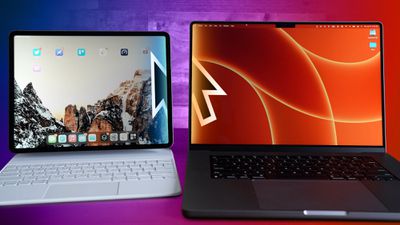
Thanks to ‌‌Universal Control‌‌, you can use the same cursor and keyboard on any nearby Mac or ‌iPad‌ that's signed into your iCloud account. So, for example, if you have a MacBook Pro and an ‌‌‌iPad‌‌‌ next to it, your Mac's trackpad and keyboard can be used to navigate the ‌‌‌iPad‌‌‌. The same is true of the ‌‌‌iPad‌‌‌ if you have a keyboard attached.

‌Universal Control‌‌ should work automatically once you've installed ‌macOS Monterey‌ 12.3 and iPadOS 15.4 because the feature is enabled by default, but there are settings that you might want to adjust or if you're not a fan, you might want to turn it off completely. Here's how.

How to Adjust or Disable Universal Control on Mac

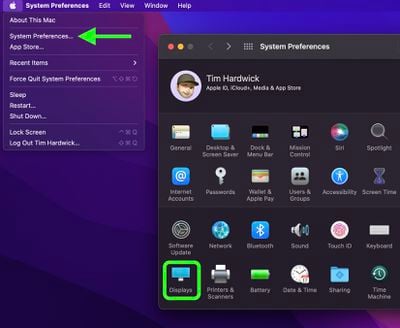
  1. Launch System Preferences from your Mac's Dock, from the Applications folder, or from the Apple menu bar ( -> System Preferences...).
  2. Select Displays in the preferences panel.
    sys prefs

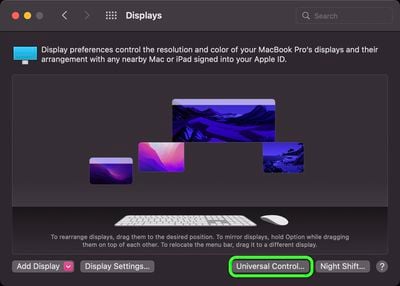
  3. Click Universal Control....
    displays

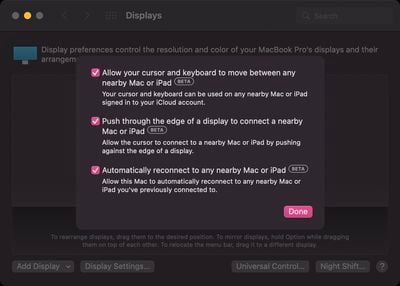
  4. Uncheck the boxes next to the following settings you want to disable: Allow your cursor and keyboard to move between any nearby Mac or iPad, Push through the edge of a display to connect a nearby Mac or iPad, and Automatically reconnect to any nearby Mac or iPad.
    displays

  5. Click Done.

Note that ‌Universal Control‌ is still in beta as of writing, so there may be some hiccups when using it. In our testing it proved very stable, although we did run into an issue where we needed to restart the Mac to get it to work. If you have an issue getting ‌Universal Control‌ up and running after updating, restarting the Mac and the ‌iPad‌ might help. See our troubleshooting guide for more help.

Popular Stories

Apple Watch Ultra 2 Black Titanium

New Apple Watch Series 12 and Apple Watch Ultra 4 Features Revealed

Sunday August 30, 2026 7:54 am PDT by
Bloomberg's Mark Gurman today further outlined what to expect from the Apple Watch Series 12 and Apple Watch Ultra 4 set to be unveiled on September 9. While it was initially rumored that Touch ID may be coming to the Apple Watch this year, Gurman reiterated that he does not expect the Series 12 or Ultra 4 to have any major design changes compared to the current Series 11 and Ultra 3 models. ...

Mac mini vs Studio Feature Sans Text 1

Apple Caught Off Guard by AI Demand for Mac Mini and Mac Studio

Sunday August 30, 2026 8:52 am PDT by
Apple's unusually timed announcement of new Mac mini and Mac Studio models this week was driven by unexpectedly strong enterprise appetite for AI hardware, according to The Information. Apple normally releases new Mac models in the autumn, closer to October or November, making this week's announcement unusually early, falling just before the anticipated arrival of new iPhone models. The...
Apple Event Logo

Apple Unveiled Four New Products This Week

Wednesday August 26, 2026 5:54 pm PDT by
Apple on Tuesday unveiled a new Mac mini with M6 and M5 Pro chip options, a new Mac Studio with M5 Max and M5 Ultra chip options, a new version of the Polishing Cloth with a lower price, and updated Magic Keyboards for Macs. To learn more about these products, read our coverage below: Apple Announces New Mac Mini With M6 and M5 Pro Chips and More Apple Unveils New Mac Studio With M5 Max...

🔗 Related Apple News & Rumors

Stay updated with the latest Apple ecosystem news and verified rumors