

Universal Control Not Working? Here’s How to Fix It - MacRumorsOpen MenuShow RoundupsShow Forums menuVisit ForumsOpen Sidebar
Skip to Content

Universal Control Not Working? Here’s How to Fix It

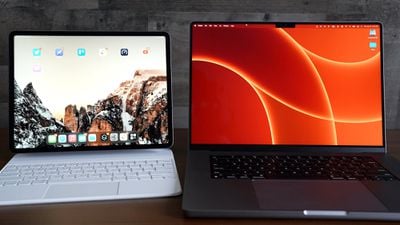
In iOS 15.4 and macOS Monterey 12.3, Apple introduced Universal Control, a feature designed to allow you to control multiple Macs and iPads with a single trackpad/mouse and keyboard. This article offers solutions to the most common problems encountered when getting Universal Control to work.
universal control
With Universal Control, you can use your main Mac's trackpad and keyboard to control additional Macs and/or iPads nearby, which means you don't need a desk cluttered up with more than one set of input devices. But getting it to work can sometimes present issues, especially the first time you come to try it.

Many of the solutions listed below are requirements that need to be fulfilled in order for Universal Control to work. Check each one to ensure you have everything set up correctly.

Mac and iPad Compatibility

First up, Universal Control requires iPadOS 15.4 on an iPad and macOS Monterey 12.3 on a Mac. It is compatible with the following devices:

  • MacBook Pro (2016 and later)
  • MacBook (2016 and later)
  • MacBook Air (2018 and later)
  • iMac (2017 and later)
  • iMac (5K Retina 27-inch, Late 2015)
  • iMac Pro, Mac mini (2018 and later)
  • Mac Pro (2019)
  • All iPad Pro models
  • iPad Air (3rd generation and later)
  • iPad (6th generation and later)
  • iPad mini (5th generation and later)

Are All Devices Signed into Your iCloud Account?

All devices must be signed into the same iCloud account in order for Universal Control to work across them. It will not work across devices signed into separate ‌Apple ID‌ accounts. You can make sure your Mac is signed into iCloud by going to System Preferences -> Apple ID. On iPad, open Settings and tap the Apple ID banner at the top of the main menu.
Universal Control Colored Feature

How Far Away Are the Devices?

Universal Control is designed to be used with Macs and iPads that are nearby, usually on the same desk, so that you can visually see the cursor move from a display to an adjacent device. For this reason, Macs and iPads need to be within 30 feet (10 meters) of one another for Universal Control to work.

Are Bluetooth and Wi-Fi Enabled?

Universal Control uses Bluetooth and Wi-Fi to communicate between devices for a seamless experience, so both of these wireless protocols need to be enabled on Macs and iPads. In addition, all devices must be connected to the same Wi-Fi network.

Is Handoff Enabled?

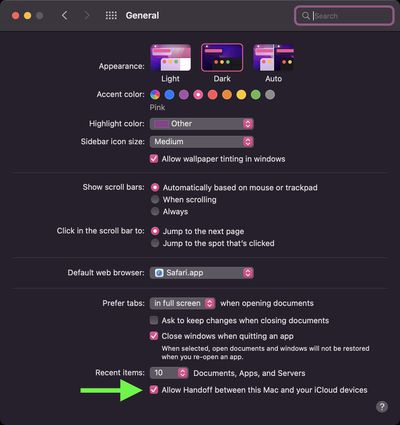
Universal Control requires Handoff to be enabled on all devices. On Mac, go to System Preferences -> General and make sure the box is checked at the bottom, next to Allow Handoff between this Mac and your iCloud devices.
sys-prefs
On iPad, open Settings -> AirPlay & Handoff and toggle on the switch next to Handoff. On the same screen, check that the switch is also in the green position next to Cursor and Keyboard (Beta).

Is the iPad Sharing a Cellular Connection?

For Universal Control to work, any ‌iPads‌ and Macs cannot be sharing a cellular and internet connection, so the Mac can't be tethered to the ‌iPad over Wi-Fi, Bluetooth, or USB‌. Make sure to disable any tethering using the options in Settings -> Personal Hotspot.

Are You Using Sidecar?

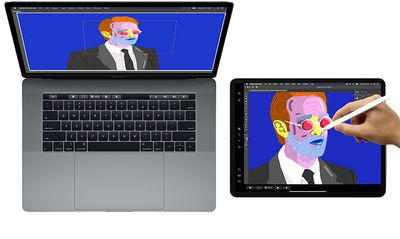
Sidecar‌ and Universal Control are separate features and some users have had trouble getting them to work in tandem. It is possible to use both features at the same time, but keep in mind that Universal Control in macOS 12.3 is still technically in beta, and some setups may throw up lingering bugs.
sidecarmacoscatalina
If you're using ‌Sidecar‌ to mirror or extend your Mac's display to an ‌iPad‌, Universal Control won't work on that iPad and may not work on an additional iPad to Mac, as there are some issues with the way the two features interact during the beta. Turn off Sidecar using the Display panel in your Mac's Control Center to prevent potential issues.

Are You Using At Least One Mac?

Though Universal Control can be used with two or more Macs and no ‌iPad‌s, at least one Mac is required to use it with iPads‌. In other words, two iPads without a Mac cannot take advantage of Universal Control, but if at least one Mac is in the mix, you can use the feature with multiple iPads.

Problems Automatically Reconnecting to a Nearby Device

The first time you use Universal Control, you can connect to a nearby Mac or ‌iPad‌ by pushing the trackpad or mouse cursor to the edge of the display toward the other device. After that, you can automatically reconnect to any nearby Mac or iPad in another session, but only if the setting is enabled (it isn't by default).

To enable automatic reconnections on Mac, go to System Preferences -> Displays -> Display Settings- > Advanced, and check the box next to Automatically reconnect to any nearby Mac or iPad, then click Done.

Problems With Drag and Drop

You can drag and drop files between two devices using Universal Control, but note that if you're using an ‌iPad‌ and a Mac, you need to have an app open that's compatible with the file type.

If you want to drag a photo from the Mac to the ‌iPad‌, for example, make sure you open up the Photos app on the ‌iPad‌ first. Or if you have a document you want to move, open up the Files app on the ‌iPad‌.

Dragging something from the ‌iPad‌ to the Mac is simpler because the Mac's desktop supports different file types, unlike the ‌iPad‌'s Home Screen.

Problems Using Multitouch Gestures

Some multitouch gestures like Mission Control are not available on an ‌iPad‌, and some are a little bit different. If you open up an app on the ‌iPad‌ and then want to exit out using the Mac's trackpad, you can use a three-finger swipe to do so. Alternately, with a mouse, you can mouse down over the dock to bring it up to swap apps.


Problems Using Copy and Paste

You can copy and paste text from one device to another using the one keyboard as long as it's an app that supports text input, but this feature does not yet appear to be working properly with apps like Safari. Features like copy/paste will likely see some refinement during the beta testing process.

Problems With Display Arrangement

If the cursor exits one display and appears on another display in a position that doesn't align with the physical arrangement of both displays, use the Displays section of the Mac's System Preferences to rearrange how your devices are laid out.

If your ‌iPad‌ is to the left of your Mac, for example, you'll want to make sure the Displays section shows that arrangement so your Mac's cursor can pop over to the ‌iPad‌'s display when you pop it off of the left edge of the Mac's screen.

Problems Using Apple Pencil

Universal Control does not work with the Apple Pencil. Input and control are limited to connected trackpads, mice, and keyboards. A single mouse/trackpad and a single keyboard can be used to control multiple iPads and Macs.

Problems Using iPhone

Universal Control is a feature that is designed only for the Mac and the ‌iPad‌. There is no option for controlling an iPhone with a Mac or ‌iPad‌'s mouse/trackpad and keyboard.

Read More

If you want to know more about the ins and outs of how Universal Control works, we have a dedicated Universal Control guide that explains everything.

Guide Feedback

Have questions an issue with Universal Control not discussed or want to offer feedback on this guide? Send us an email here.


Popular Stories

Apple HomeView lineup feature1

Apple Announces 'HomeView' Smart Home Hub

Tuesday October 13, 2026 6:00 am PDT by
Apple today announced the "HomeView," an all-new kind of smart home hub featuring a 7-inch Liquid Retina display and Siri AI. Apple's senior vice president of Worldwide Marketing Greg Joswiak said: Apple HomeView is designed to be shared by everyone in the home yet feel completely personal to each user. It recognizes your face to shift from a household screen to your own experience,...
Apple TV 4K 4th Generation feature4

New Apple TV 4K Announced With A19 Chip, Updated Siri Remote, More

Tuesday October 13, 2026 6:08 am PDT by
Apple today announced the fourth-generation Apple TV 4K, with key features including an A19 chip, Siri AI support, an updated Siri Remote that has Find My support with Precision Finding, built in far-field microphones, support for surround sound with four HomePods in front and rear pairs, and more. The A19 chip in the new Apple TV 4K delivers up to 50% faster CPU performance and up to twice...

iOS 26 Home Feature

RIP, homeOS

Tuesday October 13, 2026 9:39 am PDT by
MacRumors was first to reveal the name "HomeView" last week, after discovering a trademark filing from a secretive shell company that we correctly suspected was linked to Apple. Apple was likely behind a "homeOS" trademark filing as well, but the company ultimately decided to stick with generic "HomeView software" naming, just like it refers to the HomePod's operating system as "HomePod...


Top Rated Comments

TheYayAreaLiving 🎗️ Avatar
61 months ago
Good tips! Universal Control works just like MAGIC. It's just a magical feature.
Score: 4 Votes (Like | Disagree)
ThunderSkunk Avatar
61 months ago

Any features that require babysitting or troubleshooting I usually just don’t use.
I find myself having less and less patience as I get older, for things that do something amazing on paper, but irl only on 3 specific devices and only while standing on your head and arm wrestling a kangaroo, on tuesdays.

Tried this, & it was just another thing that started to work, and then just didn't. It would be about the most useful feature of Mac OS in my home and office, if it worked. Oh well.
Score: 3 Votes (Like | Disagree)
szw-mapple fan Avatar
61 months ago

Buuuuuuuu, we know how to fix the un-working Universal control
We are macrumors users, we are not stupiid :)
Speak for yourself. My stupidity knows no bounds :cool:
Score: 3 Votes (Like | Disagree)
61 months ago
Nice article on troubleshooting.
Score: 2 Votes (Like | Disagree)
contacos Avatar
61 months ago
I know it is still in beta but a general observation with Apple in the last few years is that they barely introduce new features to the public like they are just hidden somewhere in the settings panel (that the average user isn't even looking at) and you have to discover them yourself. Why is there no pop up after installing a new OS version introducing to "what's new" properly with some nice on-boarding screens? I know people that did not even know you could add widgets to your iPhone Home Screen let alone stack them on top of each other. I also wonder how many people actually use the hide your email feature, hidden in the iCloud controls (again, who actually checks those?). I personally had to tell people about it. I also still do not understand how the new multi tasking actually works on the iPad or why they changed it in the first place and I do not care enough to invest my time in finding out
Score: 2 Votes (Like | Disagree)
melgross Avatar
61 months ago
Keep in mind folks, that we’re in early days yet, even just a beta. Possibly some will work when it’s finalized, and more features will come as time goes on. Look at how iPad cursor support evolved, and quickly. As long as it’s possible, and not technically incompatible in a way that can’t be overcome, Apple may implement it. I can see a number of those problems going away over the next year.
Score: 2 Votes (Like | Disagree)
Latest Stories
Apple Pre-Orders Kick Off With First Discounts on HomeView and Apple TV 4K
38 minutes ago
Developers Question Scope of Potential Apple Antitrust Settlement
1 hour ago
iPhone Duo Resold for $5,000 on eBay After Selling Out
1 hour ago
Massive Discounts Hit 2026 MacBook Pro With Up to $800 Off
1 hour ago
iPhone Duo is Sold Out for Christmas as Shipping Estimates Slip to 2027
2 hours ago
Didn't Pre-Order an iPhone Duo Yet? Wait Times Are Significant Now
2 hours ago
First Apple TV 4K Pre-Order Discount Arrives at Amazon
3 hours ago
iPhone Duo Pre-Order Deals: The Best Carrier Offers From AT&T and T-Mobile
3 hours ago
iPhone Duo Now Available to Pre-Order From Apple
3 hours ago
iPhone 18 Pro vs. iPhone Duo Buyer's Guide: Which Should You Choose?
5 hours ago
Apple Store Down Ahead of iPhone Duo Pre-Orders
5 hours ago
Oops, Apple's Website Just Hinted at iPad Mini 8
14 hours ago
OLED MacBook Pro Won't Get M7 Chips Until Late 2027
17 hours ago
Apple Pledged $25 Million to Trump's White House Ballroom
18 hours ago
Touchscreen MacBook Pro Could Launch on November 6
20 hours ago
New Withings Users Must Pay $99/Year for Apple Health Syncing
20 hours ago
Meta and Apple Bring Muse Spark Open AI Model to Mac Studio
21 hours ago
iPad Mini 8: Apple Has Tested Both 60Hz and 120Hz ProMotion Displays
21 hours ago
Apple TV 4K 2022 vs. 2026 Buyer's Guide: All Differences Compared
23 hours ago
Apple CEO John Ternus on Early Foldables: 'Kind of Cheap and Crappy'
1 day ago
Greg Joswiak Says Apple Isn't Focused on Making AI for 'Lunatic Fringe'
1 day ago
Amazon Offers $120 Discount on AirPods Max 2, $50 Off AirPods Pro 3
1 day ago
Apple CEO John Ternus Featured on Cover of TIME Magazine: 'New Era'
1 day ago
Apple Announces Deadline to 'Get Ready' to Pre-Order the iPhone Duo
1 day ago
MKBHD is 'Not Convinced' About Apple's New HomeView, Here's Why
1 day ago
Apple's Wall-Mounted HomeView Ships Without a Power Adapter
1 day ago
Rare Apple-1 With Steve Jobs Letter Sells for $1.15 Million
1 day ago
Apple Now Inviting Media to October 28 'Launch Experience'
1 day ago
iPhone Duo's A20 Pro Chip Benchmarked Ahead of Launch
2 days ago
10 HomeView Features You Might Have Missed
2 days ago

🔗 Related Apple News & Rumors

Stay updated with the latest Apple ecosystem news and verified rumors







































