Rumors originally suggested the iPhone X would be tough to get through the holidays, but Apple significantly ramped up supply, so it's been relatively easy to get a new iPhone X ahead of Christmas.
That means lots of new iPhone X devices are getting unboxed today, and if you're coming from an iPhone 8 or later, it's a big adjustment. Those of us who have been using an iPhone X since November can confirm that it takes a bit of time to get used to all of the changes in the device, but within a week or two, you won't even miss that Home button.
We've shared a lot of details on the iPhone X over the course of the last month, and this post resurfaces some of that content along with a few new tidbits and tricks that will help you get used to your iPhone X more quickly.
The iPhone X Interface
Not having a Home button is on the iPhone X is the most immediately jarring change, because there are new and unfamiliar gestures to learn.
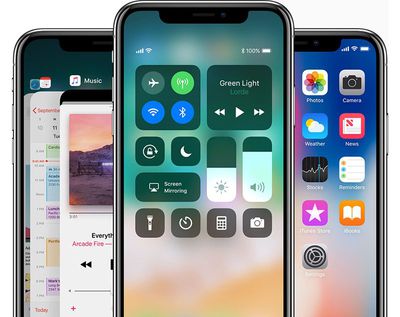
Instead of pressing on the Home button to get to the Home screen of the iPhone X, you swipe up from the bottom of the display. This minimizes any app that's open.
On earlier iPhones, a double tap on the Home button brought up the App Switcher, but on iPhone X, you swipe up from the bottom and then pause for a moment to get to the App Switcher. Closing apps is no longer done with a single swipe -- you'll need to hold again on an app in the App Switcher until the red "-" appears, and then tap it or swipe up on the app.
To activate the display of the iPhone X to see your notifications, you can use a new "Tap to Wake" gesture, which, as the name suggests, means you just tap a finger on the inactive display. Pressing the side button also works.
Getting to the Control Center is going to be one of the most difficult gestures to learn. Instead of swiping up from the bottom like you're used to, you swipe down from the top of the status bar that displays battery life and cellular signal.
A swipe down from the top of the iPhone X anywhere else on the display brings down the Cover Sheet of the Lock screen so you can see all of your notifications. Accessing Siri is now done by pressing twice on the side button instead of holding down on the Home button.
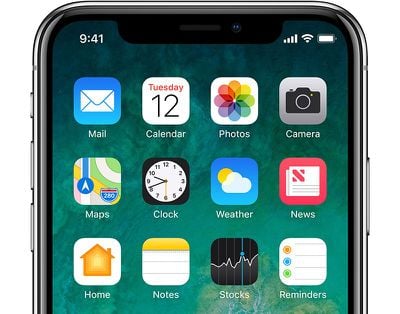
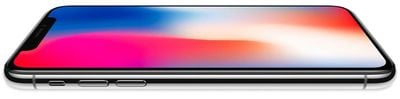
The iPhone X has an edge-to-edge display that does away with all bezels, except for a "notch" at the top of the device. Many criticized this design decision ahead of the release of the iPhone X, but in practical use, it's something you acclimatize to after a week or two of using the iPhone X, and it fades into the background instead of being a focal point whenever you're using the phone.
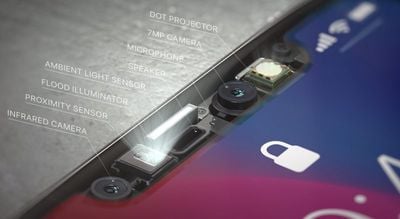
Apple needed the notch to hold all of the sensors for the TrueDepth camera, but it was implemented in a way that takes up as little space as possible, with two ears at the sides that house status information.
Apple, in developer materials, encourages developers to embrace the notch rather than to hide it away, and that's the path most apps and games have taken. In portrait mode, the notch is easy to ignore, but it will be a bit harder to get used to in landscape mode.
The iPhone X is the first iPhone from Apple to feature OLED technology for true-to-life colors, deep blacks, and an improved contrast ratio. At a resolution of 2436 x 1125 with 458 pixels per inch, it has the highest resolution and pixel density ever introduced in an iPhone.
It is the best display we've seen in an iPhone, and it's one of the features you're likely to fall in love with immediately after unboxing the iPhone. It supports HDR, wide color, 3D Touch, and True Tone for adjusting the white balance of the display to match the ambient lighting.
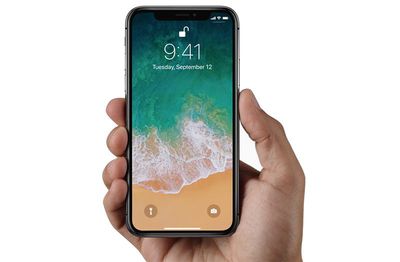
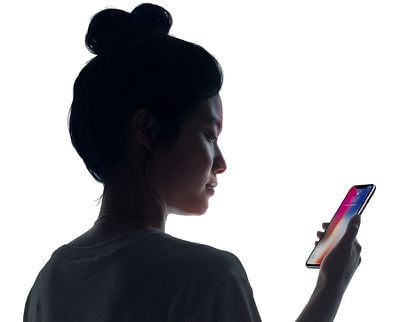
Face ID, like the removal of the Home button, is a major change in the iPhone X. A fingerprint is no longer required to unlock your iPhone because it's using a 3D facial scan instead. Face ID works through a TrueDepth Camera system that projects thousands of tiny dots onto your face, which are read through an infrared camera.
For most people, Face ID is as secure as Touch ID, but it can sometimes be fooled by masks, twins, and children.
Face ID is identical to Touch ID in terms of what it's used for (Apple Pay, device unlocking, password replacement in apps), it just uses your face instead of your finger. Developers have no access to Face ID data, nor does Apple, so it's just as secure as Touch ID.
Built-in machine learning features allow Face ID to adjust to facial changes. It can recognize you with sunglasses on, when you grow a beard, when you cut your hair, when you wear a scarf, and in other similar situations.
The TrueDepth Camera isn't just used for Face ID -- it powers a new feature called Animoji, which are animated characters that mimic your facial expressions. Animoji live in the Messages app, so you can send friends and family messages featuring animated characters with your voice and facial expression.
Animoji were popular just after the release thanks to "Animoji Karaoke," designed to make it look like the Animoji characters were singing hit songs, but that has died out over the last few weeks.
The TrueDepth Camera can send a rough facial map of your face to developers for ARKit apps. Snapchat, for example, can use this additional data from the TrueDepth camera to make its built-in facial filters more realistic than ever before.
Apple Pay on iPhone X is as simple to use as Apple Pay with devices that have Touch ID, but the checkout process is different.
Instead of confirming a payment with a finger on the Touch ID Home button, you'll need to unlock your iPhone X with Face ID, hold it down towards the payment terminal, and then press twice on the side button. The video below walks through the steps required:
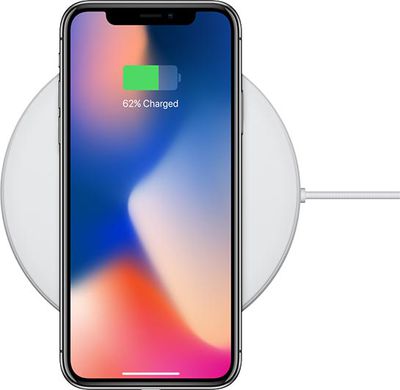
You can still charge the iPhone X via Lightning port like any other iPhone, but it also supports wireless charging functionality. It will work with any Qi-certified wireless charger, with or without a case (with the exception of cases with a very thick back, aluminum cases, or cases with built-in magnets).
Wireless charging is about as fast as charging with the standard 5W wired charger from Apple, but it's slower than other wired charging methods and charging speeds can vary based on factors like ambient temperature and the amount of power being delivered by the charger.
Compared to older iPhones, the iPhone X cameras operate in much the same way, but there are some improvements and tweaks to be aware of. The iPhone X's rear-facing cameras are vertical rather than horizontal, but in practice, they work the same way.
Portrait mode, limited to the rear-facing camera in older Plus iPhone models, is available on both the front and rear facing cameras on the iPhone X. With the front camera, Portrait Mode is enabled through the TrueDepth camera system.
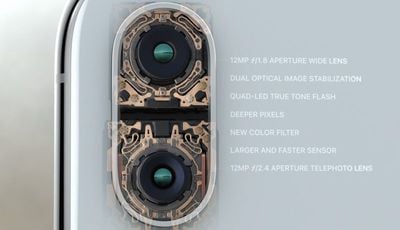
The rear facing camera is much improved, with an improved 12-megapixel sensor, new color filter, and a new image signal processor for better automatic adjustments and faster autofocus. Also new is optical image stabilization for the telephoto camera, meaning better portraits and an overall improvement to both lenses in the device.
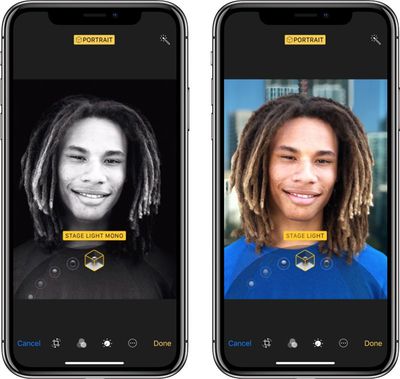
For both the front and rear cameras in the iPhone X, there's a new Portrait Lighting effect that works alongside Portrait Mode to let you adjust the lighting in your image to introduce studio-quality effects.
For video, iPhone X supports 4K video at up to 60 frames per second and slo-mo video at up to 240 frames per second, and all of the aforementioned new hardware brings better stabilization for reduced blur and shakiness.
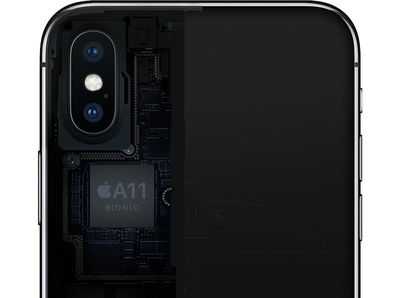
There are a ton of other new features in the iPhone X, including a new battery design for more battery life and an A11 Bionic processor that's incredibly fast and powers all of the iPhone X's camera functionality, but these are under-the-hood inclusions that won't be an immediate change from former iPhones.
I got my wife a X in November. It’s a very nice phone and the camera is great, but quite frankly, I couldn’t find a single feature that would convince me to make upgrade from my 6 (other that a new battery of course). Although my wife appreciates her new phone, she shares the same opinion.
Thank you for an excellent article. It will help a lot of new iPhone X users. I love my beautiful gorgeous stunning eye catching attention getter silver best iPhone since November 3rd.
Apple needs to give us an option to turn off the home bar (I call it the swipe bar). It's really annoying, and after you get used to the iPhone X (took me about 30 seconds) there is no reason to ever see it again.
Good article. Got my X a few Weeks ago. Took maybe 20 minutes to get used to the changes. Funny thing is that now the gestures and Face ID feel so normal using my wife or kids phones feels awkward, lol.
Rumors originally suggested the iPhone X would be tough to get through the holidays, but Apple significantly ramped up supply, so it's been relatively easy to get a new iPhone X ahead of Christmas.
That means lots of new iPhone X devices are getting unboxed today, and if you're coming from an iPhone 8 or later, it's a big adjustment. Those of us who have been using an iPhone X since November can confirm that it takes a bit of time to get used to all of the changes in the device, but within a week or two, you won't even miss that Home button.
We've shared a lot of details on the iPhone X over the course of the last month, and this post resurfaces some of that content along with a few new tidbits and tricks that will help you get used to your iPhone X more quickly.
The iPhone X Interface
Not having a Home button is on the iPhone X is the most immediately jarring change, because there are new and unfamiliar gestures to learn.
Instead of pressing on the Home button to get to the Home screen of the iPhone X, you swipe up from the bottom of the display. This minimizes any app that's open.
On earlier iPhones, a double tap on the Home button brought up the App Switcher, but on iPhone X, you swipe up from the bottom and then pause for a moment to get to the App Switcher. Closing apps is no longer done with a single swipe -- you'll need to hold again on an app in the App Switcher until the red "-" appears, and then tap it or swipe up on the app.
To activate the display of the iPhone X to see your notifications, you can use a new "Tap to Wake" gesture, which, as the name suggests, means you just tap a finger on the inactive display. Pressing the side button also works.
Getting to the Control Center is going to be one of the most difficult gestures to learn. Instead of swiping up from the bottom like you're used to, you swipe down from the top of the status bar that displays battery life and cellular signal.
A swipe down from the top of the iPhone X anywhere else on the display brings down the Cover Sheet of the Lock screen so you can see all of your notifications. Accessing Siri is now done by pressing twice on the side button instead of holding down on the Home button.
Additional Reading:
* 6 Interface Tricks for iPhone X ('https://www.macrumors.com/2017/11/05/gestural-tricks-to-try-with-your-new-iphone-x/') * Top 10 iPhone X Tricks ('https://www.macrumors.com/2017/11/06/top-10-iphone-x-tips-and-tricks/') * iPhone X First Look ('https://www.macrumors.com/2017/11/03/iphone-x-first-look-video/') The Notch
The iPhone X has an edge-to-edge display that does away with all bezels, except for a "notch" at the top of the device. Many criticized this design decision ahead of the release of the iPhone X, but in practical use, it's something you acclimatize to after a week or two of using the iPhone X, and it fades into the background instead of being a focal point whenever you're using the phone.
Apple needed the notch to hold all of the sensors for the TrueDepth camera, but it was implemented in a way that takes up as little space as possible, with two ears at the sides that house status information.
Apple, in developer materials, encourages developers to embrace the notch rather than to hide it away, and that's the path most apps and games have taken. In portrait mode, the notch is easy to ignore, but it will be a bit harder to get used to in landscape mode.
Additional Reading:
* Embracing the Notch ('https://www.macrumors.com/2017/11/14/iphone-x-embracing-the-notch/') * iPhone X Notch: Everything You Need to Know ('https://www.macrumors.com/2017/09/14/iphone-x-notch/') * Apple Approves Notch Remover App for iPhone X ('https://www.macrumors.com/2017/11/13/apple-approves-notch-remover-app-iphone-x/') * Prime Real Estate: The Fight for Space in the iPhone X ('https://www.macrumors.com/2017/11/02/fight-for-space-iphone-x/') The Display
The iPhone X is the first iPhone from Apple to feature OLED technology for true-to-life colors, deep blacks, and an improved contrast ratio. At a resolution of 2436 x 1125 with 458 pixels per inch, it has the highest resolution and pixel density ever introduced in an iPhone.
It is the best display we've seen in an iPhone, and it's one of the features you're likely to fall in love with immediately after unboxing the iPhone. It supports HDR, wide color, 3D Touch, and True Tone for adjusting the white balance of the display to match the ambient lighting.
Additional Reading:
* Apple Says Minor Screen Burn-In and Shifts in Color When Looking at iPhone X Off-Angle Are Normal ('https://www.macrumors.com/2017/11/03/iphone-x-display-screen-burn-in-normal/') Face ID
Face ID, like the removal of the Home button, is a major change in the iPhone X. A fingerprint is no longer required to unlock your iPhone because it's using a 3D facial scan instead. Face ID works through a TrueDepth Camera system that projects thousands of tiny dots onto your face, which are read through an infrared camera.
For most people, Face ID is as secure as Touch ID, but it can sometimes be fooled by masks ('https://www.macrumors.com/2017/11/27/face-id-iphone-x-fooled-by-mask/'), twins ('https://www.macrumors.com/2017/10/31/iphone-x-face-id-twin-tests/'), and children ('https://www.macrumors.com/2017/11/14/face-id-spoofed-by-child-and-mask/').
Face ID is identical to Touch ID in terms of what it's used for (Apple Pay, device unlocking, password replacement in apps), it just uses your face instead of your finger. Developers have no access to Face ID data, nor does Apple, so it's just as secure as Touch ID.
Built-in machine learning features allow Face ID to adjust to facial changes. It can recognize you with sunglasses on, when you grow a beard, when you cut your hair, when you wear a scarf, and in other similar situations.
Additional Reading:
* Apple Shares In-Depth Face ID Security Info ('https://www.macrumors.com/2017/09/27/apple-face-id-security-paper-support-document/') * Face ID Unlocked With Mask ('https://www.macrumors.com/2017/11/27/face-id-iphone-x-fooled-by-mask/') * Face ID Twin Tests ('https://www.macrumors.com/2017/10/31/iphone-x-face-id-twin-tests/') * 10-Year Old Unlocks Face ID on Mother's iPhone ('https://www.macrumors.com/2017/11/14/face-id-spoofed-by-child-and-mask/') * Face ID is Faster than Touch ID in Day-to-Day Usage ('https://www.macrumors.com/2017/11/01/face-id-touch-id-iphone-unlocking-comparison/') * Face ID Works With Sunglasses ('https://www.macrumors.com/2017/09/14/face-id-works-with-sunglasses-thwarts-thieves/') * Face ID Works in the Dark, With Hats, and With Beards ('https://www.macrumors.com/2017/09/13/how-iphone-x-face-id-works/')Animoji and Third-Party Apps
The TrueDepth Camera isn't just used for Face ID -- it powers a new feature called Animoji, which are animated characters that mimic your facial expressions. Animoji live in the Messages app, so you can send friends and family messages featuring animated characters with your voice and facial expression.
Animoji were popular just after the release thanks to "Animoji Karaoke," designed to make it look like the Animoji characters were singing hit songs, but that has died out over the last few weeks.
The TrueDepth Camera can send a rough facial map of your face to developers for ARKit apps. Snapchat, for example, can use this additional data from the TrueDepth camera to make its built-in facial filters more realistic than ever before.
Additional Reading:
* Privacy Advocates and Devs Raise Concerns About Third-Party App Access to TrueDepth Camera ('https://www.macrumors.com/2017/11/30/truedepth-camera-third-party-app-concerns/') * Animoji Karaoke Takes Over Social Media Following iPhone X Launch ('https://www.macrumors.com/2017/11/04/animoji-karaoke/')Apple Pay
Apple Pay on iPhone X is as simple to use as Apple Pay with devices that have Touch ID, but the checkout process is different.
Instead of confirming a payment with a finger on the Touch ID Home button, you'll need to unlock your iPhone X with Face ID, hold it down towards the payment terminal, and then press twice on the side button. The video below walks through the steps required:
Wireless Charging
You can still charge the iPhone X via Lightning port like any other iPhone, but it also supports wireless charging functionality. It will work with any Qi-certified wireless charger, with or without a case (with the exception of cases with a very thick back, aluminum cases, or cases with built-in magnets).
Wireless charging is about as fast as charging with the standard 5W wired charger from Apple, but it's slower than other wired charging methods and charging speeds can vary based on factors like ambient temperature and the amount of power being delivered by the charger.
Aditional Reading:
* iPhone X Charging Speeds Compared ('https://www.macrumors.com/guide/iphone-x-fast-charging-speeds-compared/') * iOS 11.2 Supports Faster 7.5W Wireless Charging on iPhone X ('https://www.macrumors.com/2017/11/14/ios-11-2-faster-wireless-charging-iphone-x/') * Comparison: Belkin and Mophie's Wireless Chargers ('https://www.macrumors.com/2017/12/06/mophie-belkin-wireless-chargers-comparison/') * Discounted and Upcoming Qi Charging Pads ('https://www.macrumors.com/2017/09/14/qi-charging-pads-iphone/') Cameras
Compared to older iPhones, the iPhone X cameras operate in much the same way, but there are some improvements and tweaks to be aware of. The iPhone X's rear-facing cameras are vertical rather than horizontal, but in practice, they work the same way.
Portrait mode, limited to the rear-facing camera in older Plus iPhone models, is available on both the front and rear facing cameras on the iPhone X. With the front camera, Portrait Mode is enabled through the TrueDepth camera system.
The rear facing camera is much improved, with an improved 12-megapixel sensor, new color filter, and a new image signal processor for better automatic adjustments and faster autofocus. Also new is optical image stabilization for the telephoto camera, meaning better portraits and an overall improvement to both lenses in the device.
For both the front and rear cameras in the iPhone X, there's a new Portrait Lighting effect that works alongside Portrait Mode to let you adjust the lighting in your image to introduce studio-quality effects.
For video, iPhone X supports 4K video at up to 60 frames per second and slo-mo video at up to 240 frames per second, and all of the aforementioned new hardware brings better stabilization for reduced blur and shakiness.
Additional Reading:
* iPhone X Camera Overview: Portrait Lighting, Video Improvements, Front-Facing Portraits and More ('https://www.macrumors.com/2017/11/07/iphone-x-camera-overview/') * iPhone X Low Light Photography Test Demonstrates Improved Telephoto Lens ('https://www.macrumors.com/2017/11/23/iphone-x-test-improved-telephoto-lens/') Other Features
There are a ton of other new features in the iPhone X, including a new battery design for more battery life and an A11 Bionic processor that's incredibly fast and powers all of the iPhone X's camera functionality, but these are under-the-hood inclusions that won't be an immediate change from former iPhones.
For more information on all of the new features included iPhone X, make sure to check out our dedicated iPhone X roundup ('https://www.macrumors.com/roundup/iphone-x/').
Article Link: Getting to Know Your New iPhone X - What's Different ('https://www.macrumors.com/guide/iphone-x-whats-different/')
[doublepost=1514232959][/doublepost]Is it just me, or does the "edge to edge" claim seem a bit disingenuous? Emperor' s new clothes?
Apple's long-rumored smart home hub will have an iMac G4-style design and a host of unique features, Bloomberg's Mark Gurman reports.
The smart home hub is said to feature a square 6-inch display, with variants that can be placed on a countertop or mounted on a wall. It features a single FaceTime camera on the front, with microphones and speakers in its connected base. Gurman described the...
Apple plans to introduce a series of new smart home products on Tuesday, October 13, according to Bloomberg's Mark Gurman.
Apple reportedly plans to debut its long-awaited smart home hub device, a new HomePod mini, and a new Apple TV on the date. The new HomePod mini and Apple TV are set to retain their existing designs, but tout faster chips to support Siri AI. The new HomePod mini will...
Thursday October 1, 2026 1:37 pm PDT by Joe Rossignol
Apple on Instagram today shared a curated gallery of six photos shot on the iPhone Duo. The photos were shot by American photographers Jake Michaels and Jason Nocito, as part of a project commissioned by Apple.
iPhone Duo is equipped with four cameras:A rear 48-megapixel Fusion Main camera
A rear 48-megapixel Ultra Wide camera
A front 12-megapixel Center Stage camera in the outer display
A...
Apple's first foldable iPhone, with a book-style design featuring a 5.4-inch outer display and a 7.6-inch inner display with a minimal crease down the middle.

















































Top Rated Comments