

Everything New With the iOS 15 Notes and Reminders Apps - MacRumorsOpen MenuShow RoundupsShow Forums menuVisit ForumsOpen Sidebar
Skip to Content

Everything New With the iOS 15 Notes and Reminders Apps

Those who use the Notes and Reminders apps will be pleased to hear that iOS 15 and iPadOS 15 bring some useful new features. The Notes app has enhanced functionality on the iPad with the Quick Note feature, while Reminders features better Siri integration and natural language support.
iOS 15 Notes Feature
The guide below highlights the new features that you'll find in the Notes and Reminders apps in iOS 15.

Notes

The major new feature in the Notes app, Quick Note, is exclusive to the ‌iPad‌, but Apple has added some general quality of life improvements and new features for those who share notes between multiple people.

Tags

When writing a note, you can use hashtags to tag it with a word or a phrase for organizational purposes. You can use any tag you want, like #cooking, #plants, #work, #reminders, etc.
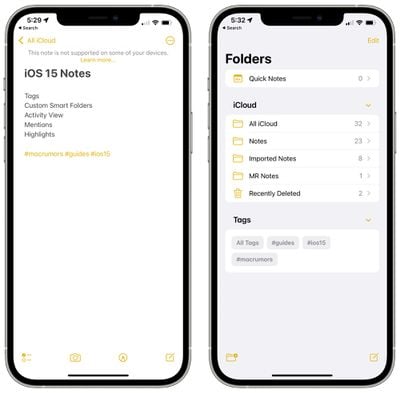
ios 15 notes tags
Once you create a tag, it's added to the "Tags" section in the Notes app overview. You can tap on any of the tag names to see all notes that contain that tag.
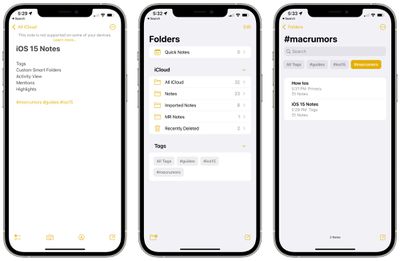
ios 15 notes tag browser

Custom Smart Folders

To go along with tags, there's a new Smart Folders option that you can use to create a folder to house tags.
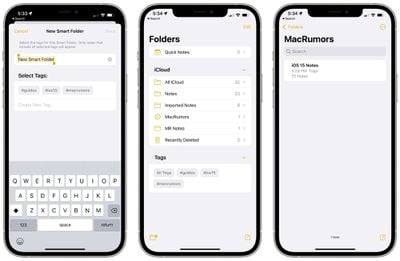
ios 15 smart folders
When creating a Smart Folder, you can choose a name and select which tags you want it to include. You can choose tags you've already created or add new tags that will be used in future notes.

Tags and Smart Folders offer a new way to organize your notes and it's a system that's quicker and more simple than manually organizing your notes into different folders.

Activity View

The Notes app has offered sharing features for some time now, but in iOS 15, Apple is making it easier to collaborate and work on a note with another person.
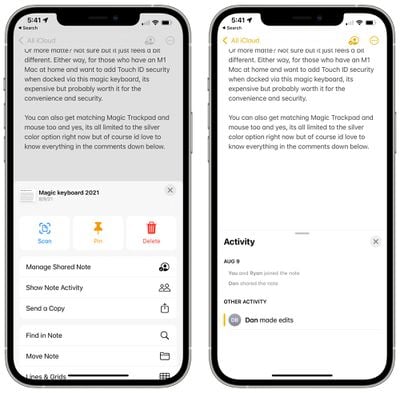
ios 15 notes sharing activity
On any shared note, if you tap the three dots in the upper right hand corner or the little person icon, you can get to an Activity View that shows you the edits that each person has made and who has interacted with the note.

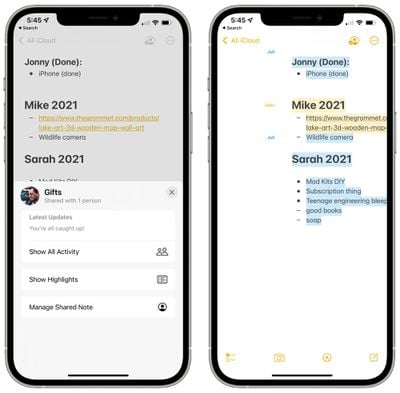
If you tap on "Highlights" or swipe right in a note, you can see an overview of the portions of the note that each person has contributed. If you have a gift list or grocery list, for example, you can see the items that each person involved with the note has added.
ios 15 show highlights collaboration
Edit times and dates are included, and each person's contributions are shown in a different color. When you open a note, you'll also see a notification of the changes that have been made since the last time you opened the note.

Mentions

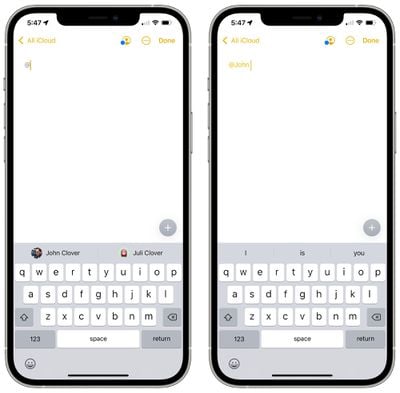
In shared notes or folders, you can add an @ sign and type in the name of a person the note is shared with to bring their attention to it and to let them know if there's been an important update.
ios 15 notes mentions
With an @mention, the person receives a notification about the note, which is similar to how @mentions work in other apps.

Quick Note - iPadOS 15

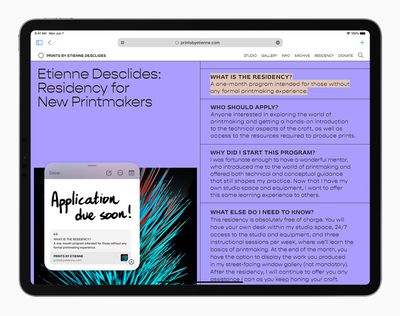
On the ‌iPad‌, if you tap in the lower right corner with an Apple Pencil or swipe with a finger, you can bring up a Quick Note to jot down a thought or an idea.
Apple iPadPro iPadOS15 QuickNote Safari 060721 big carousel
You can bring up a Quick Note from the Home Screen, in any app, when using Split View, or anywhere else in iPadOS.

You can type in a Quick Note or use the ‌Apple Pencil‌ to write, and Quick Note size can be adjusted or it can be collapsed down to the side of the ‌iPad‌ so you can bring it right back up when you need it.

Links from an app or website can be added to Quick Note for context, and when you go back to the same place in the app or on the site, a thumbnail of the Quick Note appears to remind you of your earlier note.

Quick Notes are all stored in the Quick Note folder in the Notes app and they can be viewed on the iPhone or a device that doesn't support Quick Note as a standard note.

Reminders

Some of the same new features that Apple added to Notes are also available in the Reminders app, along with a few useful bonus features like natural language support.

Tags

As with Notes, you can now add any hashtag to a reminder as a new organizational method. You can group up all reminders that are tagged with a certain word, such as "groceries," so it's a great way to split your reminders up without having to use different lists.
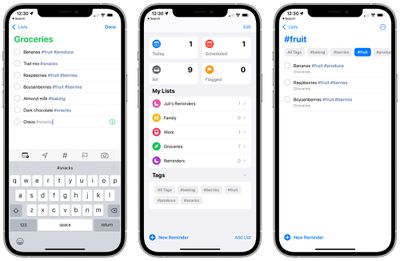
ios 15 reminders tags
Once you've added at least one tag to a reminder, the Reminders app will have a new Tag Browser that aggregates all of the tag names. Tapping on a tag shows all of the reminders using that tag.

Custom Smart Lists

Smart Lists are how your different Reminder tags can be aggregated together. Smart Lists can be made to organize reminders based on tags, dates, times, locations, flags, and priority.
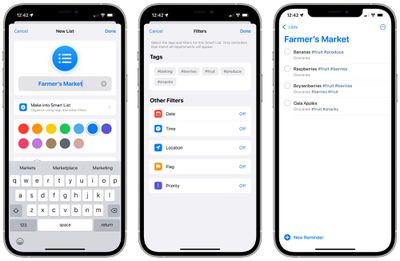
ios 15 reminders smart lists
For tags, you can create lists that will aggregate multiple tags like #cooking and #groceries so you can create the organizational system that works for you.

Natural Language Support

In iOS 15, you can use more natural phrases to create reminders more quickly. "Jog every other morning," will create an every other day reminder, for example. You can use phrases like "clean the kitchen every Friday" or "check the mail every day at 4:00 p.m." and the iPhone and ‌iPad‌ will accurately interpret what you're aiming for.
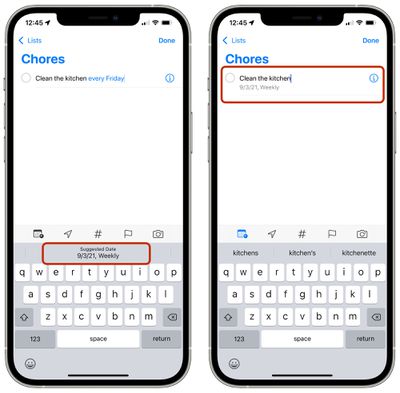
ios 15 reminders natural language

Deleting Completed Reminders

It's easier to delete completed roundups in iOS 15. In any list with a lot of reminders, you can tap on the new "Clear" label. Depending on how old the reminder is, you might see options for deleting all completed reminders, completed reminders older than a year, completed reminders older than six months, and completed reminders older than a month.
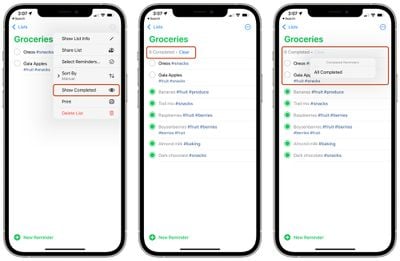
ios 15 reminders delete completed
If your completed reminders aren't visible, you can tap on the icon with the three dots and then select "Show Completed." From there, the "Clear" option for removing finished reminders will be available.

Swiping to delete, a feature that was already available, can also be used to clear completed reminders, but the new feature for clearing all finished reminders is quicker.

Announce Reminders with Siri

When a reminder that you need to attend to pops up when you're wearing AirPods or compatible Beats headphones, ‌Siri‌ will announce it similar to notifications or incoming messages.

ios 15 reminders announce notifications
This feature can be toggled on in the Settings app under ‌Siri‌ and Search > Announce Notifications > Reminders.

Expand Suggested Attributes

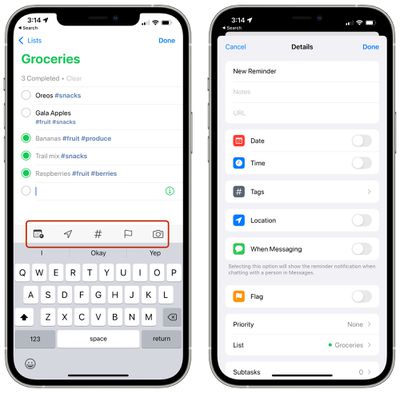
Adding a tag is a new quick suggestion in the Reminders toolbar along with date, location, flag, and photo.
ios 15 reminders toolbar
Tapping on the info icon also now provides tags as an option alongside date, time, location, flags, when messaging a certain person, and priority.

Guide Feedback

Have questions about the new Notes and Reminders changes in iOS 15, know of a feature we left out, or want to offer feedback on this guide? Send us an email here.


Related Forum: iOS 15

Popular Stories

Apple HomeView lineup feature1

Apple Announces 'HomeView' Smart Home Hub

Tuesday October 13, 2026 6:00 am PDT by
Apple today announced the "HomeView," an all-new kind of smart home hub featuring a 7-inch Liquid Retina display and Siri AI. Apple's senior vice president of Worldwide Marketing Greg Joswiak said: Apple HomeView is designed to be shared by everyone in the home yet feel completely personal to each user. It recognizes your face to shift from a household screen to your own experience,...
Apple TV 4K 4th Generation feature4

New Apple TV 4K Announced With A19 Chip, Updated Siri Remote, More

Tuesday October 13, 2026 6:08 am PDT by
Apple today announced the fourth-generation Apple TV 4K, with key features including an A19 chip, Siri AI support, an updated Siri Remote that has Find My support with Precision Finding, built in far-field microphones, support for surround sound with four HomePods in front and rear pairs, and more. The A19 chip in the new Apple TV 4K delivers up to 50% faster CPU performance and up to twice...
iOS 26 Home Feature

RIP, homeOS

Tuesday October 13, 2026 9:39 am PDT by
MacRumors was first to reveal the name "HomeView" last week, after discovering a trademark filing from a secretive shell company that we correctly suspected was linked to Apple. Apple was likely behind a "homeOS" trademark filing as well, but the company ultimately decided to stick with generic "HomeView software" naming, just like it refers to the HomePod's operating system as "HomePod...

Top Rated Comments

67 months ago

I may be in the minority here but I have a hard time remembering to even use the Reminder app.
You should set a reminder for that
Score: 19 Votes (Like | Disagree)
zorinlynx Avatar
67 months ago

I may be in the minority here but I have a hard time remembering to even use the Reminder app.
I use it quite a bit! Think of it not only as a reminders app, but also as a list-keeping app. Anything that you need to keep a list of, you can put in there.

For example, I use it for groceries, I can even put a picture of the exact item I want to buy so I can reference it when shopping. And you can check off things on the list as you put them in the cart, and uncheck them at home when you need to buy more. I've gotten to the point where I don't have to type much at all to update my grocery list because all the things I regularly buy are already in there!

I also put in things like movies I want to get around to watching, etc... all in different lists.

And of course it lives up to its name, reminding me to pill my cat, pay my bills, etc. It truly is a great app.
Score: 10 Votes (Like | Disagree)
67 months ago
I may be in the minority here but I have a hard time remembering to even use the Reminder app.
Score: 10 Votes (Like | Disagree)
TheYayAreaLiving 🎗️ Avatar
67 months ago
Lovely! Notes App have come a really long way. I’m glad Apple is able to make it extremely useful.
Score: 9 Votes (Like | Disagree)
Mr Todhunter Avatar
67 months ago
I deleted the Reminders app from all my iOS devices because I find it incomprehensible.

Score: 8 Votes (Like | Disagree)
67 months ago
I'm glad that Apple is purposely adding features to Notes SLOWLY. Rather than trying to jam a lot of features and complexity into the application.

For me, that's the approach Evernote took 7 or so years ago making it less enjoyable and more complicated to use. And why I then switched to Notes and never looked back. I appreciate its simplicity and "just works" aspect among the devices my notes sync across, always without issue. Notes is an app I use everyday and depend on.
Score: 5 Votes (Like | Disagree)
Latest Stories
Oops, Apple's Website Just Hinted at iPad Mini 8
15 minutes ago
OLED MacBook Pro Won't Get M7 Chips Until Late 2027
3 hours ago
Apple Pledged $25 Million to Trump's White House Ballroom
4 hours ago
Touchscreen MacBook Pro Could Launch on November 6
6 hours ago
New Withings Users Must Pay $99/Year for Apple Health Syncing
6 hours ago
Meta and Apple Bring Muse Spark Open AI Model to Mac Studio
7 hours ago
iPad Mini 8: Apple Has Tested Both 60Hz and 120Hz ProMotion Displays
7 hours ago
Apple TV 4K 2022 vs. 2026 Buyer's Guide: All Differences Compared
9 hours ago
Apple CEO John Ternus on Early Foldables: 'Kind of Cheap and Crappy'
9 hours ago
Greg Joswiak Says Apple Isn't Focused on Making AI for 'Lunatic Fringe'
10 hours ago
Amazon Offers $120 Discount on AirPods Max 2, $50 Off AirPods Pro 3
11 hours ago
Apple CEO John Ternus Featured on Cover of TIME Magazine: 'New Era'
11 hours ago
Apple Announces Deadline to 'Get Ready' to Pre-Order the iPhone Duo
12 hours ago
MKBHD is 'Not Convinced' About Apple's New HomeView, Here's Why
12 hours ago
Apple's Wall-Mounted HomeView Ships Without a Power Adapter
12 hours ago
Rare Apple-1 With Steve Jobs Letter Sells for $1.15 Million
13 hours ago
Apple Now Inviting Media to October 28 'Launch Experience'
13 hours ago
iPhone Duo's A20 Pro Chip Benchmarked Ahead of Launch
1 day ago
10 HomeView Features You Might Have Missed
1 day ago
Apple Becomes Second Company to Close Above $5 Trillion
1 day ago
Which Apple Home Devices Get Siri AI, and When
1 day ago
Apple's Long-Delayed HomeView Was Already Being Tested in 2024
1 day ago
Apple Intelligence Coming to China in December With iOS 27.3
1 day ago
Apple Invites App Updated With Two New Features
1 day ago
OpenAI Says Ex-Employee Showed Its Device Plans to Apple
1 day ago
Discover the Best Cases and Screen Protectors for Your New iPhone Duo
1 day ago
Apple Store Near Los Angeles Closed Due to 'Events Beyond Our Control'
1 day ago
No, HomePod Mini 1 Won't Support Siri AI as CNET Reported
1 day ago
iPhone Duo Compromises: Everything You Have to Give Up
1 day ago
Apple HomeView Has These 15 Apps, Some CarPlay Apps and Widgets Also Supported
1 day ago

🔗 Related Apple News & Rumors

Stay updated with the latest Apple ecosystem news and verified rumors





































