

iPadOS 15: How to Use Quick Notes - MacRumorsOpen MenuShow RoundupsShow Forums menuVisit ForumsOpen Sidebar
Skip to Content

iPadOS 15: How to Use Quick Notes

by

In iPadOS 15, Apple introduced a new productivity feature called Quick Notes that aims to provide a quicker way to jot down things on your iPad without you having to go in and out of the Notes app.

Quick Notes Feature 2
Whether you're on the Home Screen or within any app, you can bring up a floating Quick Note window at any time using your finger or an Apple Pencil, by swiping diagonally up from the bottom right-hand corner of the screen.
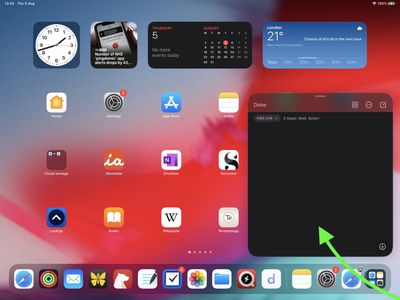
quick notes 1
If you're using a connected keyboard that has a Globe key, simply press the Globe key + Q to launch a Quick Note. You can also add a Quick Note button to Control Center: Go to Settings -> Control Center, then add the Quick Note option from the "Included Controls" section.

quick notes
The note you call up can be the last note you used, so you can just keep adding to it, or you can create a new note with a tap of the New Note icon in the top-right corner of the interface.
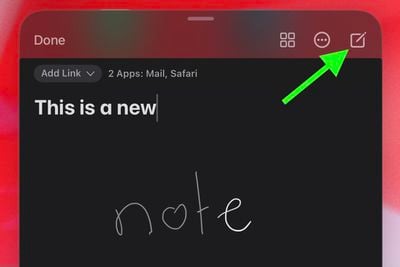
new quick note
When you tap on the note, it will bring up the virtual keyboard so you can begin typing. If you're using ‌Apple Pencil‌ and you have the Scribble toggle enabled in Settings -> Apple Pencil, you can just start jotting down handwritten notes, and they'll be transcribed into standard text.

Also at the top of your Quick Note window, there's also an ellipsis icon top-right to share the note, and to the left of that, a square quadrant icon that takes you into the Notes app proper, which is where all your Quick Notes live.

quick note buttons
Meanwhile, at the bottom of the interface, there's a Markup icon in the right corner to bring up standard Markup tools, and if you've created several Quick Notes, you'll see three dots along the bottom of the currently viewed note to indicate that you can swipe between them within the editor window.

quick notes
Quick Notes can also detect the app you're currently using or just recently used, and will show a dropdown menu at the top of the editor window for you to add a link to the specific message you're viewing in Mail or the website you were just viewing in Safari, for example. Whenever you're viewing a note with a link, just tap the link and you'll be taken directly to the related content.
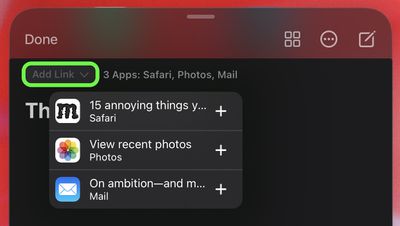
quick notes
If the Quick Note window is obscuring your view of something, you can drag it to any corner of the screen. To dismiss a Quick Note at any time, tap the Done button in the top-left, or swipe diagonally towards the corner of the screen it's closest to – you can recall it at any time by tapping the reveal bar off to the side.

quick notes
That's Quick Notes on ‌iPad‌ in a nutshell. You can also create them on a Mac running macOS 12 Monterey, but be aware that Quick Notes can't be created on an iPhone running iOS 15. However, because Quick Notes live in the Notes app, you can access any that you've created elsewhere on your iPhone, just as easily as any other note.


Related Forum: iOS 15

Top Rated Comments

fwmireault Avatar
68 months ago

I don’t get where the line is drawn between a ‘quick’ note and a document. If you going to be copy-pasting or extracting information on an iPad then surely you’d just run Notes in split screen?
Think of it like the digital equivalent of a Post It. Sometimes you just want to write something very quick, and the comprehensive integration of links and active apps makes it a good solution to just write down an idea, a task, something to do later, etc.
Score: 4 Votes (Like | Disagree)
68 months ago
I don't like the timing of articles like this that talk about products in the past tense when they've yet to be released. I feel like this would be timed better after the release of iPadOS15 so the majority of folks and go and try it.
Score: 4 Votes (Like | Disagree)
68 months ago
Did not install beta. Looking forward to using it on my iPad once iPadOS 15 launches.
Score: 3 Votes (Like | Disagree)
Prince Akeem Avatar
68 months ago
This would be cool on iPhone too...
Score: 3 Votes (Like | Disagree)
Rafterman Avatar
68 months ago

Nice! 7 years ago I dropped Evernote and its frequent changes and increasing complexity for Apple's Notes, and never looked back.

I'm glad Notes is evolving *slowly* with measured and thoughtful feature enhancements, yet is still super easy to use, and just works.

After Safari and Mail, it's my most used app.
Evernote has a lot of nice features, but it is starting to get bloated, is updated costantly, which is getting annoying and it's kind of slow. Apple Notes isn't fancy, but it's quick and simple.

Score: 2 Votes (Like | Disagree)
Oohara Avatar
68 months ago
Love it. Steps in the right direction.

Score: 2 Votes (Like | Disagree)

Popular Stories

Apple TV 4K HomeView HomePod Mini tweaked

New Apple TV 4K, HomeView, and HomePod Mini: 16 Details Just Leaked

Sunday October 11, 2026 12:56 pm PDT by
Just two days before Apple's "Welcome home" experience in New York, Bloomberg's Mark Gurman has leaked several details about the new products set to be unveiled, including an all-new smart home hub, a HomePod mini 2, and a new Apple TV 4K. Here is an all-in-one summary of the details shared by Gurman:Apple's home hub with a touch-enabled display will be named HomeView, seemingly confirming a ...
Apple HomeView lineup feature1

Apple Announces 'HomeView' Smart Home Hub

Tuesday October 13, 2026 6:00 am PDT by
Apple today announced the "HomeView," an all-new kind of smart home hub featuring a 7-inch Liquid Retina display and Siri AI. Apple's senior vice president of Worldwide Marketing Greg Joswiak said: Apple HomeView is designed to be shared by everyone in the home yet feel completely personal to each user. It recognizes your face to shift from a household screen to your own experience,...
Apple TV 4K 4th Generation feature4

New Apple TV 4K Announced With A19 Chip, Updated Siri Remote, More

Tuesday October 13, 2026 6:08 am PDT by
Apple today announced the fourth-generation Apple TV 4K, with key features including an A19 chip, Siri AI support, an updated Siri Remote that has Find My support with Precision Finding, built in far-field microphones, support for surround sound with four HomePods in front and rear pairs, and more. The A19 chip in the new Apple TV 4K delivers up to 50% faster CPU performance and up to twice...
Latest Stories
Apple Pledged $25 Million to Trump's White House Ballroom
8 minutes ago
Touchscreen MacBook Pro Could Launch on November 6
2 hours ago
New Withings Users Must Pay $99/Year for Apple Health Syncing
2 hours ago
Meta and Apple Bring Muse Spark Open AI Model to Mac Studio
3 hours ago
iPad Mini 8: Apple Has Tested Both 60Hz and 120Hz ProMotion Displays
3 hours ago
Apple TV 4K 2022 vs. 2026 Buyer's Guide: All Differences Compared
5 hours ago
Apple CEO John Ternus on Early Foldables: 'Kind of Cheap and Crappy'
6 hours ago
Greg Joswiak Says Apple Isn't Focused on Making AI for 'Lunatic Fringe'
6 hours ago
Amazon Offers $120 Discount on AirPods Max 2, $50 Off AirPods Pro 3
7 hours ago
Apple CEO John Ternus Featured on Cover of TIME Magazine: 'New Era'
7 hours ago
Apple Announces Deadline to 'Get Ready' to Pre-Order the iPhone Duo
8 hours ago
MKBHD is 'Not Convinced' About Apple's New HomeView, Here's Why
8 hours ago
Apple's Wall-Mounted HomeView Ships Without a Power Adapter
9 hours ago
Rare Apple-1 With Steve Jobs Letter Sells for $1.15 Million
9 hours ago
Apple Now Inviting Media to October 28 'Launch Experience'
10 hours ago
iPhone Duo's A20 Pro Chip Benchmarked Ahead of Launch
21 hours ago
10 HomeView Features You Might Have Missed
22 hours ago
Apple Becomes Second Company to Close Above $5 Trillion
22 hours ago
Which Apple Home Devices Get Siri AI, and When
1 day ago
Apple's Long-Delayed HomeView Was Already Being Tested in 2024
1 day ago
Apple Intelligence Coming to China in December With iOS 27.3
1 day ago
Apple Invites App Updated With Two New Features
1 day ago
OpenAI Says Ex-Employee Showed Its Device Plans to Apple
1 day ago
Discover the Best Cases and Screen Protectors for Your New iPhone Duo
1 day ago
Apple Store Near Los Angeles Closed Due to 'Events Beyond Our Control'
1 day ago
No, HomePod Mini 1 Won't Support Siri AI as CNET Reported
1 day ago
iPhone Duo Compromises: Everything You Have to Give Up
1 day ago
Apple HomeView Has These 15 Apps, Some CarPlay Apps and Widgets Also Supported
1 day ago
iPhone Duo: Apple Charging $49 for New Cover Layer, $229 for Battery
1 day ago
iPhone Duo: Skipping AppleCare+ Could Be $1,499 Mistake
1 day ago

🔗 Related Apple News & Rumors

Stay updated with the latest Apple ecosystem news and verified rumors







































