

iOS 15: How to Use Tags to Organize Your Notes - MacRumorsOpen MenuShow RoundupsShow Forums menuVisit ForumsOpen Sidebar
Skip to Content

iOS 15: How to Use Tags to Organize Your Notes

by

In iOS 15, Apple has added a much-requested feature to the Notes app in the form of tags. This means you can now include hashtags in your notes which can help you organize your notes and find stored notes more easily. Let's take a look at how they work.

iOS 15 Notes Feature

  1. Launch the Notes app and create a new note or select an existing one.
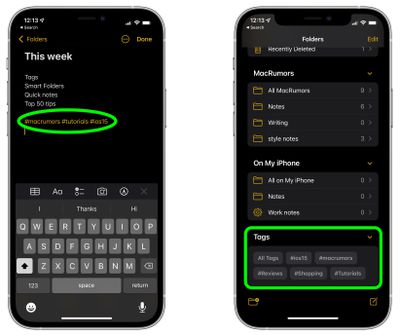
  2. Add a tag anywhere in the note by using the hash (#) symbol and including a word or phrase that identifies it for organizational purposes. Some examples are #cooking, #plants, #work, or #shopping, but it can be literally anything you want.
  3. Repeat the above steps for other new notes or stored notes – the tags will be highlighted automatically to show they are recognized as such.

  4. Now return to the main Folders overview screen, and under the new "Tags" section, tap a tag that you created to see all the notes which contain that tag.
notes

Tags can be a powerful method of organizing your notes, because there's no limit to how many you can have, and a single note can include multiple tags, so the same note can show up in different tagged categories that you've created. Also, when you add a hash symbol to a note, iOS will conveniently suggest existing notes for you to pick above the virtual keyboard.

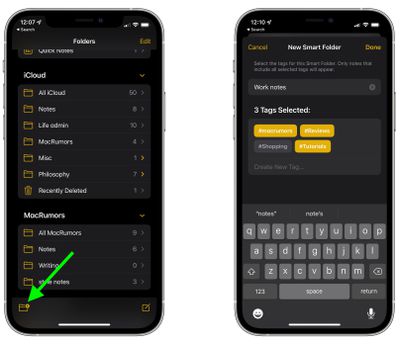
In iOS 15, Apple has also added a new Smart Folders option that you can use to create a folder to house tags. Simply tap the folder icon in the bottom left corner of the Notes overview screen, then tap New Smart Folder.
notes
Give the folder a name, then select the tags that you want it to include. You can choose tags you've already created, or add new tags that will be used in future notes by tapping Create New Tag.... Note that only notes that include all selected tags will appear in your Smart Folder.


Popular Stories

iOS 27 and Notes Feature

iOS 27 Adds Four New Features to Notes App, Including Markdown Copy-and-Paste

Wednesday June 17, 2026 10:11 am PDT by
The upcoming iOS 27 update that Apple unveiled last week includes some new features and enhancements for Apple's Notes app on the iPhone. iOS 27 is currently available as a developer beta, with a public beta to follow in July. The update is expected to be released to all users in September. Below, we have outlined four additions to Apple's Notes app on iOS 27. Siri AI On the iPhone...


Apple Acquires Award Winning App Play Feature

Apple Acquires Award-Winning App 'Play'

Monday June 29, 2026 7:39 am PDT by
In February, Apple notified the European Commission that it would be acquiring certain assets from and have the right to hire certain employees from Rabbit 3 Times, the company behind the award-winning app design tool Play. The notification was published on the European Commission's website this week, following a four-month waiting period. Play was a Mac and iPhone app that allowed designers ...
American Express Gold Apple Pay Feature

American Express Announces New Apple Pay Feature

Tuesday June 30, 2026 10:27 am PDT by
American Express today announced that you can now redeem Membership Rewards points when checking out with Apple Pay on the web and in apps on the iPhone and iPad. When checking out with Apple Pay on iOS 18 or iPadOS 18 or later, tap on your eligible American Express card (Platinum, Gold, Green, and others) and select the Membership Rewards points option. You can use points to cover all or...

🔗 Related Apple News & Rumors

Stay updated with the latest Apple ecosystem news and verified rumors







































