

iOS 15 is absolutely packed with new features, and it can be overwhelming sorting through everything that's new. If you're wondering whether it's worth upgrading and what new features might be worth getting access to right away, we've rounded up 10 of the best new additions in the iOS 15 update that you might not be aware of.

1. Android and Web-Based FaceTime
For the first time, FaceTime is expanding to non-Apple device users, and those who are on Android and PCs can join in on a FaceTime call.
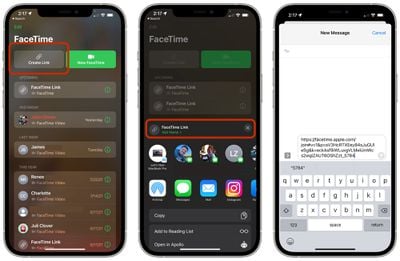
If you have an Apple device, you can open up the FaceTime app and select the "Create Link" option to make a FaceTime "room" that anyone can join from the web on an Android device, PC, or other compatible option. You can also create a link while you're already on a FaceTime call.
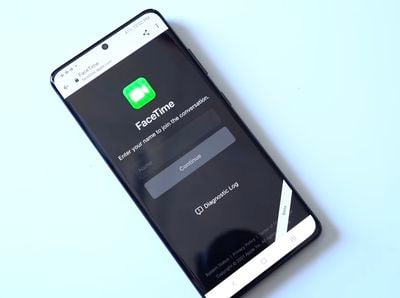
You can send the link to someone using a text message, email, or other means, and that person will be directed to enter their name before being allowed into the chat. The FaceTime creator will need to approve their access, so no one can join without express approval. All that's necessary to enter a FaceTime call is a web browser and a device with a camera and a microphone.

While Android and PC users can join FaceTime calls, an iPhone, iPad, or Mac is required to create the initial FaceTime link and to approve participants.
2. Notification Summary
Depending on how many apps you have installed and your notification permissions, you could be receiving hundreds of notifications a day, many of which are not urgent.
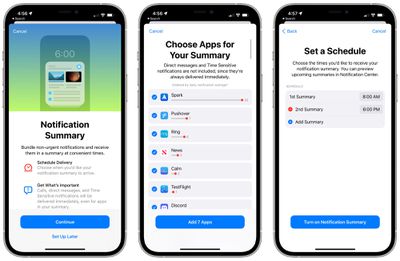
With Notification Summary, you can set specific times for your unimportant notifications to be delivered, such as in the morning and the evening, preventing you from being interrupted all day long. Important, time sensitive notifications bypass Notification Summary, but things like Instagram likes, game pop ups, news alerts, and other similar notifications can be saved for a time that's best for you.
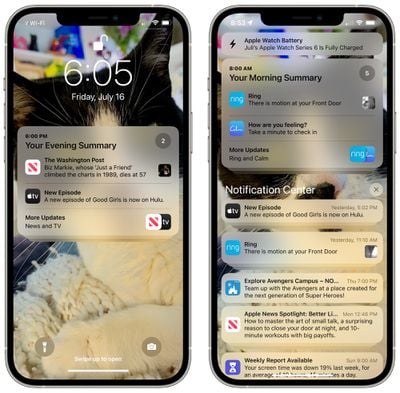
Notification Summary can be turned on and managed by going to the Notifications section of the Settings app. You can choose your summary times and which apps will be relegated to the summary.
3. Tab Groups
There's been a lot of discussion about Safari's new design, but Apple toned it down over the course of the beta testing period and even left an option to stick with the iOS 14 design.
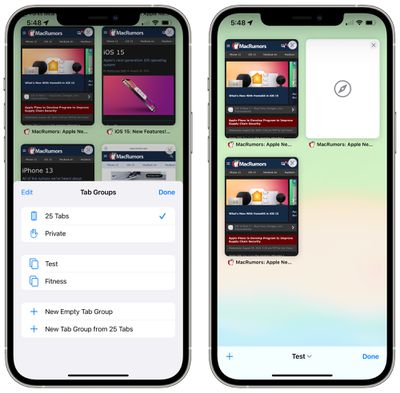
Because the design has gotten so much attention, it's easy to forget that there are other great Safari features like Tab Groups. With Tab Groups, you can save all of your open tabs into a folder and open them back up later.
If you're planning for a trip, have a few websites you use often for work, or just want to do something like save the menus of your favorite restaurants, you can do that with Tab Groups.
Open up the new tiled tab view in Safari (icon on the far right corner) and then long press on the Tabs icon in the middle to save your open tabs into a Tab Group or to open one of your saved Tab Groups. Tab Groups sync across iOS and Mac so they're accessible on all of your Apple devices.
As a bonus feature, make sure to pull down on a website whenever you want to refresh it because that's a quick new way to refresh a site.
4. On-Device and Offline Siri
Most Siri requests are now processed on device instead of being kicked back to Apple's servers, which makes Siri faster and more secure.

Siri is also able to better understand commands over time as a device is used, getting used to the contacts that you interact with, the words you type, and the topics you prefer, with that data kept on device.
On-device Siri is enabled through the Neural Engine and is available on iPhones and iPads equipped with an A12 Bionic chip or later.
Because a lot of Siri commands are handled on device, many Siri requests now work offline. You can create and disable timers and and alarms, launch apps, control audio playback, and access Settings with no connectivity.
5. Live Text
When you look at an image in Photos, preview a photo you're going to take with the Camera app, or view a photo on the web, if there's text in that photo, the iPhone and the iPad will now recognize the text. You will see a little box with three lines of text whenever text is recognized, and you can tap it to see all of the text in the image highlighted.

You can long press on the highlighted text in an image to select it, copy it, look it up, translate it, or share it. Live Text is system wide so you can use it wherever you see an image, and it's handy for copying notes, keeping track of receipts, and more.
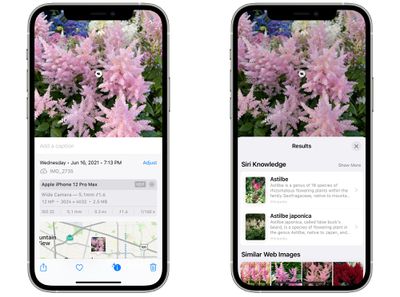
The Photos app also has a bonus Visual Lookup feature that will identify plants, animals, landmarks, and more. Apple will tell you what it thinks you're seeing, and show similar web images.
6. System-Wide Translation
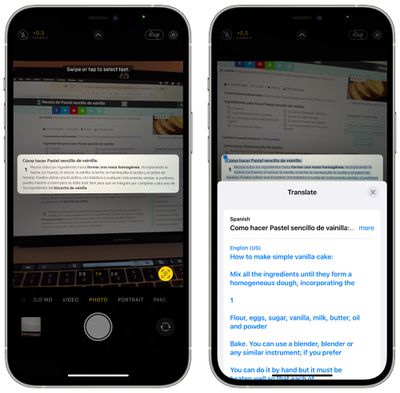
Translate is now system wide, so any text that you select anywhere in iOS can be translated to or from another language. Supported languages include Arabic, Chinese, English (UK and US), French, German, Italian, Japanese, Korean, Portuguese, Russian, and Spanish.
7. Health App Trends
A new Trends section in the Health app lets you keep an eye on all of your health trends over time so you can see at a glance if you're exercising less, if your heart rate shifts, if your oxygen levels drop, and more.
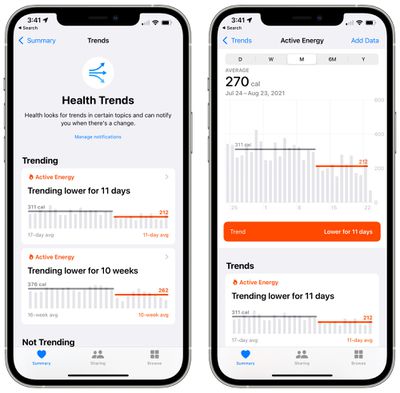
You can view Trends in the Health app, and can opt to get notifications if there's a change in Trends. The Health app also has sharing features so you can send your health records to family members, and a Health Checklist if you want to make sure you're taking advantage of all the health features offered through the iPhone and Apple Watch.
8. Find Devices Erased and Powered Off
Using the Find My Network, the Find My app in iOS 15 can be used to locate devices that are turned off or that have been erased, which will make it easier to find lost devices and harder for thieves to hide stolen devices.
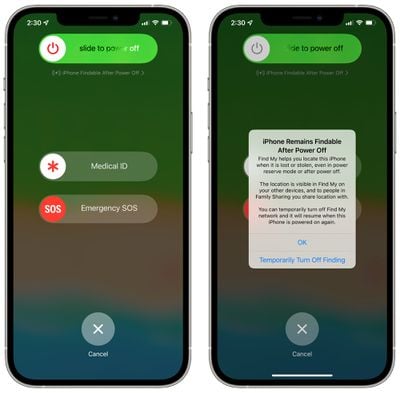
If a device that was stolen has been turned off or if it was low on battery and has died, it can still be tracked when it's close to another Apple device that's active.
Similarly, an iPhone that's been stolen and then erased is still going to show up in the Find My app and it will be trackable even after it's been wiped, which wasn't the case in earlier versions of iOS.
For these features to work, the Find My network feature must be enabled. It's on by default, but you can double check by going to your profile, tapping on Find My, selecting Find My iPhone, and then making sure "Find My network" is toggled on.
9. Drag and Drop
iOS 15 supports cross-app drag and drop, so you can grab images, links, highlighted text excerpts, files, and more with a finger and then drag them from one app to another.
Using cross-app drag and drop on iPhone in iOS 15. Finally 🎉 #WWDC21 pic.twitter.com/1RbyPBGfcq — Federico Viticci (@viticci) June 7, 2021
If you have a Safari link you want to share, for example, you can long press on it and drag it with a finger. Holding that finger on the display, you can swipe to exit Safari and open another app like Messages, where you can drop the link to send it to someone.
This works for all kinds of file types, and if you want to drag multiple files, you can drag a single item and then select additional items by tapping them with another finger to create a stack. The stack can be dragged into another app from there.
Cross-app drag and drop has been an iPad feature for some time now, but it's new to the iPhone in iOS 15.
10. Built-In Authenticator
In the Passwords section of the Settings app, you can now save two-factor verification codes right alongside your username and password, so you no longer need a secondary app like Google Authenticator for two-factor authentication.
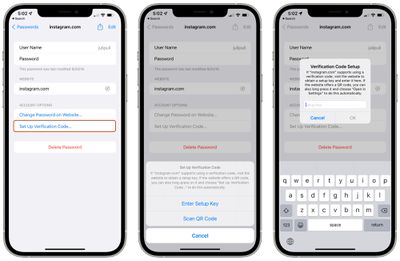
Setup requires a QR code or a setup key, similar to any other authentication app. Once added, you can get a code from the Passwords section when logging into a website, but if you're logging in using Safari, it will autofill, which is super convenient.
Wrap Up
Have a favorite feature in iOS 15 that we didn't mention here? Let us know in the comments below.




/https://forums.macrumors.com/attachments/1837725/)













































