iOS 15 Find My: Tracking When iPhone is Off, Live Locations, AirPods - MacRumorsOpen MenuShow RoundupsShow Forums menuVisit ForumsOpen Sidebar
Skip to Content

iOS 15 Find My: Tracking When iPhone is Off, Live Locations, AirPods

Since introducing the unified Find My app, Apple has been working to improve the ‌Find My‌ experience. iOS 15 brings some major new features to ‌Find My‌, including features like live locations and the ability to track an iPhone even after it's been erased or powered off.
iOS 15 Find My Feature
This guide covers everything that Apple added to the ‌Find My‌ app in iOS 15.

Live Locations

When you track a friend or a family member using the ‌Find My‌ app, it now shows continuous streaming updates on their location rather than updating with a new location every few minutes.

Apple says that this feature is designed to provide an immediate sense of speed, direction, and progress when you're looking at someone's location.

Locate Lost Devices That Are Off

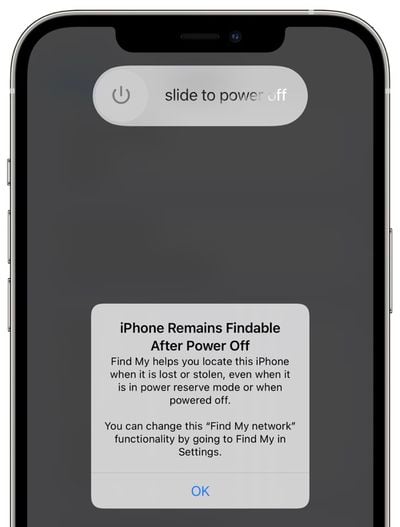
Devices that have been turned off can still be tracked by the ‌Find My‌ network in iOS 15. If a device was low on battery power or turned off by a thief, it can still be found when it's close to another Apple device.
iphone power off ios 15 find my
The ‌Find My‌ network is a feature that Apple introduced with iOS 13, and it enabled Apple devices to be located even without a WiFi or cellular connection by leveraging other nearby iPhones, iPads, and Macs.

In iOS 15, Apple has extended the ‌Find My‌ network to work with devices that are turned off as well. Apple has not outlined just how this feature works, but either the U1 chip, Bluetooth, or NFC continues to be powered in the background even when your device is off or out of battery, though in the case of battery, tracking may last a limited number of hours.

Apple has a similar feature for Car Keys that uses NFC, and it lasts for about five hours after an iPhone's battery dies. In this case, it lets you continue to unlock your car if your iPhone is dead.

For this feature to work, the ‌Find My‌ network feature must be enabled. It's on by default, but you can double check by going to your profile, tapping on ‌Find My‌, selecting ‌Find My‌ iPhone, and then making sure "‌Find My‌ network" is toggled on.

Locate Lost Devices That Have Been Erased

If someone steals your iPhone and then erases it, in iOS 15, it's still going to show up in the ‌Find My‌ app, and it will be trackable even after it's been wiped.

The feature is tied to Activation Lock, which prevents someone from using your iPhone without your Apple ID and password. In iOS 14 and prior iOS updates, erasing a device would leave Activation Lock on so no one could use your iPhone without your password, but erasing a device did prevent ‌Find My‌ from functioning.

A wiped iPhone would not show up in the ‌Find My‌ app, but now, erasing an iPhone no longer works that way. If Activation Lock is on (i.e., it wasn't wiped using your username and password to disable Activation Lock), it's tied to your account and locatable using ‌Find My‌.

Combined with the feature for tracking a device that's turned off, the ‌Find My‌ app serves as a much stronger theft deterrent.

To prevent someone from being tricked into purchasing a device that's tied to your account, the Hello screen will make it clear that the device is locked, locatable using ‌Find My‌, and the property of someone else.

Separation Alerts

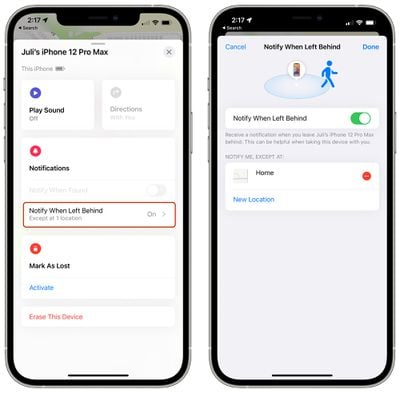
With Separation Alerts, the ‌Find My‌ app can let you know if an iPhone or iPad is left behind by alerting you on one of the other devices with you.
find my ios 15 separation alert
Separation Alerts work for AirTags and for third-party accessories that integrate with the ‌Find My‌ network, so if you leave a wallet or a MacBook behind at a cafe after you walk out with your iPhone, your iPhone will let you know.
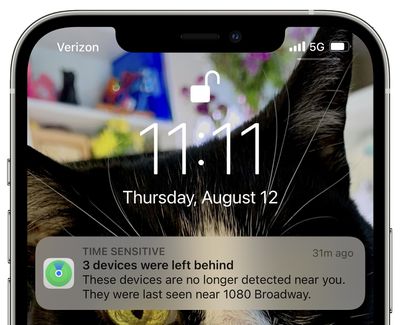
find my items left behind
Separation Alerts can be toggled on in the ‌Find My‌ app and need to be turned on for each individual item that you own. You can also set exceptions, so if you leave something behind at home on purpose, you won't get an alert.

Find My for AirPods

For AirPods Max and AirPods Pro, the ‌Find My‌ network is able to deliver an approximate location if these items become lost.

AirPods have always shown up in the ‌Find My‌ app, but until now, functionality has been limited. In iOS 14 and earlier versions of iOS, AirPods Pro and Max show up in ‌Find My‌, but if they're out of Bluetooth range of your own devices, you only see their last known location.
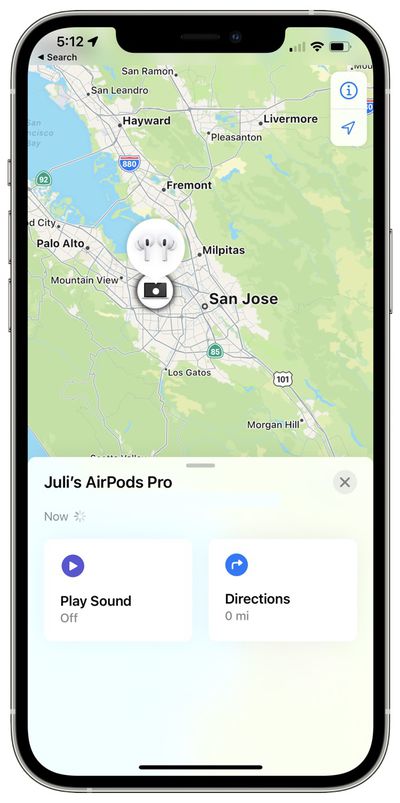
find my airpods pro ios 15
With the ‌Find My‌ network, AirPods Pro and AirPods Max can communicate with the Apple devices of others, which lets you track them even when they're out of range of your own devices.

You can get an approximate location using this method, and Apple says it is designed to help you get within Bluetooth range so you can activate the Play a Sound feature to track them down. According to Apple, this feature will be coming in an update to iOS 15 that will be released later in the year.

Find My Widget

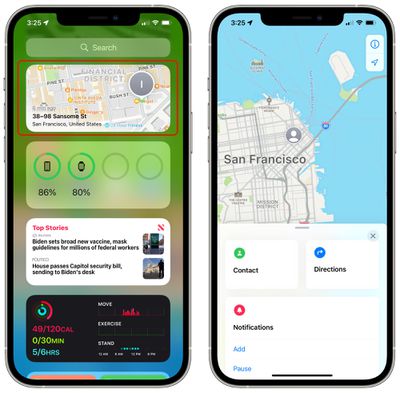
There's now a ‌Find My‌ widget that you can add to the Home screen or the Today View to track items at a glance without having to open up the ‌Find My‌ app.

find my widget ios 15
Widgets come in two sizes, small and medium, and can be used to track People or Items. The People feature tracks your friends and family members who have location sharing enabled, and the Items widget tracks your AirTag items and third-party accessories that use the ‌Find My‌ network.

Tapping on either ‌Find My‌ widget opens up the full ‌Find My‌ app.

Find My on iPad and Mac

The changes in this guide are applicable to the iPhone, but on the ‌iPad‌, there's support for Separation Alerts, the ‌Find My‌ Widget, and live locations for family and friends.

Macs with macOS Monterey support the ‌Find My‌ widget and for live locations for family and friends. Offline tracking and tracking for erased devices are features limited to iPhone.

Guide Feedback

Have questions about ‌Find My‌ in iOS 15, know of a feature we left out, or want to offer feedback on this guide? Send us an email here.


Related Forum: iOS 15

Popular Stories

Apple HomeView lineup feature1

Apple Announces 'HomeView' Smart Home Hub

Tuesday October 13, 2026 6:00 am PDT by
Apple today announced the "HomeView," an all-new kind of smart home hub featuring a 7-inch Liquid Retina display and Siri AI. Apple's senior vice president of Worldwide Marketing Greg Joswiak said: Apple HomeView is designed to be shared by everyone in the home yet feel completely personal to each user. It recognizes your face to shift from a household screen to your own experience,...
Apple TV 4K 4th Generation feature4

New Apple TV 4K Announced With A19 Chip, Updated Siri Remote, More

Tuesday October 13, 2026 6:08 am PDT by
Apple today announced the fourth-generation Apple TV 4K, with key features including an A19 chip, Siri AI support, an updated Siri Remote that has Find My support with Precision Finding, built in far-field microphones, support for surround sound with four HomePods in front and rear pairs, and more. The A19 chip in the new Apple TV 4K delivers up to 50% faster CPU performance and up to twice...

iOS 26 Home Feature

RIP, homeOS

Tuesday October 13, 2026 9:39 am PDT by
MacRumors was first to reveal the name "HomeView" last week, after discovering a trademark filing from a secretive shell company that we correctly suspected was linked to Apple. Apple was likely behind a "homeOS" trademark filing as well, but the company ultimately decided to stick with generic "HomeView software" naming, just like it refers to the HomePod's operating system as "HomePod...


Top Rated Comments

68 months ago
Separation alerts and being able to track devices that are off or have been erased are great additions to Find My.
Score: 7 Votes (Like | Disagree)
68 months ago
All around good update and nice article / summary by MR.
Score: 6 Votes (Like | Disagree)
68 months ago
What happens if the thief turns on Airplane mode?

does the find my network still work?
Score: 5 Votes (Like | Disagree)
68 months ago

“The Find My network is a feature that Apple introduced with iOS 13, and it enabled Apple devices to be located even without a WiFi or cellular connection by leveraging other nearby iPhones, iPads, and Macs…” which is basically what airplane mode turns off.

Now, if someone can access control panel even on a locked device and kill Bluetooth, it might be hard to find that way.
The Bluetooth toggle in control center does not turn off Bluetooth, it only disconnects all devices. To actually turn it off you would need access to settings.
Score: 4 Votes (Like | Disagree)
68 months ago
it now shows continuous streaming updates on their location rather than updating with a new location every few minutes.

This will be awesome. I recently had to help someone navigate around some severe weather and the delayed updates made it more difficult than it needed to be. I imagine there will be lots of scenarios where faster location updates will be incredibly useful.
Score: 4 Votes (Like | Disagree)
TheYayAreaLiving 🎗️ Avatar
68 months ago
I love the new interface and the revamped App.
Score: 3 Votes (Like | Disagree)
Latest Stories
Apple TV 4K and HomePod Mini Price Increases 'Much More Striking' Than New Features
49 minutes ago
The MacRumors Show: Was HomeView Worth the Wait?
2 hours ago
Apple Refers to HomeView as 'HomePodDevice' in Legal Document
3 hours ago
Apple Pre-Orders Kick Off With First Discounts on HomeView and Apple TV 4K
4 hours ago
Developers Question Scope of Potential Apple Antitrust Settlement
5 hours ago
iPhone Duo Resold for $5,000 on eBay After Selling Out
5 hours ago
Massive Discounts Hit 2026 MacBook Pro With Up to $800 Off
5 hours ago
iPhone Duo is Sold Out for Christmas as Shipping Estimates Slip to 2027
5 hours ago
Didn't Pre-Order an iPhone Duo Yet? Wait Times Are Significant Now
6 hours ago
First Apple TV 4K Pre-Order Discount Arrives at Amazon
6 hours ago
iPhone Duo Pre-Order Deals: The Best Carrier Offers From AT&T and T-Mobile
6 hours ago
iPhone Duo Now Available to Pre-Order From Apple
6 hours ago
iPhone 18 Pro vs. iPhone Duo Buyer's Guide: Which Should You Choose?
9 hours ago
Apple Store Down Ahead of iPhone Duo Pre-Orders
9 hours ago
Oops, Apple's Website Just Hinted at iPad Mini 8
18 hours ago
OLED MacBook Pro Won't Get M7 Chips Until Late 2027
20 hours ago
Apple Pledged $25 Million to Trump's White House Ballroom
22 hours ago
Touchscreen MacBook Pro Could Launch on November 6
23 hours ago
New Withings Users Must Pay $99/Year for Apple Health Syncing
23 hours ago
Meta and Apple Bring Muse Spark Open AI Model to Mac Studio
1 day ago
iPad Mini 8: Apple Has Tested Both 60Hz and 120Hz ProMotion Displays
1 day ago
Apple TV 4K 2022 vs. 2026 Buyer's Guide: All Differences Compared
1 day ago
Apple CEO John Ternus on Early Foldables: 'Kind of Cheap and Crappy'
1 day ago
Greg Joswiak Says Apple Isn't Focused on Making AI for 'Lunatic Fringe'
1 day ago
Amazon Offers $120 Discount on AirPods Max 2, $50 Off AirPods Pro 3
1 day ago
Apple CEO John Ternus Featured on Cover of TIME Magazine: 'New Era'
1 day ago
Apple Announces Deadline to 'Get Ready' to Pre-Order the iPhone Duo
1 day ago
MKBHD is 'Not Convinced' About Apple's New HomeView, Here's Why
1 day ago
Apple's Wall-Mounted HomeView Ships Without a Power Adapter
1 day ago
Rare Apple-1 With Steve Jobs Letter Sells for $1.15 Million
1 day ago

🔗 Related Apple News & Rumors

Stay updated with the latest Apple ecosystem news and verified rumors