iOS 15: How to Get Notified If You Leave an AirTag or Apple Device Behind - MacRumorsOpen MenuShow RoundupsShow Forums menuVisit ForumsOpen Sidebar
Skip to Content

iOS 15: How to Get Notified If You Leave an AirTag or Apple Device Behind

by

In iOS 15, Apple has added separation alerts to the Find My app, which let you know when you leave an AirTag or other Apple device behind. Separation alerts also support Find My-enabled third-party accessories. This article explains how you set them up.

FindMy Feature
Called "Notify When Left Behind," the new ‌Find My‌ separation alerts let you know every time you are separated from your item at an unknown location, which can be helpful for items you take with you while traveling or visiting public locations.

The feature automatically sets your home as a Trusted Location (somewhere where you leave your items frequently and don't want to be notified every time), so you need to add your home address to your contact card in the Contacts app before enabling it.

The following steps run through the process of setting up separation alerts in the latest iOS 15 developer beta, a version of which will be available to the public next month.

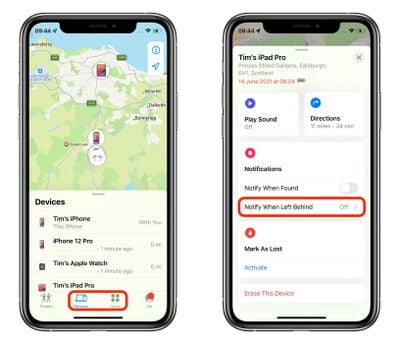
  1. Launch the Find My app on your iPhone.
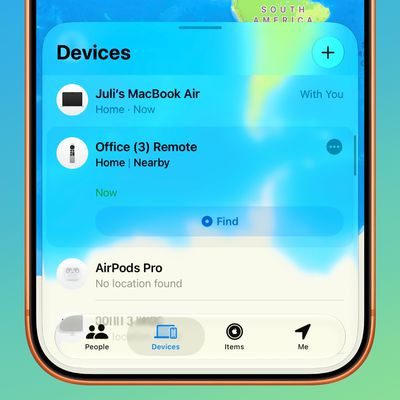
  2. Select the Devices or Items tab, and tap on the device that you want to set up the alerts for.
  3. Tap Notify When Left Behind.
    find my

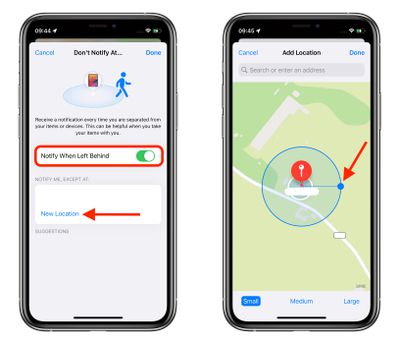
  4. Toggle on the switch for Notify When Left Behind.
  5. Under "Notify Me, Except At," tap New Location to set a Trusted Location where you don't want to receive alerts.
  6. In the "Add Location" map screen, search or enter an address in the input field. You can define the radius of the ringed geofence for your trusted location by dragging the blue dot or using the Small, Medium, or Large options at the bottom. Tap Done when you're finished.
  7. If there are no more location exceptions you want to add, tap Done.
    find my

Now the next time you leave your ‌AirTag‌ or other Apple device behind in a public place, you'll receive an alert informing you in good time, giving you a chance to retrieve it before you travel any further.

Of course, these alerts depend on you not leaving your iPhone behind (there's currently no equivalent separation alert available on Apple Watch for this scenario, sadly), so that's the device you won't want to forget, wherever it is you go.

Apple will make iOS 15 available for general release this fall.

Related Roundup: AirTag
Buyer's Guide: AirTag (Buy Now)
Related Forum: iOS 15

Top Rated Comments

whsbuss Avatar
69 months ago
When will we get a notification on Apple Watch when I leave my iPhone behind!
Score: 18 Votes (Like | Disagree)
69 months ago
This finally makes my AirTags useful day-to-day. I’m still surprised this wasn’t a feature at launch.

Score: 9 Votes (Like | Disagree)
ironpony Avatar
69 months ago
Whoops, left my pants at home again, but it is a "Trusted Location" so no one should notice ...
Score: 5 Votes (Like | Disagree)
69 months ago
This is gonna be very handy
Score: 5 Votes (Like | Disagree)
69 months ago
According to that screenshot even a small geofence is the size of several buildings?

So this wouldn’t work as a reminder that you left home without something until too late to quickly turn back?

So for smaller homes it would be better to NOT add the trusted location right?

What level of separation triggers the alert?
Score: 4 Votes (Like | Disagree)
DrNevs Avatar
69 months ago

When will we get a notification on Apple Watch when I leave my iPhone behind!
This is what I’ve been after for years. Seems like it would be easy to implement
Score: 3 Votes (Like | Disagree)

Popular Stories

General iCloud App Feature

iCloud, Photos, Find My and More Experiencing Issues

Tuesday August 18, 2026 1:56 pm PDT by
Several iCloud services are experiencing issues, according to Apple's system status page. Find My, Game Center, Photos, iCloud Calendar, iCloud Mail, iCloud Contacts, iCloud Web Apps, and iWork for iCloud are all experiencing service interruptions. Apple says only some users may run into problems. The issue started at 3:33 p.m. Eastern Time and is...
iOS 27 Next to iPhone

Here's When iOS 27 Rolls Out Today in Every Time Zone [Update: It's Out]

Sunday September 13, 2026 3:00 am PDT by
Update 10:04 a.m.: iOS 27 is rolling out now, though it may take a bit for all users to see it, so keep checking! Apple is about to release iOS 27, which will finally deliver more advanced Siri AI capabilities as well as a variety of other refinements, improvements, and new features to iPhones. It's Apple's biggest software update of the year, and Apple announced at Wednesday's iPhone event...
iOS 27 Icon iPhone

iOS 27 Available Today With These 8 New Features

Monday September 14, 2026 9:00 am PDT by
Update: Apple has released iOS 27. During its iPhone 18 Pro and iPhone Duo event last week, Apple announced that iOS 27 will be released widely on Monday, September 14. iOS 27 should be available around 10 a.m. Pacific Time / 1 p.m. Eastern Time today via the Settings app, under General → Software Update. Below, we have highlighted eight new features and changes coming with iOS...

🔗 Related Apple News & Rumors

Stay updated with the latest Apple ecosystem news and verified rumors