

Best Email Apps for iOS - MacRumorsOpen MenuShow RoundupsShow Forums menuVisit ForumsOpen Sidebar
Skip to Content

Five of the Best Email Apps on iPhone

Email apps are a popular App Store category for one simple reason - almost all of us need to access email on our iPhones and iPads. While Apple has its own Mail app built into iOS devices, some people want a more feature rich experience.

Luckily there are plenty of developers out there who are trying to create the perfect iOS inbox, but it's hard to sort through the dozens of email apps available. We dove into the ‌App Store‌ in our latest YouTube video and rounded up a handful of the best email apps we found.


Best Email Apps for iPhone

Spike

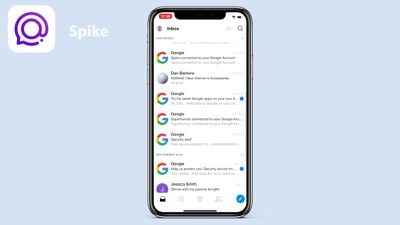
Spike, a free app, is a conversation-based email app that used to be called Hop. The app's aim is to turn emailing into more of a message like conversation, organizing the inbox into a chat-style window.
emailappsspike
Spike removes email headers, signatures, and more to make the emailing experience chat-like, and it prioritizes emails sent by people while filing newsletters and other automatic emails to other folders. Other features include a unified inbox, email grouping options, quick responses, a unified calendar, and snooze. Spike is unusual and not our first choice, but it's definitely unique and could be what some people are looking for.

Polymail

Polymail, also free, is more of a traditional email app. It has a sleek, clean interface with a useful comment and mention feature that's available on the desktop for teams.

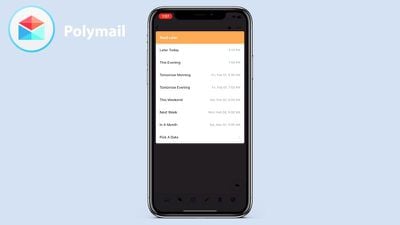
On iOS, Polymail offers useful features like quick tags, read later, and read receipts to let you know what someone has received and read your email. You can also get reminders to follow up on an email that someone has read but not responded to. Other unique features include a calendar invite option in the compose window, one-click unsubscribe, email scheduling, click and attachment tracking, and more.
emailappspolymail
Polymail is one of the more useful apps if you want to better track who is viewing your emails, but if you don't need that functionality, there may be better apps for you.

Airmail

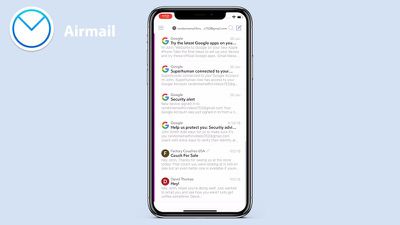
Airmail, priced at $4.99, started as a Mac app and then expanded to iOS. Airmail is a straightforward email app with a focus on minimalism. There's a single unified "All Inboxes" view for quick email management, but if you swipe from the left, there's access to folders for to-do lists, snoozed emails, and attachments, which is handy for finding specific content.

Airmail keeps it simple with options to reply, delete, and archive when viewing an email, though there are an expanded set of features in the compose window, including tracking, send later options, reminders, and templates. Airmail is compatible with a wide range of other services and apps so you can better integrate the apps you already use with your email app.
emailappsairmail
Airmail's interface isn't going to appeal to everyone, especially on iOS, but it offers a good cross-platform experience.

Spark

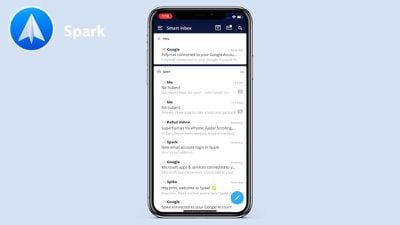
Spark, a free app from Readdle, is one of our top email app picks. Spark offers up a Smart Inbox that presents your most important emails first, saving the junk, newsletters, and less important tasks for later.

Emails are automatically categorized into sections that include Personal, Notifications, and Newsletters, but you can use a single firehose inbox option if you want. Spark has a robust search engine, which makes it easy to find any email, something that we liked about the app.
emailappsspark
Spark has tools for discussing and collaborating on emails with your team, and it's one of the few email apps with these kinds of tools. It also offers options for scheduling emails and snoozing emails, plus there are smart notifications so you only get pinged when there's something important to see.

Other Spark features include followup reminders, integrations with other services, and customizable swipe gestures.

Edison Mail

Edison Mail, another free app, is super popular on the ‌App Store‌ for a reason. It has a clean, modern look, customizable swipe settings, and all of the tools that you need for managing your email.

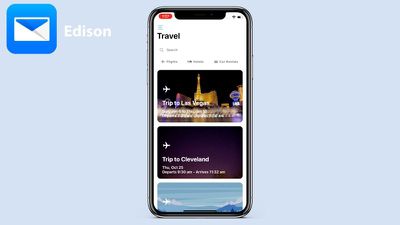
Edison Mail's design is reminiscent of the design of the Mail app, so it fits well on the iPhone, but it offers a richer feature set than the Mail app. There's an included personal assistant that organizes your inbox, sorting out subscriptions, travel emails, bills, receipts, and package emails.
emailappsedison
It lets you track packages and sends an alert when something is out for delivery, and it can do other things like send notifications for upcoming flights. Traditional tools are included too, like snooze options, send undo, and one-tap unsubscribe. It also integrates with Face ID, providing another layer of protection for your inbox.

Conclusion

Of all the email apps listed above, which are some excellent options for email management, we liked Spark and Edison the best, with Edison ranking as our top favorite. If you're looking for a new email app to try out, it's worth taking a look at everything on the list.

Did we miss your favorite email app? Let us know which one you prefer in the comments.

Popular Stories

Home Hub Command Center with Dome Base Feature

Apple Smart Home Hub to Feature iMac G4-Style Design

Wednesday September 30, 2026 4:36 am PDT by
Apple's long-rumored smart home hub will have an iMac G4-style design and a host of unique features, Bloomberg's Mark Gurman reports. The smart home hub is said to feature a square 6-inch display, with variants that can be placed on a countertop or mounted on a wall. It features a single FaceTime camera on the front, with microphones and speakers in its connected base. Gurman described the...
HomePod minis on gradient feature 1 1

Three New Apple Smart Home Products Coming on October 13

Wednesday September 30, 2026 4:04 am PDT by
Apple plans to introduce a series of new smart home products on Tuesday, October 13, according to Bloomberg's Mark Gurman. Apple reportedly plans to debut its long-awaited smart home hub device, a new HomePod mini, and a new Apple TV on the date. The new HomePod mini and Apple TV are set to retain their existing designs, but tout faster chips to support Siri AI. The new HomePod mini will...
Apple TV Sans Remote Feature

New Apple TV 4K Leaked

Friday September 25, 2026 8:16 am PDT by
MacRumors contributor Aaron Perris has uncovered an image file from Apple for an unreleased Apple TV 4K, suggesting that a new model will finally be released soon. The image is specifically for an "Apple TV 4K (4th generation)" model. Apple TV 4K (4th generation) image (on a gradient) The image reveals that the Apple TV will have the same external design as the current model, with all of its...

Top Rated Comments

100 months ago
Shocked you didn't mention Outlook. The latest version combines what I like in Airmail and Edison
Score: 45 Votes (Like | Disagree)
100 months ago
Outlook on iOS is by far and away the best. Makes Apple’s own effort look poor.
Score: 43 Votes (Like | Disagree)
drumcat Avatar
100 months ago
All of which you must provide your email password, and every email traverses their servers.

I did this with Airmail shortly, and they screwed up and forced 4 password resets with iCloud in 48 hours. Once I knew they were a proxy, it was immediately back to the iOS app. It's not just a better UI; it's a server you have to trust. I don't anymore after being burned.

Just be sure you are comfortable with all of your emails going through the servers of the app you use.

(Edit: remember, if something is free, you're the product...)
Score: 31 Votes (Like | Disagree)
100 months ago
I'm always on guard for an app that 'free', which is code for 'you are the product'. If Edison is free, how is it monetised - how-do-they-make-money?
Score: 23 Votes (Like | Disagree)
Apple_Robert Avatar
100 months ago
Dan, I am surprised you like and recommend Edison.

From their privacy policy: "Any data we do collect is used for only three purposes: 1) to provide you with the best service possible, 2) to perform research on new features for our users, and 3) to create aggregate ecommerce trends.

Edison talks a good security game earlier in their statement and then in less than straight-forward language, they let you know what they are really about. Sound familiar? Think Google and Facebook.

Edited to add: If MR is going to suggest apps like these, the least they should do is alert the readers to the difference in security policies and use when using iOS or Mac, so that people will be better informed. No mention of the difference between PUSH or FETCH and how the email clients handle each.
Score: 20 Votes (Like | Disagree)
100 months ago
Email apps are a popular App Store category for one simple reason - almost all of us need to access email on our iPhones and iPads. While Apple has its own Mail app built into iOS devices, some people want a more feature rich experience.

Luckily there are plenty of developers out there who are trying to create the perfect iOS inbox, but it's hard to sort through the dozens of email apps available. We dove into the App Store in our latest YouTube video and rounded up a handful of the best email apps we found.


Subscribe to the MacRumors YouTube channel ('https://www.youtube.com/user/macrumors?sub_confirmation=1') for more videos.

Spike

Spike ('https://itunes.apple.com/us/app/spike-conversational-email/id707452888?mt=8'), a free app, is a conversation-based email app that used to be called Hop. The app's aim is to turn emailing into more of a message like conversation, organizing the inbox into a chat-style window.

best email apps ios image

Spike removes email headers, signatures, and more to make the emailing experience chat-like, and it prioritizes emails sent by people while filing newsletters and other automatic emails to other folders. Other features include a unified inbox, email grouping options, quick responses, a unified calendar, and snooze. Spike is unusual and not our first choice, but it's definitely unique and could be what some people are looking for.

Polymail

Polymail ('https://itunes.apple.com/us/app/polymail/id1082058386?mt=8'), also free, is more of a traditional email app. It has a sleek, clean interface with a useful comment and mention feature that's available on the desktop for teams.

On iOS, Polymail offers useful features like quick tags, read later, and read receipts to let you know what someone has received and read your email. You can also get reminders to follow up on an email that someone has read but not responded to. Other unique features include a calendar invite option in the compose window, one-click unsubscribe, email scheduling, click and attachment tracking, and more.

best email apps ios image

Polymail is one of the more useful apps if you want to better track who is viewing your emails, but if you don't need that functionality, there may be better apps for you.

Airmail

Airmail ('https://itunes.apple.com/us/app/airmail-your-mail-with-you/id993160329?mt=8'), priced at $4.99, started as a Mac app and then expanded to iOS. Airmail is a straightforward email app with a focus on minimalism. There's a single unified "All Inboxes" view for quick email management, but if you swipe from the left, there's access to folders for to-do lists, snoozed emails, and attachments, which is handy for finding specific content.

Airmail keeps it simple with options to reply, delete, and archive when viewing an email, though there are an expanded set of features in the compose window, including tracking, send later options, reminders, and templates. Airmail is compatible with a wide range of other services and apps so you can better integrate the apps you already use with your email app.

best email apps ios image

Airmail's interface isn't going to appeal to everyone, especially on iOS, but it offers a good cross-platform experience.

Spark

Spark ('https://itunes.apple.com/us/app/spark-email-app-by-readdle/id997102246?mt=8'), a free app from Readdle, is one of our top email app picks. Spark offers up a Smart Inbox that presents your most important emails first, saving the junk, newsletters, and less important tasks for later.

Emails are automatically categorized into sections that include Personal, Notifications, and Newsletters, but you can use a single firehose inbox option if you want. Spark has a robust search engine, which makes it easy to find any email, something that we liked about the app.

best email apps ios image

Spark has tools for discussing and collaborating on emails with your team, and it's one of the few email apps with these kinds of tools. It also offers options for scheduling emails and snoozing emails, plus there are smart notifications so you only get pinged when there's something important to see.

Other Spark features include followup reminders, integrations with other services, and customizable swipe gestures.

Edison Mail

Edison Mail ('https://itunes.apple.com/us/app/email-edison-mail/id922793622?mt=8'), another free app, is super popular on the App Store for a reason. It has a clean, modern look, customizable swipe settings, and all of the tools that you need for managing your email.

Edison Mail's design is reminiscent of the design of the Mail app, so it fits well on the iPhone, but it offers a richer feature set than the Mail app. There's an included personal assistant that organizes your inbox, sorting out subscriptions, travel emails, bills, receipts, and package emails.

best email apps ios image

It lets you track packages and sends an alert when something is out for delivery, and it can do other things like send notifications for upcoming flights. Traditional tools are included too, like snooze options, send undo, and one-tap unsubscribe. It also integrates with Face ID, providing another layer of protection for your inbox.

Conclusion

Of all the email apps listed above, which are some excellent options for email management, we liked Spark and Edison the best, with Edison ranking as our top favorite. If you're looking for a new email app to try out, it's worth taking a look at everything on the list.

Did we miss your favorite email app? Let us know which one you prefer in the comments.

Article Link: Five of the Best Email Apps on iOS ('https://www.macrumors.com/guide/best-email-apps-ios/')

I used to love edison mail before they admitted they let their employees read peoples emails.
Score: 18 Votes (Like | Disagree)
Latest Stories
Apple Shares Photos Shot on iPhone Duo
1 hour ago
Apple Says iPhone Duo Has Replaceable 'Cover Layer' Above the Display
2 hours ago
Apple's Smart Home Camera Will Apparently Have 'No Video Recording'
4 hours ago
Apple TV Just Updated Its Selection of 'Bonus' Movies
6 hours ago
iPhone 18 Pro Colors Buyer's Guide: Which Should You Choose?
6 hours ago
Early Prime Big Deal Days: Best Discounts on Accessories, TVs, and More at Amazon
6 hours ago
MacBook Pro With OLED Touch Screen Rumored to Launch in October or November
7 hours ago
Apple's All-New Home Hub Rumored to Launch in These Four Colors
8 hours ago
iPhone 18 Pro Aperture Control Goes Fully Manual in Halide 3.2
9 hours ago
Apple Stores Receive 'Do Not Open' Boxes Ahead of Smart Home Products Launch
10 hours ago
iPhone 18 Pro Sales Jump in China Ahead of iPhone Duo Launch
10 hours ago
Apple TV Still Down for Some Users Following Apple Services Outage
11 hours ago
PSA: Apple Mail on Mac May Stop Syncing Microsoft 365 Accounts Today
11 hours ago
Apple's Smart Home Hub: Everything We Know So Far
22 hours ago
Apple's Home Hub Borrows From the iPhone Duo's StandBy Mode
23 hours ago
Apple Invites App Updated With Three New Features
1 day ago
Apple Event on October 13?
1 day ago
Apple Watch SE 3 vs. Series 12 Buyer's Guide: Which Should You Buy?
1 day ago
iPad Mini 8 to Offer These 10 New Features
1 day ago
DoorDash Unveils AI Food Ordering Through Apple's Messages App
1 day ago
Amazon Takes Up to $150 Off Select M5 MacBook Air Models
1 day ago
Apple Still Plans to Release a New Full-Sized HomePod
1 day ago
Apple Working to Expand HomeKit
1 day ago
Apple Smart Home Hub to Feature iMac G4-Style Design
1 day ago
Three New Apple Smart Home Products Coming on October 13
1 day ago
Apple Pay Now Available in India With Axis Bank Cards
2 days ago
OpenAI Launches Always-On 'Dots' Agents to Rival Meta's Muse
2 days ago
AirPods 5 Teardown: Batteries Removable, Case Still Tough
2 days ago
iPhone 18 Pro Owners Complain of Speaker Crackling or Popping
2 days ago
You Can 'Get Ready' for iPhone Duo Pre-Orders on October 12
2 days ago

🔗 Related Apple News & Rumors

Stay updated with the latest Apple ecosystem news and verified rumors







































