Apple Pencil Pro: Tips for Using Apple's 2024 iPad Stylus - MacRumorsOpen MenuShow RoundupsShow Forums menuVisit ForumsOpen Sidebar
Skip to Content

Apple Pencil Pro: Tips for Using Apple's 2024 iPad Stylus

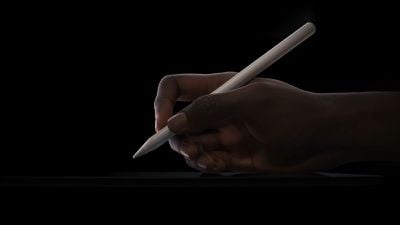
Apple's latest Apple Pencil Pro is the first major revision to the ‌Apple Pencil‌ lineup since the 2018 launch of the ‌Apple Pencil‌ 2.

Apple Pencil Pro Newsroom
Alongside staple Apple Pencil features like low latency, tilt sensitivity, and pressure sensitivity, Apple Pencil Pro additionally includes a new squeeze gesture, gyroscope, haptic feedback, Find My support, and more. Keep reading to learn how to use them.

Supported Devices

First of all, it's important to know that Apple Pencil Pro does not work with iPads that were launched before 2024. The ‌Apple Pencil‌ Pro is compatible with the M2 ‌iPad Air‌ models and the M4 ‌iPad Pro‌ models, so as of writing, it only works with the May 2024 iPads.

  • M2 iPad Air 11-inch
  • M2 iPad Air 13-inch
  • M4 iPad Pro 11-inch
  • M4 iPad Pro 13-inch

Pairing and Charging

The ‌Apple Pencil‌ Pro attaches to the side of the iPad Pro or the iPad Air, and the magnetic connection makes pairing and charging the accessory super-easy.
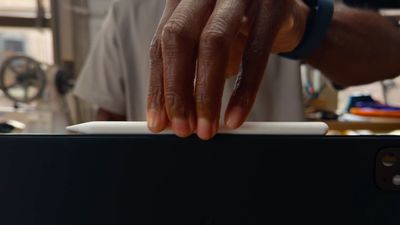
apple pencil pro
Ensure your M4 iPad Pro or M2 iPad Air is on and unlocked, then simply place the Apple Pencil Pro against the magnet along the side of your iPad, and tap Pair when the onscreen prompt appears.

Squeeze Gesture

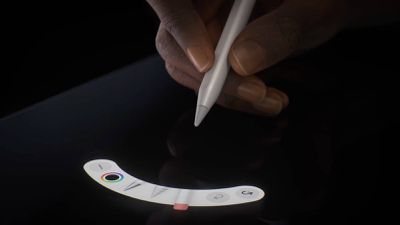
Exclusive to Apple Pencil Pro is a new squeeze gesture that allows it to sense when pressure is applied to the sides of the device. This action performs the assigned function, and also provides haptic feedback so you know it has been triggered.
Apple Pencil Pro
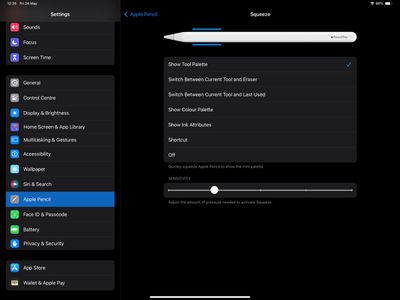
By default, Squeeze invokes the tool palette in the app you are using (Apple Notes and Freeform, for example), but you can change what the Squeeze gesture does, and you can even trigger a shortcut with it.

  1. Open the Settings app.
  2. Select Apple Pencil.
  3. Tap Squeeze.
  4. Choose between the following functions: Show Tool Palette, Switch Between Current Tool and Eraser, Switch Between Current Tool and Last Used, Show Color Palette, Show Ink Attributes, Shortcut, and Off.
apple pencil pro settings2

Note that you can also adjust Squeeze sensitivity from this screen, so you can lower it if you tend to trigger it unintentionally.

Barrel Roll

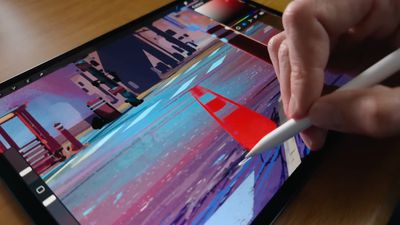
One of the significant enhancements in the Apple Pencil Pro compared to its predecessor is the barrel roll feature. This utilizes a gyroscope in the Pencil Pro, enabling the barrel's rotation to alter the orientation of specific tools. It provides more precise control over shaped pen and brush tools, mimicking the natural function of a real pen or brush when tilted during drawing or sketching.
apple pencil barrel roll
To activate barrel roll, simply rotate the Pencil Pro while using a compatible app like Notes or Freeform. This feature works particularly well with non-circular brushes and the "Hover" feature: Hover the Pencil tip near the screen without touching it, and you will see the precise angle of contact as you rotate the brush or pen.

Find My

Apple Pencil‌ Pro supports Find My, so it can be tracked right alongside the iPad and other devices in the ‌Find My‌ app. Note that unlike some Apple devices which have an Ultra Wideband chip, Apple Pencil Pro simply uses Bluetooth to pinpoint its location via Find My.

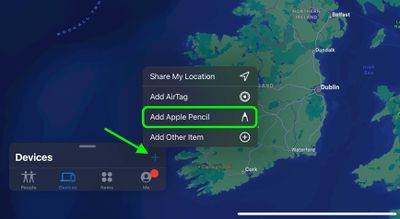
An option to add Apple Pencil Pro should appear onscreen during the initial pairing process, but if you can't find Apple Pencil Pro in the Find My app after pairing, you can connect it manually like so:

  1. Open the Find My app.
  2. Tap the plus (+) symbol.
  3. Choose Add Apple Pencil.

find my

Double-Tap

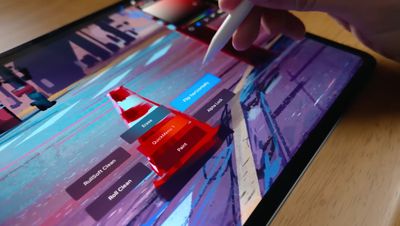
The Double-Tap feature that debuted with the Apple Pencil 2 is also supported by Apple Pencil Pro, and allows you to perform various actions such as showing a color palette or switching to the tool you last used.
apple pencil double tap
Double-Tap can also be used to select items without touching the screen. Simply hover the Apple Pencil over options and make a selection by tapping twice on its side.

To change the function of Double-Tap, follow these steps:

  1. Open the Settings app.
  2. Select Apple Pencil.
  3. Tap Double-Tap.
  4. Choose from the following actions: Switch Between Current Tool and Eraser, Switch Between Current Tool and Last Used, Show Color Palette, Show Ink Attributes, and Off.
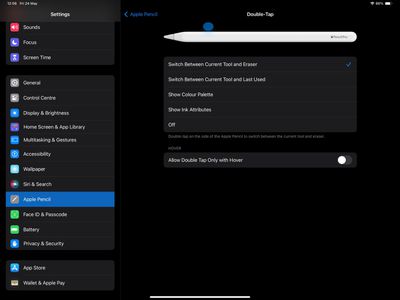
settings

Note that this screen also includes an option to Allow Double Tap Only with Hover.

Supported Apps

While Apple's iPad apps are ready to go with Apple Pencil Pro, it's important to note that third-party app developers need to add support for the new accessory before they will work. As of writing this, only a handful of apps have been updated with Apple Pencil Pro support, but more are sure to get on board in the very near future.
Related Forum: iPad Accessories

Popular Stories

Apple Pencil USB C sliding cap feature

iPhone Duo Only Works With the $79 USB-C Apple Pencil, Not the Apple Pencil Pro

Wednesday September 9, 2026 2:15 pm PDT by
The iPhone Duo will work with the Apple Pencil, but support is limited. Apple says that you need the Apple Pencil with USB-C for the iPhone Duo, so if you have the Apple Pencil Pro, you may be out of luck. It's likely the iPhone Duo doesn't support the Apple Pencil Pro because there's no magnetic surface for charging the pencil. The Apple Pencil Pro charges magnetically when connected to a...

apple pencil pro purple

Foldable iPhone Duo to Come With Apple Pencil Support

Wednesday September 9, 2026 4:06 am PDT by
Apple's foldable iPhone Duo will come with Apple Pencil support, reports Bloomberg's Mark Gurman. Gurman previously claimed that Apple had prototyped a dedicated Apple Pencil for its foldable iPhone that was "stubbier than the versions for iPads" and "designed to magnetically attach and charge on the side of the device," but he said it was unlikely that the accessory would be released....
iphone duo hero

A Shorter Apple Pencil Was Supposed to Launch Alongside iPhone Duo

Sunday September 20, 2026 7:47 pm PDT by
A shorter Apple Pencil for the iPhone Duo was in development, but Apple scrapped it due to "technical problems ahead of mass production," according to Bloomberg's Mark Gurman. Instead, Apple said the iPhone Duo will gain support for the existing USB-C version of the Apple Pencil later this...
Latest Stories
iPhone 18 Pro Aperture Control Goes Fully Manual in Halide 3.2
38 minutes ago
Apple Stores Receive 'Do Not Open' Boxes Ahead of Smart Home Products Launch
1 hour ago
iPhone 18 Pro Sales Jump in China Ahead of iPhone Duo Launch
2 hours ago
Apple TV Still Down for Some Users Following Apple Services Outage
2 hours ago
PSA: Apple Mail on Mac May Stop Syncing Microsoft 365 Accounts Today
3 hours ago
Apple's Smart Home Hub: Everything We Know So Far
13 hours ago
Apple's Home Hub Borrows From the iPhone Duo's StandBy Mode
14 hours ago
Apple Invites App Updated With Three New Features
18 hours ago
Apple Event on October 13?
19 hours ago
Apple Watch SE 3 vs. Series 12 Buyer's Guide: Which Should You Buy?
21 hours ago
iPad Mini 8 to Offer These 10 New Features
21 hours ago
DoorDash Unveils AI Food Ordering Through Apple's Messages App
23 hours ago
Amazon Takes Up to $150 Off Select M5 MacBook Air Models
23 hours ago
Apple Still Plans to Release a New Full-Sized HomePod
1 day ago
Apple Working to Expand HomeKit
1 day ago
Apple Smart Home Hub to Feature iMac G4-Style Design
1 day ago
Three New Apple Smart Home Products Coming on October 13
1 day ago
Apple Pay Now Available in India With Axis Bank Cards
2 days ago
OpenAI Launches Always-On 'Dots' Agents to Rival Meta's Muse
2 days ago
AirPods 5 Teardown: Batteries Removable, Case Still Tough
2 days ago
iPhone 18 Pro Owners Complain of Speaker Crackling or Popping
2 days ago
You Can 'Get Ready' for iPhone Duo Pre-Orders on October 12
2 days ago
Apple Pay Reportedly Launching in India Today
2 days ago
Apple Releases New AirPods Beta Firmware
2 days ago
Apple Shares New Guide for Using iOS 27 Parental Controls
2 days ago
Apple Creator Studio and Final Cut Camera Get New Features
2 days ago
Apple Explains Why It Removed ICE Tracking Apps Last Year
2 days ago
Amazon Expands $779.99 Apple Watch Ultra 4 Deal to More Models
2 days ago
Switch Siri AI for ChatGPT on Your Mac
2 days ago
Apple Says Emergency SOS via Satellite Now Available in Norway
2 days ago

🔗 Related Apple News & Rumors

Stay updated with the latest Apple ecosystem news and verified rumors