Your Apple ID and Phone Number Are Being Used on Another Device - What To Do - MacRumorsOpen MenuShow RoundupsShow Forums menuVisit ForumsOpen Sidebar
Skip to Content

Your Apple ID and Phone Number Are Being Used on Another Device - What To Do

by

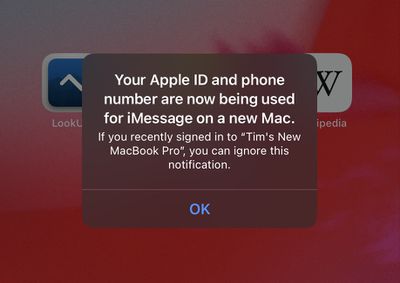
Have you received an unexpected notification on your Apple device saying that your Apple ID and phone number are now being used for iMessage and FaceTime on a new Mac, iPhone or iPad?
apple id being used another device facetime imessage
If the answer is yes, there's no need to panic. The message doesn't necessarily mean anything malicious has happened to your Apple account. In fact, in the vast majority cases, there's a simple explanation for it. Keep reading to learn more.

Why Have I Received This Message?

Whenever you set up a new Apple device, you will be asked to sign into it using your ‌Apple ID‌. Your ‌Apple ID‌ is the account you use to sign in to all Apple services like iCloud, the iTunes Store, and the App Store. You can have multiple devices signed into the same ‌Apple ID‌. This ensures that your ‌iCloud‌ user data, app downloads, and media purchases can sync between them.

If you set up a new Apple device, erase and re-install the operating system on a device you already own and then sign back into your ‌Apple ID‌, or simply sign out of iMessage or ‌FaceTime‌ on a device, any other devices signed in to the same ‌Apple ID‌ should throw up the following popup notification on the screen: "Your ‌Apple ID‌ and phone number are now being used for iMessage/‌FaceTime‌ on a new [iPhone/‌iPad‌/Mac]. If you recently signed into [device name] you can ignore this notification."

But I Didn't Do Any of Those Things Recently!

Even if you haven't done anything recently to warrant the pop-up message and you don't recognize the default name of the device ("iPhone," for example), it doesn't necessarily mean anything untoward has occurred. Sometimes it takes a while for Apple to update your ‌Apple ID‌ device list in its Activation Servers.

On other occasions, the message will pop up if you turn on a device that hasn't been connected to the internet for a while, especially if you logged in to iMessage or ‌FaceTime‌ during the period that it was disconnected. The message can also occur if the device has been relying on a poor Wi-Fi connection.

In these cases, the message is simply a delayed notification and not a sign of a compromised ‌Apple ID‌. However, if you're suspicious because the name of the device that signed into your ‌Apple ID‌ is not a default name and you don't recognize it, you can investigate the cause by checking your ‌Apple ID‌ device list with Apple. The following steps show you how.

How to Check Your Apple ID Device List

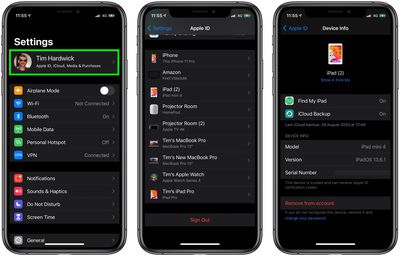
  1. On your iPhone or ‌iPad‌, open the Settings app.
  2. Tap your ‌Apple ID‌ banner at the top of the menu.
  3. Scroll down, then tap any device name to view that device's information, such as the device model, serial number, OS version, and whether the device is trusted and can be used to receive ‌Apple ID‌ verification codes.
    apple id device list ios

You can also view this list on a Mac by clicking the Apple menu () in the menu bar, selecting System Preferences..., and clicking Apple ID.

If you see anything untoward or suspicious – a device linked to your ‌Apple ID‌ that you don't recognize, for example – then your account may be compromised. You should remove the device from your account using the red option at the bottom of the screen for that device. After you've done that, follow the steps below to secure your account.

How to Gain Control of Your Apple ID

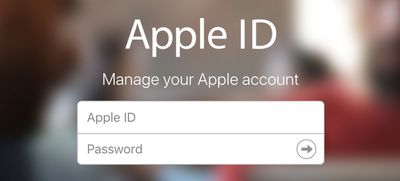
  1. Sign in to your ‌Apple ID‌ account page using Apple's Apple ID website. If you can't sign in or you receive a message that the account is locked when you try to sign in, try to reset or change your password.
    apple passwords id login

  2. Review all the personal and security information in your account. Update any information that isn't correct or that you don't recognize, including your name, your primary ‌Apple ID‌ email address and alternate/rescue email address, your phone numbers. Also check your security questions and answers, and make sure your answers aren't easy to guess.
  3. If you haven't already, set up two-factor authentication for your Apple ID. This additional security feature is designed to prevent anyone from accessing your account, even if they know your password.
If you don't have 2FA enabled, click these corresponding links to take you to the sections explaining how to reset your Apple ID password if you're using SMS-based two-factor verification, or if you have email, password and security questions set up for your account.


Popular Stories

Home Hub Command Center with Dome Base Feature

Apple Smart Home Hub to Feature iMac G4-Style Design

Wednesday September 30, 2026 4:36 am PDT by
Apple's long-rumored smart home hub will have an iMac G4-style design and a host of unique features, Bloomberg's Mark Gurman reports. The smart home hub is said to feature a square 6-inch display, with variants that can be placed on a countertop or mounted on a wall. It features a single FaceTime camera on the front, with microphones and speakers in its connected base. Gurman described the...

HomePod minis on gradient feature 1 1

Three New Apple Smart Home Products Coming on October 13

Wednesday September 30, 2026 4:04 am PDT by
Apple plans to introduce a series of new smart home products on Tuesday, October 13, according to Bloomberg's Mark Gurman. Apple reportedly plans to debut its long-awaited smart home hub device, a new HomePod mini, and a new Apple TV on the date. The new HomePod mini and Apple TV are set to retain their existing designs, but tout faster chips to support Siri AI. The new HomePod mini will...
iPhone Duo Open

iPhone Duo Reportedly Facing Production Problems Ahead of Launch

Tuesday September 29, 2026 6:16 am PDT by
The iPhone Duo is reportedly facing production difficulties ahead of its October launch, with early output expected to be limited. A person said to be close to Foxconn's supply chain told China's Jiemian News that final assembly yields for Apple's first foldable iPhone were only slightly above 60% as of September 17. The source said that, under Apple's current quality standards, it could...
Latest Stories
New 'AirFly Drive' Accessory Turns Wired CarPlay Into Wireless CarPlay
2 hours ago
Apple Shares Photos Shot on iPhone Duo
4 hours ago
Apple Says iPhone Duo Has Replaceable 'Cover Layer' Above the Display
5 hours ago
Apple's Smart Home Camera Will Apparently Have 'No Video Recording'
7 hours ago
Apple TV Just Updated Its Selection of 'Bonus' Movies
8 hours ago
iPhone 18 Pro Colors Buyer's Guide: Which Should You Choose?
8 hours ago
Early Prime Big Deal Days: Best Discounts on Accessories, TVs, and More at Amazon
9 hours ago
MacBook Pro With OLED Touch Screen Rumored to Launch in October or November
10 hours ago
Apple's All-New Home Hub Rumored to Launch in These Four Colors
11 hours ago
iPhone 18 Pro Aperture Control Goes Fully Manual in Halide 3.2
12 hours ago
Apple Stores Receive 'Do Not Open' Boxes Ahead of Smart Home Products Launch
13 hours ago
iPhone 18 Pro Sales Jump in China Ahead of iPhone Duo Launch
13 hours ago
Apple TV Still Down for Some Users Following Apple Services Outage
14 hours ago
PSA: Apple Mail on Mac May Stop Syncing Microsoft 365 Accounts Today
14 hours ago
Apple's Smart Home Hub: Everything We Know So Far
1 day ago
Apple's Home Hub Borrows From the iPhone Duo's StandBy Mode
1 day ago
Apple Invites App Updated With Three New Features
1 day ago
Apple Event on October 13?
1 day ago
Apple Watch SE 3 vs. Series 12 Buyer's Guide: Which Should You Buy?
1 day ago
iPad Mini 8 to Offer These 10 New Features
1 day ago
DoorDash Unveils AI Food Ordering Through Apple's Messages App
1 day ago
Amazon Takes Up to $150 Off Select M5 MacBook Air Models
1 day ago
Apple Still Plans to Release a New Full-Sized HomePod
1 day ago
Apple Working to Expand HomeKit
2 days ago
Apple Smart Home Hub to Feature iMac G4-Style Design
2 days ago
Three New Apple Smart Home Products Coming on October 13
2 days ago
Apple Pay Now Available in India With Axis Bank Cards
2 days ago
OpenAI Launches Always-On 'Dots' Agents to Rival Meta's Muse
2 days ago
AirPods 5 Teardown: Batteries Removable, Case Still Tough
2 days ago
iPhone 18 Pro Owners Complain of Speaker Crackling or Popping
2 days ago

🔗 Related Apple News & Rumors

Stay updated with the latest Apple ecosystem news and verified rumors