macOS 27 Finally Brings Direct Touch Control to Sidecar - MacRumorsOpen MenuShow RoundupsShow Forums menuVisit ForumsOpen Sidebar
Skip to Content

macOS 27 Finally Brings Direct Touch Control to Sidecar

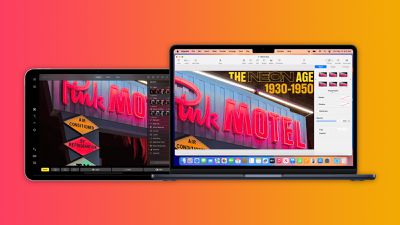
Apple has added direct touch input to Sidecar with macOS 27 Golden Gate and iPadOS 27, allowing users to tap and interact with macOS interface elements using a finger on their iPad for the first time.
macos sidecar
Previously, ‌Sidecar‌ was deliberately limited as a touch interface. While multi-touch gestures like two-finger scrolling, pinch-to-zoom, and three-finger editing gestures for copy, cut, paste, and undo have been supported for years, directly tapping to click links, open apps, or interact with macOS UI elements was not possible with a finger. Those interactions required either the Mac's connected mouse or trackpad, or an Apple Pencil.

The new Direct Touch capability closes that gap. In macOS 27, users can can now tap, swipe, and interact with macOS apps on their ‌iPad‌ screen using a finger, bringing ‌Sidecar‌ closer to how third-party tools like Luna Display have worked for some time. ‌Apple Pencil‌ support continues alongside the new touch capabilities.

The expanded ‌Sidecar‌ functionality requires an Apple Silicon Mac running macOS 27 Golden Gate and a compatible ‌iPad‌ running ‌iPadOS 27‌. As with previous versions of the feature, both devices must be signed into the same Apple ID, connected to the same Wi-Fi network, and have Bluetooth enabled, with the two devices within 10 meters of each other.

The feature is likely another indication of impending touch support on the Mac, along with other features like pull-to-refresh. Apple is said to be planning to launch a "MacBook Ultra" as a new top-tier laptop with a touchscreen OLED display, an M6-series chip, the Dynamic Island, and a thinner design. Reports suggest that the device is scheduled to launch in early 2027.


Related Roundup: macOS Golden Gate

Popular Stories

macOS 27 Feature Blue

macOS Emerald to macOS Big Bear: What Will Apple Name macOS 27?

Tuesday June 2, 2026 8:20 am PDT by
Every year heading into WWDC, one thought on many Mac fans' minds is what Apple will choose as the name for the next version of macOS. The tradition dates all the way back to the beginning of Mac OS X with big cat names like Leopard, and Apple eventually shifted to California-themed names with the unveiling of OS X Mavericks. Apple has yet to announce the name for macOS 27, but macOS Emerald ...
macOS 27 on MacBook Pro

Apple Says macOS 27 Won't Be Compatible With These Macs

Wednesday June 3, 2026 8:29 am PDT by
During WWDC 2025, Apple revealed that macOS 26 Tahoe would be the final major macOS version for Intel-based Macs. macOS 27 will be compatible with Apple silicon Macs only, meaning that you will need a Mac with an M-series chip or a MacBook Neo with an A18 Pro chip in order to install the software update. Apple will unveil macOS 27 during its WWDC 2026 keynote this Monday, June 8, and the...
macOS 27 Wishlist What Do You Want From Apple at WWDC 2026 Feature

macOS 27 Wishlist: What Do You Want From Apple at WWDC 2026?

Thursday June 4, 2026 2:54 pm PDT by
We have four days to go until Apple's WWDC keynote event begins on Monday, June 8. iOS 27 has been the focus of most of the rumors, but we're also going to get a new version of macOS, macOS 27. Some of the same features that are coming in iOS 27 will come to macOS 27, like the new version of Siri and the dedicated Siri app, but we want to hear from MacRumors readers. What are you hoping to...


Top Rated Comments

fenderbass146 Avatar
3 weeks ago
Well if this isn't a clue to a touchscreen Mac coming, IDK what is.
Score: 27 Votes (Like | Disagree)
sunapple Avatar
3 weeks ago
Apple is the kind of company that takes baby steps towards the touch screen Mac over a 20 year period while maintaining until the very end that they won't do it. And then they do and it's sold as some great innovation.
Score: 15 Votes (Like | Disagree)
3 weeks ago
C'mon Apple, make a final step: connecting iPad Pros (at least) as an external display via USB-C. As a display, not as a sidecar.
Score: 9 Votes (Like | Disagree)
3 weeks ago
This is a great way for devs who don’t have access to a touchscreen Mac (all devs at the moment) to be able to ensure their Mac apps work well on a touch screen.

Smart.

And also yes obviously this means touch screen Macs are coming.
Score: 7 Votes (Like | Disagree)
Hajj.david Avatar
3 weeks ago

C'mon Apple, make a final step: connecting iPad Pros (at least) as an external display via USB-C. As a display, not as a sidecar.
This is already a thing and has been for years. Just go to your display settings and extend or duplicate it to the ipad. You can hide any and all ipad UI at that point and use it as a purely external screen over USB C or wirelessly
Score: 5 Votes (Like | Disagree)
nortonandreev Avatar
3 weeks ago
Oh wow... but yeah, it's not very usable. Tap targets are too small on the macOS. Not sure what they will do for the touchscreen MacBook.
Score: 3 Votes (Like | Disagree)

🔗 Related Apple News & Rumors

Stay updated with the latest Apple ecosystem news and verified rumors