Apple Releases macOS Golden Gate Beta 6 - MacRumorsOpen MenuShow RoundupsShow Forums menuVisit ForumsOpen Sidebar
Skip to Content

Apple Releases macOS Golden Gate Beta 6

Apple today provided developers with the sixth beta of macOS Golden Gate, with the update coming a week after Apple seeded the fifth beta.

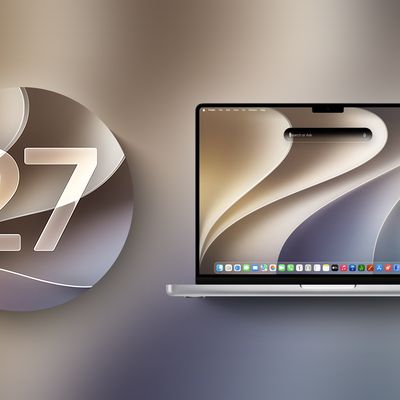
macOS 27 next to MacBook Pro Running macOS 27
Developers can download ‌macOS Golden Gate‌ by going to System Settings > General > Software Update. Beta Updates will need to be enabled, and a free developer account is required.

‌macOS Golden Gate‌ includes multiple design improvements. Liquid Glass opacity has been improved to increase readability, there's a slider for controlling the level of transparency, and changes to shadowing make it easier to tell when a window is active. Apps now have uniform toolbars, edge-to-edge sidebars, and less rounded corners, plus there are fewer icons in menu bars.

Siri has been transformed into ‌Siri‌ AI, a chatbot-style assistant that combines general world knowledge, your personal data, and onscreen awareness to answer questions about anything and find information for you. ‌Siri‌ lives in Spotlight, and you can ask questions with the new Search or Ask interface.

There's also a ‌Siri‌ app where you can chat with ‌Siri‌ and view past conversations, and on newer Macs, you can set a custom voice for ‌Siri‌ with personalized pace and expressivity. Visual Intelligence is now on the Mac so ‌Siri‌ can answer questions about what's on your screen, and a Write with ‌Siri‌ feature lets ‌Siri‌ generate text or give feedback on your writing.

There are AI photo editing tools in the Photos app, AI tab organization in Safari, an option to use AI to automatically update weak passwords in the Passwords app, and a revamped Image Playground app that can generate photorealistic images.

More on all of the new features in ‌macOS Golden Gate‌ can be found in our macOS Golden Gate roundup.
Related Roundup: macOS Golden Gate

Popular Stories

macOS 27 next to MacBook Pro Running macOS 27

Apple Releases macOS Golden Gate Beta 5

Monday August 10, 2026 10:27 am PDT by
Apple today provided developers with the fifth beta of macOS Golden Gate, with the update coming two weeks after Apple seeded the fourth beta. Developers can download macOS Golden Gate by going to System Settings > General > Software Update. Beta Updates will need to be enabled, and a free developer account is required. macOS Golden Gate includes multiple design improvements. Liquid Glass ...
macOS 27 Public Beta Thumb 2

Third macOS Golden Gate Public Beta Now Available

Tuesday August 11, 2026 10:26 am PDT by
Apple today released the third public beta of macOS Golden Gate, allowing non-developers to test the software ahead of its fall release. You can sign up to test the update on Apple's beta website, and then download it by going to System Settings > General > Software Update and toggling on the macOS 27 beta. macOS Golden Gate includes the same Siri AI features as iOS 27 and iPadOS 27, but you ...
iOS 26 6 1 iPhone

Apple Releases iOS 26.6.1, macOS 26.6.2, and More

Monday August 17, 2026 10:52 am PDT by
Apple today released iOS 26.6.1, iPadOS 26.6.1, visionOS 26.6.1, and macOS 26.6.2, with all of the updates containing security fixes. Apple also released iOS 18.7.10 and iPadOS 18.7.10 with security fixes. All of the iOS and iPadOS updates released today deliver security fixes that were first made available in the iOS 27 and iPadOS 27 betas, according to an Apple support document, which...

Top Rated Comments

Ashwee Avatar
2 weeks ago
Updated window control buttons


Attachment Image
Score: 24 Votes (Like | Disagree)
tonywalker23 Avatar
2 weeks ago

Only a return to the Aqua of Cheeta would ever satisfy me.
Those were the best days of my life.

Seriously, last night I was thinking about my pre-Apple years. I was at a plant working third shift completely alone, wandering the place between my hourly machine checks I had to do (early 2000s pre cell phone time killing). There was a Mac in one of the rooms and I still remember the heart icon for favorites in the Finder toolbar. I got a PowerBook with 10.2 during that time, so it is hard to pin down the exact time the graphics rooms with the PowerMacs in that plant showing the Cosmos Screen Saver were something special.

I would pay an Apple subscription to have a macOS theme pack that made my devices look like the mid 2000s.
Score: 9 Votes (Like | Disagree)
2 weeks ago
build is 26A5416b

(there was also 26A5416a but it got pulled)

others:

macOS 26.7 RC 1 is 25G220
macOS 15.8 RC 1 is 24H16
iOS 27 beta 6 is 24A5418b
iPadOS 27 beta 6 is 24A5418b
tvOS 27 beta 6 is 24J5353b
audioOS 27 beta 6 is 24J5353b
watchOS 27 beta 6 is 24R5353a
visionOS 27 beta 6 is 24M5355a

public releases

macOS 26.6.2 is 25G83
iOS 26.6.1 is 23G83
iOS 18.7.10 is 22H374
iPadOS 26.6.1 is 23G83
iPadOS 18.7.10 is 22H374
visionOS 26.6.1 is 23O780
Score: 9 Votes (Like | Disagree)
2 weeks ago
Preview icon from ios is now on macos


Attachment Image
Score: 7 Votes (Like | Disagree)
2 weeks ago

Updated window control buttons


There are some HDR highlights when you click down on one of the traffic lights. Very cool. Still probably a little refinement here but it's nice to finally see some personality back in these!
Score: 7 Votes (Like | Disagree)
johnsawyercjs Avatar
2 weeks ago

cheap unispiring crap that looks like it came straight from a picture book for preschoolers.
You would have really hated Aqua
Score: 6 Votes (Like | Disagree)

🔗 Related Apple News & Rumors

Stay updated with the latest Apple ecosystem news and verified rumors