

'Workflow' for Apple Watch Brings Automated Tasks to Your Wrist - MacRumorsOpen MenuShow RoundupsShow Forums menuVisit ForumsOpen Sidebar
Skip to Content

'Workflow' for Apple Watch Brings Automated Tasks to Your Wrist

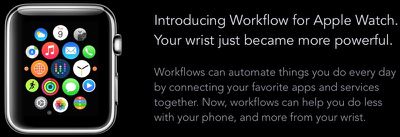
Popular iOS app Workflow was today updated with support for the upcoming Apple Watch, bringing its highly useful task automation capabilities to the wrist-worn device.

For those of you unfamiliar with Workflow, it's a powerful automation app that was first launched on iOS last December. Workflow lets users create actions and connect apps to automatically perform a huge range of tasks on the iPad or the iPhone.
workflowapplewatch
Workflows can be built from a series of actions to perform tasks like making GIFs from a series of photos, creating PDFs from websites, appending content or recordings to Evernote, seeing older versions of websites, getting images from websites, and translating text on the clipboard. There are hundreds of actions that can be combined for an endless number of different workflows.

On the Apple Watch, Workflow will work in the same way, giving users one-tap access to a wide range of different timesaving actions. For example, it'll be possible to pull up a map to the nearest coffee shop or call an Uber using Workflow. These type of quick-access actions may be particularly valuable on the Apple Watch, given its limited input methods.

workflowactions
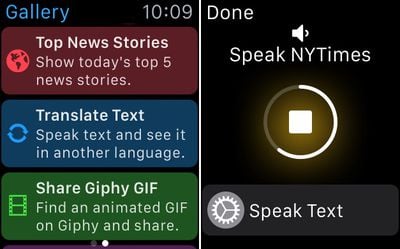
One of the best features about Workflow for iOS is its included Workflow Gallery, which makes it easy for even those new to the app to download actions that are immediately useful. The same gallery feature will be available on the Apple Watch for fast access to workflows.
workflowgallery

Workflow's Gallery and a workflow in action

Workflows can be executed by raising the Apple Watch on the wrist to turn it on and swiping up at the bottom of the screen to get to the Workflow Glance. Workflows can be run directly from the Glance portion of the Apple Watch, so accessing them will be similar to accessing an app in the Notification Center on iOS. As a reminder, Glances are quick snippets of information that are meant to be easy to access.

Third-party Glances on the Apple Watch are not interactive and do not support buttons or scrolling, so launching a workflow through the Apple Watch's Glance view is done in a unique way. The Glance automatically scrolls through the different workflows that are available and selecting one is done by tapping on the screen.

Scrolling through workflows can be sped up with a rather unique interaction -- knocking the Apple Watch against the iPhone in a pants pocket. This causes the built-in scrolling mechanism to shift to the next available workflow in the list.

Workflows from the iPhone are automatically available on the Apple Watch, including all custom-created workflows constructed from the available actions in the Workflow app. Many Apple Watch apps are somewhat limited in function due to the restricted access developers have to Apple APIs, and the same goes for Workflow.

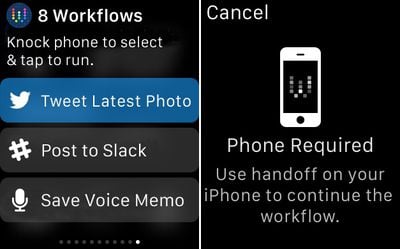
Apple Watch workflows aren't as full-featured as those on the iPhone -- it's not possible to run workflows that open other apps -- but Handoff is supported to allow users to transfer a workflow on the Apple Watch to the iPhone.
workflowhandoffandglanceview

Workflow's Glance menu and Handoff message

Workflows that involve opening apps, sending messages, or placing phone calls will all require the iPhone because developers cannot use these functions. Workflows that are not supported on the Apple Watch will direct users to use Handoff to swap over to the iPhone.

Though Apple Watch workflows can't open apps (aside from getting directions within Maps) they can still take advantage of the same data available to many iOS apps, like calendar info, contacts, Twitter, Facebook, and more. Currently, 163 out of 226 of available actions within the Workflow app are able to run natively on the Apple Watch, so there's still quite a lot that can be done directly on the device.

Workflow for the Apple Watch is available through an update to the Workflow app as of today, so it'll be accessible on the Apple Watch as soon as the first devices arrive in customers' hands.

Workflow can be downloaded from the App Store for the sale price of $2.99. [Direct Link]

Popular Stories

Home Hub Command Center with Dome Base Feature

Apple Smart Home Hub to Feature iMac G4-Style Design

Wednesday September 30, 2026 4:36 am PDT by
Apple's long-rumored smart home hub will have an iMac G4-style design and a host of unique features, Bloomberg's Mark Gurman reports. The smart home hub is said to feature a square 6-inch display, with variants that can be placed on a countertop or mounted on a wall. It features a single FaceTime camera on the front, with microphones and speakers in its connected base. Gurman described the...
HomePod minis on gradient feature 1 1

Three New Apple Smart Home Products Coming on October 13

Wednesday September 30, 2026 4:04 am PDT by
Apple plans to introduce a series of new smart home products on Tuesday, October 13, according to Bloomberg's Mark Gurman. Apple reportedly plans to debut its long-awaited smart home hub device, a new HomePod mini, and a new Apple TV on the date. The new HomePod mini and Apple TV are set to retain their existing designs, but tout faster chips to support Siri AI. The new HomePod mini will...
iphone duo colors

Apple Shares Photos Shot on iPhone Duo

Thursday October 1, 2026 1:37 pm PDT by
Apple on Instagram today shared a curated gallery of six photos shot on the iPhone Duo. The photos were shot by American photographers Jake Michaels and Jason Nocito, as part of a project commissioned by Apple. iPhone Duo is equipped with four cameras:A rear 48-megapixel Fusion Main camera A rear 48-megapixel Ultra Wide camera A front 12-megapixel Center Stage camera in the outer display A...

Top Rated Comments

jacobj Avatar
150 months ago
Can't wait!

I'll definetely use this app.

The saddest thing I have seen today: either you ordered this and then cancelled it just so you could do a screen grab, or you have the money, but are empty inside and therefore need people to validate your worth through their equally shallow admiration, or you want to annoy people like me for fun which has no satircal value and is equally sad.

Then to post it first just wreaks of a "look at me, look at me" complex.

Let's just hope it's a phase. Good luck in the future. I hope you resolve it all to your benefit.
Score: 20 Votes (Like | Disagree)
150 months ago
"Scrolling through workflows can be sped up with a rather unique interaction -- knocking the Apple Watch against the iPhone in a pants pocket"

Wait what? So if the watch is on my left hand, and my phone is in my right pocket, I have to do some kind of Macarena dance move to speed up the scrolling? I have read this sentence 10 times.... Nothing about it makes sense.
Score: 13 Votes (Like | Disagree)
150 months ago
Thanks to xhamster, my wrist is already powerful enough thanks.
Score: 12 Votes (Like | Disagree)
150 months ago
Every time I come across this app, I think about grabbing it but none of the examples given seem useful or relevant to me. I'm either not looking at enough examples, or perhaps I am a boring person. People seem to swear by this app and think it would make a good Apple purchase. :cool:
Score: 7 Votes (Like | Disagree)
DrJohnnyN Avatar
150 months ago
Can't wait!

I'll definetely use this app.
Score: 6 Votes (Like | Disagree)
150 months ago
Can't wait!

I'll definetely use this app.

Opulence You has it
Score: 5 Votes (Like | Disagree)
Latest Stories
AT&T Acknowledges iPhone 18 Pro Max Issues: 'Update Immediately'
9 hours ago
New 'AirFly Drive' Accessory Turns Wired CarPlay Into Wireless CarPlay
15 hours ago
Apple Shares Photos Shot on iPhone Duo
16 hours ago
Apple Says iPhone Duo Has Replaceable 'Cover Layer'
17 hours ago
Apple's Smart Home Camera Will Apparently Have 'No Video Recording'
19 hours ago
Apple TV Just Updated Its Selection of 'Bonus' Movies
21 hours ago
iPhone 18 Pro Colors Buyer's Guide: Which Should You Choose?
21 hours ago
Early Prime Big Deal Days: Best Discounts on Accessories, TVs, and More at Amazon
21 hours ago
MacBook Pro With OLED Touch Screen Rumored to Launch in October or November
22 hours ago
Apple's All-New Home Hub Rumored to Launch in These Four Colors
23 hours ago
iPhone 18 Pro Aperture Control Goes Fully Manual in Halide 3.2
1 day ago
Apple Stores Receive 'Do Not Open' Boxes Ahead of Smart Home Products Launch
1 day ago
iPhone 18 Pro Sales Jump in China Ahead of iPhone Duo Launch
1 day ago
Apple TV Still Down for Some Users Following Apple Services Outage
1 day ago
Microsoft 365 Work Accounts May Stop Syncing in Apple Mail
1 hour ago
Apple's Smart Home Hub: Everything We Know So Far
2 days ago
Apple's Home Hub Borrows From the iPhone Duo's StandBy Mode
2 days ago
Apple Invites App Updated With Three New Features
2 days ago
Apple Event on October 13?
2 days ago
Apple Watch SE 3 vs. Series 12 Buyer's Guide: Which Should You Buy?
2 days ago
iPad Mini 8 to Offer These 10 New Features
2 days ago
DoorDash Unveils AI Food Ordering Through Apple's Messages App
2 days ago
Amazon Takes Up to $150 Off Select M5 MacBook Air Models
2 days ago
Apple Still Plans to Release a New Full-Sized HomePod
2 days ago
Apple Working to Expand HomeKit
2 days ago
Apple Smart Home Hub to Feature iMac G4-Style Design
2 days ago
Three New Apple Smart Home Products Coming on October 13
2 days ago
Apple Pay Now Available in India With Axis Bank Cards
3 days ago
OpenAI Launches Always-On 'Dots' Agents to Rival Meta's Muse
3 days ago
AirPods 5 Teardown: Batteries Removable, Case Still Tough
3 days ago

🔗 Related Apple News & Rumors

Stay updated with the latest Apple ecosystem news and verified rumors








































