Create a Custom Pass in the Wallet App on iPhone - MacRumorsOpen MenuShow RoundupsShow Forums menuVisit ForumsOpen Sidebar
Skip to Content

Create a Custom Pass in the Wallet App on iPhone

by

In iOS 27, Apple's Wallet app lets you create custom passes for things like event tickets, gift cards, loyalty cards, and more. Here's how it works.
wallet app create a pass
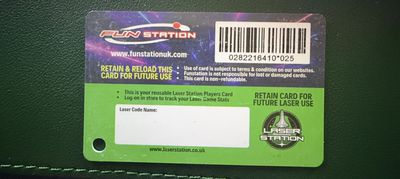
If you have a ticket for an event and there's not a digital version available for the Wallet app, you can create one using the physical pass you have. The same goes for other cards, like a membership card, for example.

The Wallet app can use ‌Visual Intelligence‌ to scan your card, and it will match it to a template with corresponding fields that you can tweak before adding it to your Wallet.

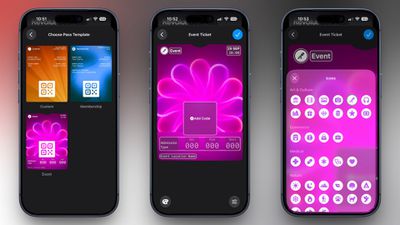
Alternatively, you can create the pass manually, choose a template ("Membership," "Event," or "Custom") and then adjust the color and other details. All you need to do then is scan the barcode or QR code from your physical pass.

Each template includes relevant information like name, location, or admission type. There are 12 background colors to choose from, or seven custom backgrounds for categories like theater, music, sports, and movies.

Fields can be added or removed when creating a custom pass, with options like label, date, membership, contact, coupon code, VIN, insurance, and more, so most physical cards should be able to be stored digitally.

Here's how you create a pass with ‌Visual Intelligence‌:

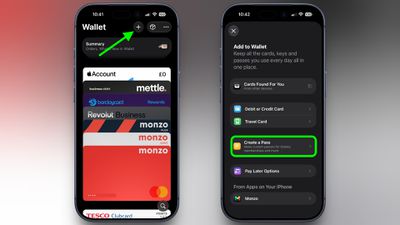
  1. Open the Wallet app on your iPhone and tap the + button at the top.
  2. Choose Create a Pass.
    wallet

  3. To let Visual Intelligence scan the pass, tap Continue, then take a photo of it in the next screen.
    pass example scaled

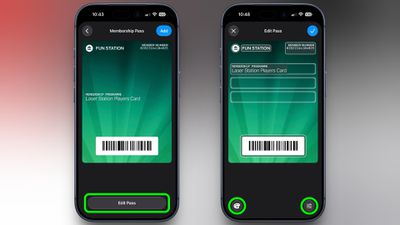
  4. After Visual Intelligence matches the pass to a template, tap Edit Pass.
  5. Use the palette icon in the bottom-left corner to change the look of the pass – you can the background colour, or use an image from your Photos library. Tap the icon in the bottom-right corner to add or remove fields.
    wallet

  6. Tap the blue checkmark at the top when you're done.
Your custom pass will now be added to your Wallet, ready for use. To edit it at any time, simply select it in Wallet, tap the three dots in the top-right corner of the screen, then tap Edit Pass.
Top Rated Comments

adrianlondon Avatar
1 week ago

Why would any venue or business accept a modified document?
It's just a way to put an email / pdf containing a QR code or barcode into the wallet.

Of course, for things which regularly regenerate the code in its own app, this won't work. Or if the ticket requires someone to actually look at it rather than just scan it, it also won't work, as you say.
Score: 9 Votes (Like | Disagree)
Rockanrolero Avatar
1 week ago
What everyone wants to know is how to do their Costco card… show us that and done 👍🏻
Score: 7 Votes (Like | Disagree)
NightFox Avatar
1 week ago

Finally! I was taking photos of these until now. The time has come to finally have my Tesco clubcard in the Wallet app and get discounts on cheap wine.
I've had my Clubcard in my Wallet for years - can't remember how though!


Attachment Image
Score: 6 Votes (Like | Disagree)
CLS9 Avatar
1 week ago
Well, that was a complete waste of time. There is no prompt to take a photo of my gym pass and when I tried to enter it manually, it wouldn't recognized the QR code and that's what they scan at the gym.
Score: 6 Votes (Like | Disagree)
1 week ago
This is definitely a nice feature to have although maybe a bit bitter-sweet for me.

I really longed for this feature 5 years ago, even more so 10 years ago, but at least in the UK most reasonable-sized businesses have now got much better about making it possible to add their loyalty cards, event tickets etc into Apple Wallet.

I'm sure that I'll still find it useful but I wish it had been introduced years ago.
Score: 6 Votes (Like | Disagree)
dannys1 Avatar
1 week ago
I remember I created custom passes a couple of years ago for going on holiday to Dominican Republic - everything that had a QR code on I created - I put in the address so it'd come on local screen automatically.

I had my little QR immigration form and my fast track through security ticket.

The queue staff at the airport didn't accept my immigration pass as proof i'd filled it in, so I had to get up the PDF anyway - and at the other end in the actual country it was for - they don't even scan the QR code, it's all linked to your passport number so you don't even need it!

The fast track staff gate keeper wouldn't accept my QR pass to get into the line, despite it working fine at the actual turn style, so I had to show her the PDF as well.

The normal person isn't ready for custom made QR code passes - they only know what they see 100 times and most of the time they don't even scan the code. It's really annoying.
Score: 5 Votes (Like | Disagree)

Popular Stories

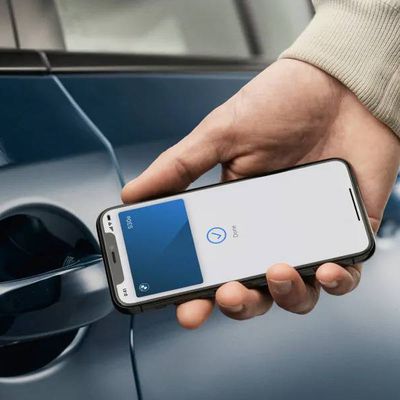
bmw car key photo

iPhone Car Keys in Apple Wallet Expanding to Three More Vehicle Brands

Tuesday September 15, 2026 6:35 am PDT by
Apple Wallet car keys are coming to three more vehicle brands, including Lincoln, Lucid Motors, and China's Freelander, according to code uncovered by MacRumors contributor Aaron Perris. However, the code does not provide a timeframe for availability. The digital key feature allows you to lock, unlock, and start a compatible vehicle with an iPhone or Apple Watch. It is already offered by...


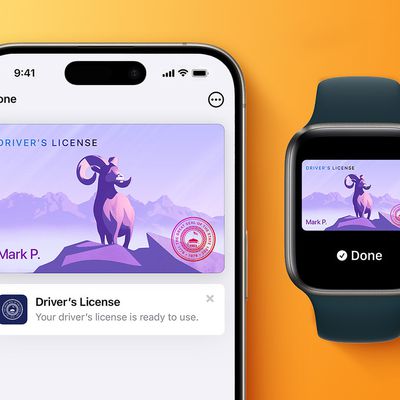
apple wallet drivers license feature iPhone 15 pro

iPhone Driver's License Feature in Apple Wallet Launches in Oklahoma

Wednesday September 2, 2026 6:38 am PDT by
Starting today, Oklahoma residents can add a digital version of their driver's license to the Apple Wallet app on the iPhone and Apple Watch. The digital ID can be used to display proof of identity or age at TSA checkpoints in select airports, at select businesses, and in select apps, but the number of places where it is accepted is still quite limited. Oklahoma is the 16th state to...
Home Hub Command Center with Dome Base Feature

Apple Smart Home Hub to Feature iMac G4-Style Design

Wednesday September 30, 2026 4:36 am PDT by
Apple's long-rumored smart home hub will have an iMac G4-style design and a host of unique features, Bloomberg's Mark Gurman reports. The smart home hub is said to feature a square 6-inch display, with variants that can be placed on a countertop or mounted on a wall. It features a single FaceTime camera on the front, with microphones and speakers in its connected base. Gurman described the...
Latest Stories
AT&T Acknowledges iPhone 18 Pro Max Issues: 'Update Immediately'
9 hours ago
New 'AirFly Drive' Accessory Turns Wired CarPlay Into Wireless CarPlay
15 hours ago
Apple Shares Photos Shot on iPhone Duo
16 hours ago
Apple Says iPhone Duo Has Replaceable 'Cover Layer'
17 hours ago
Apple's Smart Home Camera Will Apparently Have 'No Video Recording'
19 hours ago
Apple TV Just Updated Its Selection of 'Bonus' Movies
21 hours ago
iPhone 18 Pro Colors Buyer's Guide: Which Should You Choose?
21 hours ago
Early Prime Big Deal Days: Best Discounts on Accessories, TVs, and More at Amazon
21 hours ago
MacBook Pro With OLED Touch Screen Rumored to Launch in October or November
22 hours ago
Apple's All-New Home Hub Rumored to Launch in These Four Colors
23 hours ago
iPhone 18 Pro Aperture Control Goes Fully Manual in Halide 3.2
1 day ago
Apple Stores Receive 'Do Not Open' Boxes Ahead of Smart Home Products Launch
1 day ago
iPhone 18 Pro Sales Jump in China Ahead of iPhone Duo Launch
1 day ago
Apple TV Still Down for Some Users Following Apple Services Outage
1 day ago
Microsoft 365 Work Accounts May Stop Syncing in Apple Mail
1 hour ago
Apple's Smart Home Hub: Everything We Know So Far
2 days ago
Apple's Home Hub Borrows From the iPhone Duo's StandBy Mode
2 days ago
Apple Invites App Updated With Three New Features
2 days ago
Apple Event on October 13?
2 days ago
Apple Watch SE 3 vs. Series 12 Buyer's Guide: Which Should You Buy?
2 days ago
iPad Mini 8 to Offer These 10 New Features
2 days ago
DoorDash Unveils AI Food Ordering Through Apple's Messages App
2 days ago
Amazon Takes Up to $150 Off Select M5 MacBook Air Models
2 days ago
Apple Still Plans to Release a New Full-Sized HomePod
2 days ago
Apple Working to Expand HomeKit
2 days ago
Apple Smart Home Hub to Feature iMac G4-Style Design
2 days ago
Three New Apple Smart Home Products Coming on October 13
2 days ago
Apple Pay Now Available in India With Axis Bank Cards
3 days ago
OpenAI Launches Always-On 'Dots' Agents to Rival Meta's Muse
3 days ago
AirPods 5 Teardown: Batteries Removable, Case Still Tough
3 days ago

🔗 Related Apple News & Rumors

Stay updated with the latest Apple ecosystem news and verified rumors