

Powerful Image Editing App 'Pixelmator' Comes to the iPad - MacRumorsOpen MenuShow RoundupsShow Forums menuVisit ForumsOpen Sidebar
Skip to Content

Powerful Image Editing App 'Pixelmator' Comes to the iPad

by

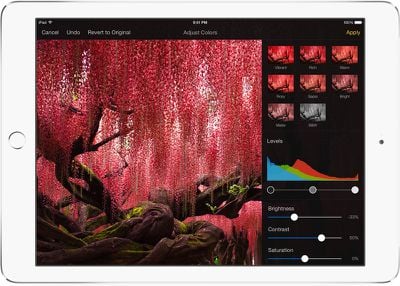
Pixelmator, a popular Photoshop replacement on the Mac, was released for the iPad today. The image editing iOS app is similar to the Mac app, incorporating many of the same tools to allow users to retouch and enhance photos and images.

The app includes a complete set of painting tools and a painting engine that can take advantage of a range of brushes from crayon and marker to pencil and paintbrush to create works of art from scratch or improve photos.
pixelmator
It offers several photo editing tools, including advanced retouching tools that let users remove unwanted objects from images in just a few minutes. There are color adjustment tools (including levels, brightness/contrast, curves, white balance, and more) to improve the look of photos, and a selection of more than 14 pre-created effects can be applied to images.


Pixelmator for iOS supports non-destructive layer styles and it includes powerful selection tools along with image straightening and cropping tools. There are also built-in shape and text tools.

Pixelmator comes with a set of top-quality retouching tools so you can easily make every picture absolutely stunning. With the innovative repair tool, quickly and easily get rid of unwanted image elements simply by painting on them or, with just a simple tap fix red eyes, brush away blemishes, smudge to smooth out hard lines, paint to boost the colors, bring in some light and so much more. Advanced technologies used in retouching tools make them incredibly fast and accurate, so that you can seamlessly bring an image to perfection.

Loaded with dozens of breathtaking effects, Pixelmator for iPad gives even more ways to enhance pictures. Add gorgeous effects like blur, vignette, vintage, black & white, light leak, bokeh, miniaturize and many more -- in an instant. You can even combine different effects for unique, near-effortless artistic creations and see the stunning results in real time.

The app has been designed from the ground up for iOS 8 and it fully supports several different iOS 8 features. It uses iCloud Drive to store images, for example, and with Handoff, it's possible to start editing an image on the iPad and pick it up on the Mac.

There's Document Picker support to allow users to edit images in other apps, and there's a Pixelmator Photo Editing extension designed for the Photos app. It's also possible to share images with other apps with Share extensions.

When Apple unveiled the new iPad Air 2 on October 16, it invited the Pixelmator team to take the stage to demo the Pixelmator app for the iPad Air 2, as it is designed to take advantage of the tablet's powerful 64-bit processor. Though created to utilize a 64-bit processor, Pixelmator for iPad is compatible with iPad 2, iPad 3, iPad 4, iPad Air, iPad Air 2, iPad mini, iPad mini 2, and iPad mini 3. iPad 4 or later is recommended for the best performance, however.

Pixelmator can be downloaded from the App Store for $4.99. [Direct Link]

Top Rated Comments

citi Avatar
156 months ago
Instant buy...especially at that price.
Score: 15 Votes (Like | Disagree)
156 months ago
Can someone tell me if macrumors makes money off these advertisements?

Why does that matter? You obviously visit this site, and it doesn't ask you for money.
Score: 13 Votes (Like | Disagree)
156 months ago
Nice. Would buy if I had an iPad.
So what are you waiting for. Go out an buy an iPad so you can enjoy Pixelmator as everyone else. :p
Score: 13 Votes (Like | Disagree)
156 months ago
I'd buy it and not use it just in order to help fund an Adobe antidote.
Score: 11 Votes (Like | Disagree)
nostaws Avatar
156 months ago
Apple had better treat developers like these well. Pixelmator adds way more value to the iPad than a lot of other apps.
Score: 10 Votes (Like | Disagree)
156 months ago
I've been playing with it on the iPad Air today. It runs smoothly, no problems that I've found.

In some ways it's even more user friendly than on the Mac. I like the rotary dial controls. Very cool.

The only gripe I have is fonts. It's so close to the Mac version that I want to use it for real projects, but without the ability to add fonts from my Mac, I can't do that. Even opening old projects isn't possible because the fonts aren't supported.

I'm sure this will get better in time.
Score: 8 Votes (Like | Disagree)

Popular Stories

Home Hub Command Center with Dome Base Feature

Apple Smart Home Hub to Feature iMac G4-Style Design

Wednesday September 30, 2026 4:36 am PDT by
Apple's long-rumored smart home hub will have an iMac G4-style design and a host of unique features, Bloomberg's Mark Gurman reports. The smart home hub is said to feature a square 6-inch display, with variants that can be placed on a countertop or mounted on a wall. It features a single FaceTime camera on the front, with microphones and speakers in its connected base. Gurman described the...
HomePod minis on gradient feature 1 1

Three New Apple Smart Home Products Coming on October 13

Wednesday September 30, 2026 4:04 am PDT by
Apple plans to introduce a series of new smart home products on Tuesday, October 13, according to Bloomberg's Mark Gurman. Apple reportedly plans to debut its long-awaited smart home hub device, a new HomePod mini, and a new Apple TV on the date. The new HomePod mini and Apple TV are set to retain their existing designs, but tout faster chips to support Siri AI. The new HomePod mini will...
iPhone Duo Open

iPhone Duo Reportedly Facing Production Problems Ahead of Launch

Tuesday September 29, 2026 6:16 am PDT by
The iPhone Duo is reportedly facing production difficulties ahead of its October launch, with early output expected to be limited. A person said to be close to Foxconn's supply chain told China's Jiemian News that final assembly yields for Apple's first foldable iPhone were only slightly above 60% as of September 17. The source said that, under Apple's current quality standards, it could...
Latest Stories
New 'AirFly Drive' Accessory Turns Wired CarPlay Into Wireless CarPlay
3 hours ago
Apple Shares Photos Shot on iPhone Duo
4 hours ago
Apple Says iPhone Duo Has Replaceable 'Cover Layer' Above the Display
6 hours ago
Apple's Smart Home Camera Will Apparently Have 'No Video Recording'
7 hours ago
Apple TV Just Updated Its Selection of 'Bonus' Movies
9 hours ago
iPhone 18 Pro Colors Buyer's Guide: Which Should You Choose?
9 hours ago
Early Prime Big Deal Days: Best Discounts on Accessories, TVs, and More at Amazon
9 hours ago
MacBook Pro With OLED Touch Screen Rumored to Launch in October or November
11 hours ago
Apple's All-New Home Hub Rumored to Launch in These Four Colors
11 hours ago
iPhone 18 Pro Aperture Control Goes Fully Manual in Halide 3.2
12 hours ago
Apple Stores Receive 'Do Not Open' Boxes Ahead of Smart Home Products Launch
13 hours ago
iPhone 18 Pro Sales Jump in China Ahead of iPhone Duo Launch
13 hours ago
Apple TV Still Down for Some Users Following Apple Services Outage
14 hours ago
PSA: Apple Mail on Mac May Stop Syncing Microsoft 365 Accounts Today
15 hours ago
Apple's Smart Home Hub: Everything We Know So Far
1 day ago
Apple's Home Hub Borrows From the iPhone Duo's StandBy Mode
1 day ago
Apple Invites App Updated With Three New Features
1 day ago
Apple Event on October 13?
1 day ago
Apple Watch SE 3 vs. Series 12 Buyer's Guide: Which Should You Buy?
1 day ago
iPad Mini 8 to Offer These 10 New Features
1 day ago
DoorDash Unveils AI Food Ordering Through Apple's Messages App
1 day ago
Amazon Takes Up to $150 Off Select M5 MacBook Air Models
1 day ago
Apple Still Plans to Release a New Full-Sized HomePod
2 days ago
Apple Working to Expand HomeKit
2 days ago
Apple Smart Home Hub to Feature iMac G4-Style Design
2 days ago
Three New Apple Smart Home Products Coming on October 13
2 days ago
Apple Pay Now Available in India With Axis Bank Cards
2 days ago
OpenAI Launches Always-On 'Dots' Agents to Rival Meta's Muse
2 days ago
AirPods 5 Teardown: Batteries Removable, Case Still Tough
2 days ago
iPhone 18 Pro Owners Complain of Speaker Crackling or Popping
2 days ago

🔗 Related Apple News & Rumors

Stay updated with the latest Apple ecosystem news and verified rumors









































