

VMware Fusion 7 Launches with Virtualization Support for OS X Yosemite and Windows 8.1 - MacRumorsOpen MenuShow RoundupsShow Forums menuVisit ForumsOpen Sidebar
Skip to Content

VMware Fusion 7 Launches with Virtualization Support for OS X Yosemite and Windows 8.1

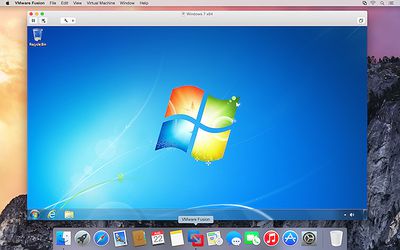
Following the launch of Parallels Desktop 10 last month, VMware has launched its new VMWare Fusion 7 virtualization software, bringing support for OS X Yosemite and improving compatibility with Windows 8.1. The release also adds a number of new features, including a new look, improved performance, enhanced connectivity, and optimization for Macs with Retina displays.
vmware_fusion_7_screen

- Designed for OS X Yosemite
Get a more Mac-like experience when running Windows applications on a Mac. The Fusion 7 updated Yosemite look and feel makes working with your Windows applications feel cleaner and more refined.

- Conquer Yosemite
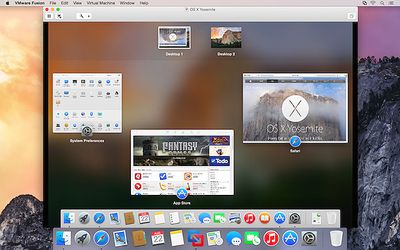
Discover OS X Yosemite by running it in a virtual machine with Fusion 7. Get more from your Mac by running OS X Yosemite and OS X Yosemite Server in virtual machines. Leveraging decades of innovation in leading the virtualization revolution, Fusion 7 is the most reliable way to develop and test new applications for the Mac and iOS.

- Ready for Windows 8.1
Get the most out of Windows 8.1 new features directly on your Mac and run Windows Store apps side-by-side with your Mac applications. With Fusion 7, view Windows Store applications in Launchpad and the Applications folder or put Windows Store Apps in the dock in Unity mode.

- Near-Native Performance
With a highly optimized 64-bit engine and multicore processing power that makes the most effective use of the latest Intel Haswell processors, Fusion 7 runs Windows and Mac applications side-by-side faster than ever.

- Retina Display Optimization
Windows never looked so good with Retina Display optimization for a crisp and detailed experience of your Windows applications. If your Mac has a native Retina display or is connected to one, Fusion 7 ensures you get a seamless experience when running Windows across Retina and non-Retina displays.

The more advanced VMware Fusion 7 Pro has also been launched, bringing the same features along with dual GPU optimization, virtual network management, enhanced support for cloned virtual machines, and more.
vmware_fusion_7_screen2
VMware Fusion 7 is available now for $69.99 while VMware Fusion 7 Pro is priced at $149.99. Those upgrading from VMWare Fusion 5 or 6 are also eligible for discounted pricing of $49.99 for VMWare Fusion 7 or $79.99 for VMWare Fusion 7 Pro.


Popular Stories

Four iPhone 18 Pro Colors Mock Feature

iPhone 18 Pro and iPhone Ultra: Pre-Orders and Release Date

Thursday July 30, 2026 6:12 am PDT by
Apple has yet to reveal when the iPhone 18 Pro and iPhone Ultra will be announced and released, but the dates usually follow a familiar pattern. Labor Day is September 7 this year. The last time the holiday fell on that day was in 2020, but the iPhone event that year was delayed until October due to the COVID-19 pandemic. So, the last time Labor Day was on September 7 in a normal year was in ...

Apple Event Logo

Apple Working on All-New Operating System

Wednesday July 29, 2026 11:39 am PDT by
Apple is developing an all-new operating system that is essentially a mix of tvOS, watchOS, and iOS, according to Bloomberg's Mark Gurman. In a report this week, he said the operating system will feature a grid of icons, widgets, and apps, along with customizable clock faces. The new software platform is intended for Apple's long-rumored smart home hub. With built-in facial recognition,...
Dynamic Island iPhone 18 Pro Feature

iPhone 18 Pro: Twelve Changes Coming to Apple's Next Flagship

Thursday July 30, 2026 3:43 am PDT by
We're less than two months out from the launch of Apple's premium next-generation smartphone lineup, and while we're not expecting a dramatic change in terms of functionality, there are still several enhancements rumored to be coming to the iPhone 18 Pro and iPhone 18 Pro Max. One thing worth noting is that Apple is reportedly planning a major change to its iPhone release cycle this year,...

Top Rated Comments

JeffyTheQuik Avatar
156 months ago
Can anyone give me just one reason, why to buy this if you want to run Windows on your Mac? We have Bootcamp and it's free - With VMware you have to pay for both Windows and VMware.

VMware must be slower than running a real install. And it costs you more.

You want to do something totally insane, like not reboot your Mac and run Windows apps right next to your Mac apps.
Score: 19 Votes (Like | Disagree)
yoz-y Avatar
156 months ago
I know. But with VMware you have to purchase Windows AND WMware. I still see no reason.

But thx for the answers :-)

When your work requires to use just one application that only runs on Windows, you will see how shelling out $80 (by your boss) is a world changing shift from rebooting every thirty minutes.
Score: 15 Votes (Like | Disagree)
156 months ago
Can anyone give me just one reason, why to buy this if you want to run Windows on your Mac? We have Bootcamp and it's free - With VMware you have to pay for both Windows and VMware.

VMware must be slower than running a real install. And it costs you more.

you can run windows within mac. among other things.
Score: 10 Votes (Like | Disagree)
156 months ago
Where are all the comments like "annual subscription", "these upgrades should be free", "I will never buy from that company again" like we say in the Parallels thread? There is even less innovation warranting the upgrade prices in Fusion 7 than there is in Parallels 10.
Score: 8 Votes (Like | Disagree)
156 months ago
VMware's usage of Windows 7 in their promo shots really highlights the fact that Windows 8.1 still isn't as good as 7 :D
Score: 8 Votes (Like | Disagree)
156 months ago

All that being said - if you NEED to run Windows on a Mac - or a PC that is supposed to run Linux as its main operating system - you have chosen the wrong main platform for your daily work. You should have stayed with Windows, period.

I NEED to run windows on a mac (visual studio), but I also NEED to run xcode. I don't want 2 machines, and I want to easily share data between the 2 platforms.

There are use cases for parallels/vmware, otherwise why would people buy it (Also its a lot cheaper in hardware cost and support/backups/restore time to have a couple of virtual machines on one set of hardware, regardless of what operating systems are actually in play).
Score: 7 Votes (Like | Disagree)

🔗 Related Apple News & Rumors

Stay updated with the latest Apple ecosystem news and verified rumors







































