

'Air Display' to Let You Use the New iPad as a HiDPI 'Retina' Display for Your Mac - MacRumorsOpen MenuShow RoundupsShow Forums menuVisit ForumsOpen Sidebar
Skip to Content

'Air Display' to Let You Use the New iPad as a HiDPI 'Retina' Display for Your Mac

Avatron, the makers of the popular Air Display app for iOS, revealed today that they will be updating their utility to fully support the 3rd Generation iPad.

Air Display allows you to use your iPad (or iPhone/iPod Touch) as an extra display for your Mac or Windows computer. This old video shows how the app works.


The iPad acts as a wireless second screen that can be used by OS X in the same manner as any other monitor.

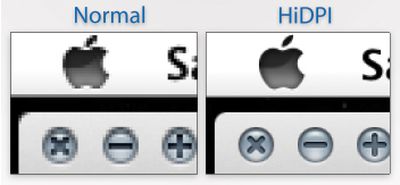
The developers were able to get their screen-extending app working with the new iPad with good performance. But using a 2048x1536 iPad as a secondary screen computer screen would result in very small windows, text and user interface elements. So, the team has also included support for Lion's new HiDPI mode. We've covered HiDPI mode in the past. HiDPI mode allows OS X to support high resolution monitors while retaining the same relative size for user interface elements, such as windows and buttons.
tumblr m17x2zcevC1r6vkzl
HiDPI mode will let the new iPad act like a 1024x768 point screen where each point is made up of 4 pixels. Apple has already built in support for HiDPI and some of their Apps, such as Messages, already include Retina-sized artwork that work in this mode. Users simply have to choose "1024x768 (HiDPI)" mode in their System Preferences to take advantage of the new mode.

Air Display is a $9.99 Universal App in the App Store. [iTunes] The Retina-enabled version will be included in a forthcoming update.


Popular Stories

Apple Event Logo

Apple Working on All-New Operating System

Wednesday July 29, 2026 11:39 am PDT by
Apple is developing an all-new operating system that is essentially a mix of tvOS, watchOS, and iOS, according to Bloomberg's Mark Gurman. In a report this week, he said the operating system will feature a grid of icons, widgets, and apps, along with customizable clock faces. The new software platform is intended for Apple's long-rumored smart home hub. With built-in facial recognition,...
imac video apple feature

Apple Made Its Second-Biggest Acquisition Ever This Year

Wednesday July 29, 2026 12:03 pm PDT by
Apple this year acquired Israeli startup Q.ai for close to $2 billion, according to the Financial Times. That would make this Apple's second-biggest acquisition ever, after it paid $3 billion for the popular headphone maker Beats in 2014. This is also the largest known Apple acquisition since the company purchased Intel's smartphone modem business and patents for $1 billion in 2019. Q.ai...
Dynamic Island iPhone 18 Pro Feature

iPhone 18 Pro: Twelve Changes Coming to Apple's Next Flagship

Thursday July 30, 2026 3:43 am PDT by
We're less than two months out from the launch of Apple's premium next-generation smartphone lineup, and while we're not expecting a dramatic change in terms of functionality, there are still several enhancements rumored to be coming to the iPhone 18 Pro and iPhone 18 Pro Max. One thing worth noting is that Apple is reportedly planning a major change to its iPhone release cycle this year,...

Top Rated Comments

187 months ago
I have Air Display, but my stupid ass didn't read the description fully and I didn't realize that my Macbook Pro isn't compatible with it. BLAH!
Score: 6 Votes (Like | Disagree)
Macman45 Avatar
187 months ago
Bring this to me NOW!!!:)
Score: 5 Votes (Like | Disagree)
garylapointe Avatar
187 months ago
This is one of those apps that need to be free and have an in app purchase to activate it.

It could have a huge flashing watermark in the middle of the screen, but at least you'd know if it worked or not. If you minded the refresh rate or not.

Then, they'd probably only get good feedback.

I'd try it if it was free, but otherwise $10 for something I might not be happy with?

(And if it used USB, wouldn't that be faster than WiFi and it would charge your device at the same time?)

Gary
Score: 3 Votes (Like | Disagree)
MRU Avatar
187 months ago
I just wish they could increase the refresh rate and reduce the noticeable lag that the app has.

I would use it a lot more if it wasn't so laggy.
Will pushing more pixels to it over the air result in further lag ?
Score: 3 Votes (Like | Disagree)
187 months ago
Just what I need... a 9.5" third monitor for my Mac :p
Score: 3 Votes (Like | Disagree)
187 months ago
I use this all the time. Whenever I'm not accessing iOS my iPad is a secondary, portable touchscreen display for OSX, and it's hugely useful.


...however, wifi can barely handle the bandwidth of the 1024x768 display streaming over it. I can't imagine how it's going to cope with 4 times as many pixels. It requires a clean ad-hoc connection as it is.

Jailbroken + a jumble of tricky tweaks, you can get AirDisplay to run via the cable, and it is perfectly fast. The lag is gone and the performance is smooth and steady. If Apple would get over their impractical wireless fetish and allow Avatron access to the USB bus, this app could be the most useful app in the store. + it'd leave your net connection open to proper network traffic.

But no, instead we have another "could be awesome" with the iPad. It's selling great, sure, but Apple's still content to restrict its usefulness...

I'd be interested in such tweaks. Please do share them.
Score: 2 Votes (Like | Disagree)

🔗 Related Apple News & Rumors

Stay updated with the latest Apple ecosystem news and verified rumors






































