

OS X Lion's HiDPI Modes Lay Groundwork for Retina Monitors - MacRumorsOpen MenuShow RoundupsShow Forums menuVisit ForumsOpen Sidebar
Skip to Content

OS X Lion's HiDPI Modes Lay Groundwork for Retina Monitors

With the release of Lion, users can now see some of the groundwork that Apple has laid down in OS X for ultra high resolution displays. We covered Apple's support of these new "HiDPI" modes while OS X Lion was still in beta.

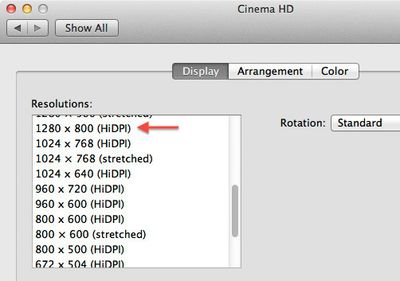
For those who have downloaded Apple's Xcode for Lion, you can enable "HiDPI" mode in the Quartz Debug application found in the Developer directory. Once enabled, OS X's Displays control panel offers additional 1/4 (and lower) resolution sizes as shown here on a 30" Cinema Display with a native resolution of 2560x1600:
hidpex
Unfortunately, there's not much to see yet. The 1280x800 HiDPI resolution shown here represents exactly 1/4 of the area of the native resolution of the 30" Cinema Display and simply offers you a zoomed in view on present day monitors.

The reasoning is that when displays do reach ultra high resolutions and dots per inch (DPI), simply drawing the OS X interface as-is would result in very small interface elements. Apple's solution is to scale all on-screen elements automatically by a factor of two (in each direction).

So, in the future, we might be using 2560x1600 (HiDPI) mode on a theoretical 30" 5120x3200 pixel display. All user interface elements would stay the same size as today's 30" Cinema Display, but when available, higher resolution textures would be used to render the graphics. This is the same way that it worked when Apple transitioned from the original iPhone resolution to the iPhone 4's retina display.

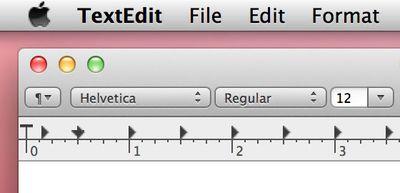
Arstechnica offers a good example screenshot showing this in effect. Fonts already render in the higher resolution while bitmapped graphics demonstrate a blocky effect as they have not yet been replaced with high resolution ("Retina") graphics.
textedit hidpi
The groundwork is there now, so when technology catches up, we could see double-DPI Retina displays in our future.


Popular Stories

iOS 27 Next to iPhone

Here's When iOS 27 Rolls Out Today in Every Time Zone [Update: It's Out]

Sunday September 13, 2026 3:00 am PDT by
Update 10:04 a.m.: iOS 27 is rolling out now, though it may take a bit for all users to see it, so keep checking! Apple is about to release iOS 27, which will finally deliver more advanced Siri AI capabilities as well as a variety of other refinements, improvements, and new features to iPhones. It's Apple's biggest software update of the year, and Apple announced at Wednesday's iPhone event...
iOS 27 Icon iPhone

iOS 27 Available Now With These 8 New Features

Monday September 14, 2026 9:00 am PDT by
Update — 10 a.m. Pacific Time: Apple has released iOS 27. During its iPhone 18 Pro and iPhone Duo event last week, Apple announced that iOS 27 will be released widely on Monday, September 14. iOS 27 should be available around 10 a.m. Pacific Time / 1 p.m. Eastern Time today via the Settings app, under General → Software Update. Below, we have highlighted eight new features and...
Apple iCloud Plus expansion hero

iCloud+ Now Includes Apple TV, Apple Arcade, and Curated Apple Music Stations in Over 100 Countries

Tuesday September 15, 2026 1:43 am PDT by
Apple today announced a new subscription initiative that turns paid iCloud+ subscriptions into a broader services bundle in more than 100 countries. In select countries, Apple says every paid iCloud+ plan, including the cheapest 50GB tier, now includes Apple TV and Apple Arcade "at no additional cost," while family sharing extends the storage, TV and Arcade access to up to five people....

Top Rated Comments

arn Avatar
198 months ago
Why not go vector based? Then it will scale to whatever you like.

because it's hard to make all graphics into vectors?

arn
Score: 11 Votes (Like | Disagree)
gnasher729 Avatar
198 months ago
Why not go vector based? Then it will scale to whatever you like.

You're not a software developer, are you?
Scaling is not the problem. Scaling and not looking like ****, that is the problem.
Score: 7 Votes (Like | Disagree)
198 months ago
I can’t wait to say, “Oh, I don’t want to watch that 1080p video on my Mac, it’ll look like crap!”
Score: 6 Votes (Like | Disagree)
jessea Avatar
198 months ago
So, maybe you'd care to enlighten us ? Maybe I'm just nostalgic for the 80s and 90s, back when vector graphics were a possibility. Now that we have much more powerful CPUs and GPUs, it seems that vector graphics have become way too hard to handle... :rolleyes:


Only stuff that's required to scale. IE : the UI.

And games have been using vector graphics since the 80s and 90s, at least, games made with a little known technology called Flash. Or the above Sierra game, Conquest of Camelot ;) In fact, isn't that screenshot from a game that uses vector graphics ? (Plants vs Zombies ?).

Obviously, not all UI elements are needed to scale. The desktop wallpaper can remain a bitmap image, but things like icons, buttons, fonts and all UI controls would need to be scaled.

Think man, think.

Sure, I'll help enlighten. ;) Here are just a few points (some of which Arn has already pointed out):


* Photorealistic graphics. As stated multiple times, you can't use vector for this.
* Pixel-perfect designs. When you see a gorgeous iPhone or iPad app, it's because of this. You can't just resize a vector icon and expect it to look great at any size. It simply doesn't work like that.
* Processing power. Load a complicated piece of vector artwork in Illustrator. It takes time to process all the math in a vector illustration.
* File size. Making the assumption that vector is always smaller is wildly incorrect. Sometimes it is, sometimes it isn't.
* Textures. Wood, cloth, stone, grunge. Those detailed, fantastic textures aren't vector -- they're raster. Can you use vector for them? Yes, the simple ones. But to get the same depth of detail (and you never will, because textures are often photorealistic), you get back to hurting processing power.
* Effects rendering. Rasterizing an effect is much simpler than combining it with vector art. It's simple for the designer, prevents a developer from having to code the effect (which is no small task), and saves processing power.
* Development time. Coding for vector in everything can increase development time due to the shortcomings of vector-based art. Often it's just faster to use rasterized artwork. Keep in mind this doesn't mean a designer doesn't use vector in his workflow, it just means that he saves it to raster at the end.


These are just a few things off the top of my head. I'm sure there are many more, but I don't have time to write a short story. ;)
Score: 5 Votes (Like | Disagree)
TumbleDryer Avatar
198 months ago
Maybe, but I know for a fact vector file sizes are much larger

No they are much smaller. They contain less information.
Score: 5 Votes (Like | Disagree)
TumbleDryer Avatar
198 months ago
That's funny, I could have sworn you originally said:

Man up and admit you were wrong for goodness sakes.


I was replying to a generalisation of the fact. Someone stated they are bigger. I said they are not, in response to their generalisation. I could of gone all boring and started stating static vector filesizes and variable bitmap sizes for scaled images of each format but I didn't.

What is your problem anyway? I asked a question 'why cant vectors be used?'. Someone, maybe you, responded and I then asked a further question regarding the response? Are we not allowed to ask questions on forums these days without people looking for a fight? Why do I have to 'man up' when I have already stated I dont fully understand the concept?

I'm asking questions because I don't understand something. I don't pretend to understand things either unlike some people around here.

Score: 4 Votes (Like | Disagree)

🔗 Related Apple News & Rumors

Stay updated with the latest Apple ecosystem news and verified rumors











































