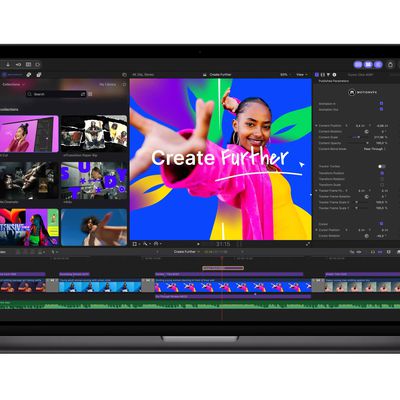
Apple today began rolling out the Creator Studio app updates that it announced last month. For example, both the Creator Studio version and standalone version of the Logic Pro app for the Mac were updated today. It is our understanding that Pixelmator Pro will also be updated today, with more apps in the suite set to be updated throughout November.
MacStories editor John Voorhees tested the updated Creator Studio apps over the past week and has shared his impressions of the new features.
Logic Pro for Mac has received a new Liquid Glass design, an AI-powered Intelligent Assistant feature that can help you build beats using natural language, a redesigned browser that centralizes things from loops and instruments to patches and plug-in presets, an enhanced Stem Splitter that now separates drums, and more.
Sidecar support will turn an iPad into a multi-touch controller for Logic Pro on the Mac.
Apple says Intelligent Assistant requires a Creator Studio subscription, so that feature will not be available in the one-time purchase version.
Here are the Logic Pro version 13.0 release notes for the one-time purchase version, which costs $199.99:
Version 13.0 - Unified Browser
• Find the perfect sound faster with a redesigned browser that brings your entire library into one place — loops, one-shots, instrument and effect patches, and plug-in presets
• Add your own custom or third-party sound to the browser and Logic Pro uses music understanding to analyze and classify them, applying tags that make even massive sample libraries easily searchable
• Narrow results with dynamic tag filtering, or describe what you're looking for in plain terms like "atmospheric pad" or "lo-fi kick"
• Find similar sounds or samples across your entire collection with ease
• Browse your licensed Splice sounds alongside the rest of your library
• Add any folder on your Mac as a Browser location for instant access to your personal collection
Enhanced Stem Splitter
• Break the drum stem into individual tracks — kick, snare, hi-hat, toms, cymbals, and other percussion
• Rebalance your entire drum mix without ever needing the original multitracks
All-New Liquid Glass Design
• Bring clarity to your workflow with translucent surfaces and deeper contrast — menus, toolbars, and windows feel lighter and more refined
Sidecar Support
• Transform your iPad into a Multi-Touch controller for Logic Pro on your Mac
• Tap to trigger cells in Live Loops, populate Step Sequencer patterns, adjust plug-ins and instruments, and control multiple mixer channels at once
Play Surface
• Play instruments with a resizable performance window — trigger drum and chord pads with your typing keyboard and mouse, or tap your iPad using Sidecar
• Play a musical keyboard with controls for velocity, modulation, and polyphonic pitch glide
• Make beats by triggering drum pads and use note repeat to add rolls — perfect for trap hats
• Customize Chord pads to follow the Chord track in realtime, so every chord and note you play fits perfectly
Step Sequencer Multi-Select
• Select a range of steps with a drag or Shift-click, then adjust velocity, note repeat, or any parameter for the entire selection at once
• Copy and paste groups of steps to new positions or rows, and use dedicated key commands to select all steps in a row, invert a selection, or nudge selected steps
Apple has more detailed Logic Pro release notes in a support document.
For $12.99 per month or 129 per year in the U.S., a Creator Studio subscription provides access to full-featured versions of Final Cut Pro, Logic Pro, Pixelmator Pro, Motion, Compressor, MainStage, Keynote, Pages, Numbers, and Freeform.
One-time-purchase versions of Final Cut Pro, Logic Pro, Pixelmator Pro, Motion, Compressor, and MainStage remain available on the Mac App Store.
Free versions of Keynote, Pages, Numbers, and Freeform continue to be available, but they do not receive all of the new Creator Studio features.
When the remaining updates are released, we will let you know.