

There's a range of Made for iPhone-compatible Apple-approved Bluetooth controllers available, all of which will work with the new Apple TV, but the SteelSeries Nimbus is the only controller that was designed specifically for the Apple TV in partnership with Apple.
As such, it's been heavily marketed by Apple and it's sold alongside the Apple TV as an accessory in Apple Stores. We went hands-on with the SteelSeries Nimbus to figure out whether it's worth its $50 price tag and if it's a must-have gaming accessory for the new fourth-generation Apple TV.
Design
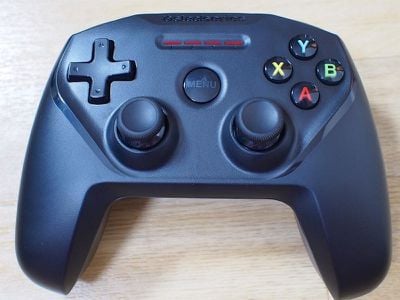
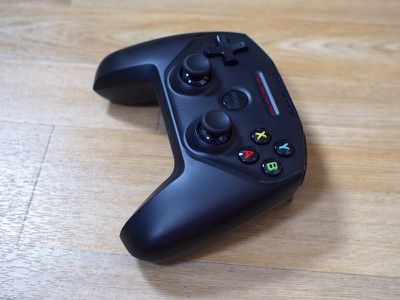
The Nimbus is similar in size and design to the Stratus XL, an earlier controller SteelSeries released. It looks like a cross between an Xbox One controller and a PlayStation 4 controller, with a shape that's close to the Xbox controller but a PlayStation-style layout. It's also very similar to many existing Made for iPhone controllers like the popular Mad Catz C.T.R.L.i.
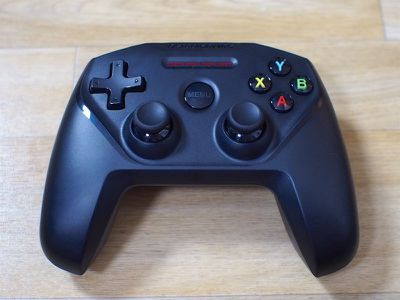
If you've used one Made for iPhone controller, you've essentially used them all. The Nimbus is not much different than the rest of the available controllers on the market, so choosing a controller to purchase really comes down to preference for things like size, button layout, trigger shape, and overall design.
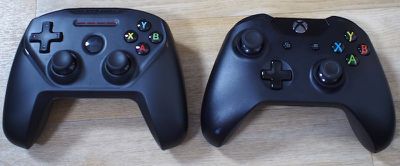
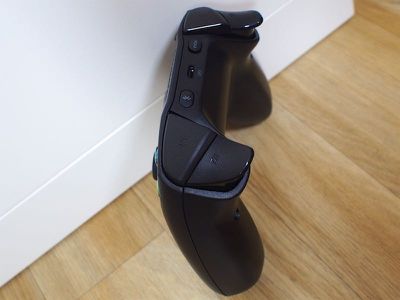
On the Nimbus, there's a d-pad at the top, located across from four action buttons. Two analog joysticks sit at the bottom, adjacent to one another as on the PS4 controller. In the middle, there's a large Menu button, and at the back, there's a Bluetooth button, a Lightning port for charging, and a "Hold" button that toggles the power on and off. There are two triggers on each side, along with shoulder buttons above those.
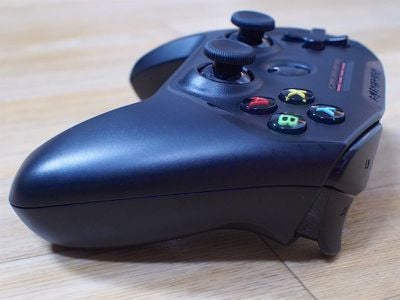
A lot of early Made for iPhone controllers were expensive and had a poor build quality, but over the last several months, things have improved. I was pleasantly surprised with the quality of the SteelSeries Nimbus, especially at it's $50 price point. It has a solid feel in the hand and it seems like a product that's going to hold up well to years of heavy use.
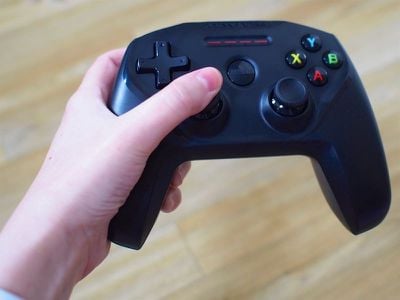
In the hand, the Nimbus was comfortable, even for long periods of gaming. I am primarily an Xbox One user (I have a PlayStation, but it essentially just collects dust) and so I tend to prefer controllers like the C.T.R.L.i, but I adjusted well to the setup of the Nimbus. I especially liked the triggers on the Nimbus. They're wider than those on the other controllers I've used and their shape made them easy to press. I have small hands so triggers can be problematic on some controllers - that's not the case with the Nimbus.
The d-pad is easy to use and has a design that I prefer over the d-pad of the C.T.R.L.i, and the analog sticks were smooth and easy to use. The buttons feel exactly like the buttons on the Xbox controller to me, and overall, I had no complaints about the layout of the controller, its quality, or the feel of any of its components. It's a solid controller.
That said, there are a few questionable design choices. At the top of the controller above the Menu button, there's a set of four numbered LEDs. I assume these are meant to denote which player you are in an iOS game, but the lights don't work properly even when two controllers are connected to an Apple TV. The Apple TV only allows a maximum of two controllers anyway, so it's a curious and somewhat confusing design choice. On a practical basis, these light up when charging and will flash when the battery is low.
Bluetooth Connection
The Nimbus uses Bluetooth 4.1, which theoretically would offer better energy savings and perhaps a more solid Bluetooth connection with an Apple TV or iOS device, but I couldn't tell the difference. It stayed connected and there was no perceptible lag, but that's been true of other accessories I've used as well.
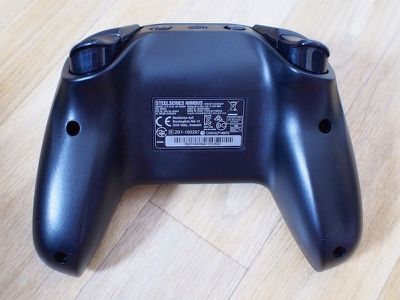
I believe the Nimbus is the only controller available right now that offers Bluetooth 4.1. By the way, the setup is the same as any other Bluetooth device on an iOS device, and it's similar on an Apple TV. Navigate to the Settings, choose Remotes and Devices, and then activate the Bluetooth on the Nimbus. I had no problems getting it paired.
Charging
The SteelSeries Nimbus sets itself apart from other Apple-approved gaming controllers on the market with its built-in Lightning port. It's able to charge over Lightning, which means you don't need to have a micro-USB cable on hand.
Being able to charge over Lightning is super useful because it means I only need a single cable to charge all of my iOS devices and the controller. It might not seem like a big deal to use a micro-USB cable, but I travel a lot and getting to cut out even a single extra cable is great.
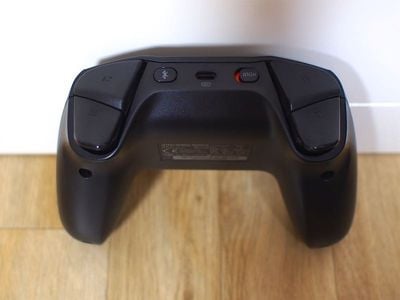
Apple just recently started letting third-party accessories incorporate Lightning connectors and ports, so hopefully charging over Lightning is something that's going to become a lot more common in the future.
It should be noted that the SteelSeries Nimbus does not include a Lightning cable in the box, likely to help keep the cost low. You will need to use the Lightning cable that comes with the Apple TV, the iPhone, or the iPad.
The Nimbus battery lasts for 40 hours before it needs to be recharged via Lightning, which is long enough for quite a few gaming sessions. It doesn't take too long to charge, either. Mine was full within a couple of hours.
Gaming
When it comes to the Apple TV, the Nimbus is hindered by one thing - a distinct lack of games that adequately take advantage of the more advanced controls that it offers. A lot of the games that I tried to play using the controller used only a button or two and I had little motivation to use a controller over the Siri Remote for the Apple TV. Other games had no controller support.
Gaming on the Apple TV probably isn't going to approach console quality gaming without some policy changes. Right now, Apple requires Apple TV games to be fully playable with the Siri Remote, which offers limited input methods. When using the controller to play games on the Apple TV, I was frustrated every time it wouldn't do a logical action I wanted it to do because the controls were just too simple.
There were a few bright spots where the controller came in handy, though. Disney Infinity 3.0, Oceanhorn, and Geometry Wars benefitted from the Nimbus controller on the Apple TV, and of course it was useful for iOS apps that take advantage of a controller. As the Apple TV matures, I'm sure there will be a lot more apps that are better designed for controller input, but it's slim pickings right now since everything is so new.
Bottom Line
Do you need a gaming controller for the Apple TV? The answer is no. At this point in time, there are a limited number of games on the Apple TV and only a fraction of those support game controllers. Of those that do support the controller, few use more than a single button, making the Apple TV remote more than adequate for gaming.
Until Apple changes the rules that require developers to create games that can be controlled by the Apple TV remote in addition to a controller or gives developers more incentive to create compelling games on the Apple TV, there's no real need to purchase a controller like the SteelSeries Nimbus specifically for use with the set-top box.
That said, this is a nice controller. If you prefer the feel of using a standard controller over the remote (even for a single button) it's worth picking up. It's also worth purchasing if you plan to use it with other devices beyond the Apple TV, like the iPhone and the iPad.
In comparison to other Made for iPhone Bluetooth-enabled controllers, the SteelSeries Nimbus has a solid build quality, a good feel in the hand, an affordable price tag, and it's the only one of the controllers that can charge using a Lightning cable, a benefit that's highly convenient. In short, if you're planning to buy a controller, this is probably the one to get.
If you already own an MFi controller, there's probably no need to upgrade. The Nimbus has some neat features, but it's not all that different from a lot of other readily available controllers.
How to Buy
The SteelSeries Nimbus controller can be purchased directly from Apple for $49.95.














































Top Rated Comments
And because the Nimbus controller is MFi certified, it will work with any game on the Apple TV that supports controllers. It is not game specific.
Its pretty awesome with NES ROMs sideloaded.
Mac rumors you should review the horipad ultimate controller