Lifeprint Harry Potter Magic Photo and Video Printer Review - MacRumorsOpen MenuShow RoundupsShow Forums menuVisit ForumsOpen Sidebar
Skip to Content

Review: Lifeprint's Harry Potter Printer Lets You Print Photos That Come to Life Using Augmented Reality

by

Lifeprint recently came out with its newest product, the Harry Potter Magic Photo and Video Printer, a Harry Potter-themed version of its standard Lifeprint photo printer that connects to the iPhone.

The Harry Potter version of the Lifeprint printer is identical in function to the regular Lifeprint printer options, but it has a unique Harry Potter design and the branding is a clever way to highlight the Lifeprint's augmented reality capabilities.


In the Harry Potter universe, photographs are animated rather than still, something that Lifeprint mimics through an augmented reality app that can play videos or Live Photos in the Lifeprint app when a photo printed with a Lifeprint printer is scanned.
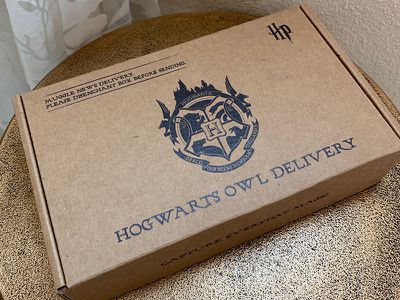
lifeprintharrypotterbox

Design

Functionally, the Harry Potter printer is similar in design and shape to the standard Lifeprint printer. Like all Lifeprint printers, it is a ZINK printer which means it uses ZINK paper with no need to bother with printer cartridges and other hassles.

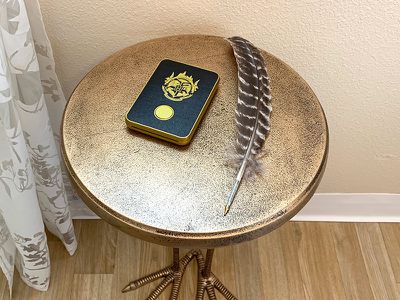
The Harry Potter printer is rectangular in shape and is thicker and wider than an iPhone, but still portable enough to easily tuck into a bag or backpack. It measures in at about 4.7 inches long, just under an inch thick, and three inches wide.
lifeprintharrypotterdesign
You can get the printer in either black and gold or black and white, with both options decorated with a Hogwarts crest on the front. The crest isn't as ornate as it is in the Harry Potter movies, but it features the four houses, an outline of the castle, and the Hogwarts motto, "Draco Dormiens Nunquam Titillandus" which means Never Tickle a Sleeping Dragon.

lifeprintharrypotterinhand
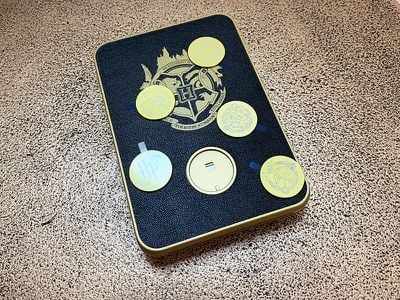
The printer itself is made from a gold plastic with a textured top plate where the Hogwarts branding is emblazoned. Below the Hogwarts crest, there's a circular spot where you can add a house crest. The printer ships with four circular crests for Gryffindor, Slytherin, Hufflepuff, and Ravenclaw.
lifeprintharrypottercustomization
Because it's made of plastic, the printer feels a bit lightweight and cheaper than I'd like it to feel, but it looks nice on a desk next to other Harry Potter paraphernalia.

The top part of the printer slides up and off of the bottom part to allow you to insert the ZINK paper, and then the entire thing slides back together. It takes just a few seconds to open it up, slide the paper in and then put it back together again.

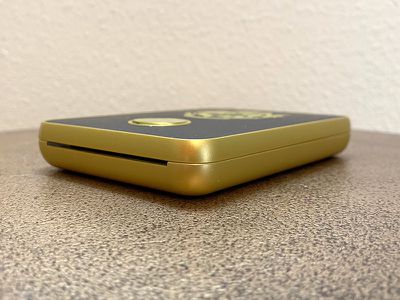
At one bottom edge, there's a micro-USB port for charging purposes, a power button to turn it on, and a little lock so it can be locked in place on a table or other surface if desired.
lifeprintharrypottersideview
The other bottom edge has a small slot which is where the photograph comes out after you print it.

ZINK Paper

The Harry Potter Magic Photo and Video Printer is a ZINK printer, as mentioned above, which means it uses ZINK paper. ZINK stands for zero ink, and as the name suggests, there is no ink involved. It is thermal paper that uses heat to print a photo.

ZINK paper is great because there's no need to bother with printer cartridges, plus it's super fast with no smearing or fading when printing. ZINK paper is also sticky on the back so you can turn your photos into stickers.
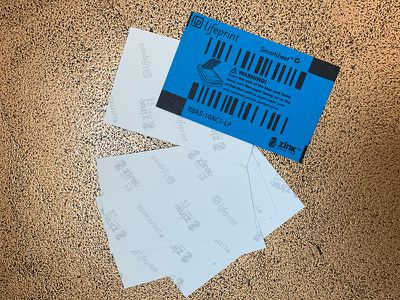
lifeprintharrypotterpaper
The Harry Potter printer uses two inch by three inch ZINK paper, which means the photos that you get out of this printer are tiny.

ZINK paper is, unfortunately, expensive, and that's a major downside when purchasing a Lifeprint printer or a similar printer that uses ZINK. On Amazon, it costs just over $27 for a 50 pack of compatible paper, which means each photo is going to cost you a little more than 50 cents.

50 cents may not sound like a lot, but keep in mind that you can get larger 4x6 prints from big box stores like Walmart for around 25 cents in the store or printed and shipped for as little as nine cents from sites like Shutterfly.

Having immediate access to your own prints is a nice benefit of a ZINK printer because it means you can print out photos of friends right before their eyes or take it to a party for instant shots, but it's not cheap.

App Functionality

To use the Harry Potter printer, you need to download the Lifeprint app and connect the printer to your iPhone over Bluetooth, a process that's simple.

You will need to sign up for a Lifeprint account to use the Lifeprint printer, and I noticed that Lifeprint makes it irritating to choose a password by not supporting special characters. This is frustrating when creating an account and no special characters means a less secure password because Safari's automatic strong password functionality, which involves dashes, doesn't work.

The password still requires an uppercase letter and a digit though, instructions that aren't provided until after you've tried creating a password without one, so the account creation process is going to take some time while you try to think up a secure password that fulfills all of the requirements but doesn't use Safari's very simple, very quick password function.

Once an account is created and the printer is connected to your phone via Bluetooth, there's a quick pairing confirmation process to go through before you're ready to print. With the Harry Potter version of the printer, the Lifeprint app is able to detect it, and it switches over to a matching Harry Potter-themed interface that's darker than the standard theme with Harry Potter-style app icons.

Aside from the Harry Potter skin, the app is functionally the same, with the exception of Harry Potter-themed stickers that you can add to your photos.
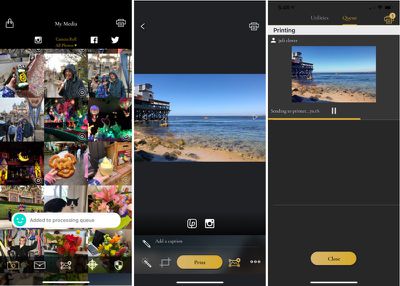
lifeprintinterface
The main app interface lets you select a photo for printing directly from your iPhone's camera roll. Once you choose an image to print, there are an extensive number of editing tools in the app. You can add the aforementioned Harry Potter stickers or emoji stickers, and there are options for text, drawing, frames, and more.

You can select from filters that change the look of the photo and overlays that add things like raindrops, light leaks, and paper texture. The overlays are a neat addition to the photos, and I wish there were more overlay options.
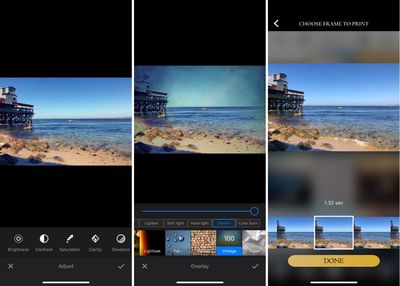
lifeprintappeffects
There are also standard photo editing tools for adjusting aspects like cropping, brightness, contrast, saturation, clarity, exposure, white balance, and more, and there's an auto adjust tool that will brighten up photos automatically.

You can take a photo directly within the Lifeprint app that can then be printed, and if you use the front-facing camera, there are a number of Harry Potter-themed lenses to use that add items like Harry Potter's glasses and scar, a house scarf, Luna Lovegood's Spectrespecs, and Mad Eye Moody's rolling eye.

lifeprintharrypotter
There are also other non Harry Potter-themed filters for both the front and rear-facing cameras.

Augmented Reality Capabilities

The Harry Potter theming comes into play with the printer and the app through its augmented reality feature that works when printing stills from videos or Live Photos (which are essentially photos with a video attached). You can choose these in the Lifeprint app, select a frame to print, and then when you view it with the Lifeprint app, it will animate.

Printing a still frame from a video works fine, but I wasn't happy with the way Live Photos work. Live Photos on an iPhone capture a bit of video before and after a main key frame, which is the sharpest, highest resolution. When importing a Live Photo into the Lifeprint app, it does it as a video, and the main key frame is lost.

With both Live Photos and videos you need to select a still frame to print, and with Live Photos, it's difficult to find the part of the video that's most in focus. It's not a dealbreaker, though, and being able to print Live Photos and videos that animate when someone views them through the app is a neat enough effect that it's worth the extra editing time to find the sharpest frame.

When you print a Live Photo or a video and then give it to someone, that person can view it as is, a still printed photo, or download the Lifeprint app and scan it to view the animation that's attached to it. By the way, you can select a still photo and then attach a different video too it, which is a fun effect.

Lifeprint's AR functionality is something that I've thought was a bit gimmicky on other Lifeprint printers, but on this one, it fits in well with the theme, and with the growing popularity of augmented reality, using an iPhone to scan a photo to see an animation is something that makes more sense to people.

You can, for example, print a photo of your cat and then attach a video of your cat in action, which a friend can then view over the top of the original photo when it's scanned via the app. Here's a demo of a monster from Meow Wolf. I printed a still from a video and attached the moving part of the video, so it's visible when scanned via the Lifeprint app.


Being able to watch a still photo animate through the Lifeprint app is a lot like looking at one of the moving photographs from the Harry Potter universe, but it does require several more steps. Anyone who wants to view an animated Lifeprint photo is going to need to open up the App Store, download the Lifeprint app, open it up, allow it to access the camera, and then scan the photo.

As a side note, whenever you print with the Lifeprint printer, it automatically uploads it to Lifeprint's built-in social network. If you don't want your photos shared (which I don't), make sure to check the little box when printing that says "secret."

Photo Quality

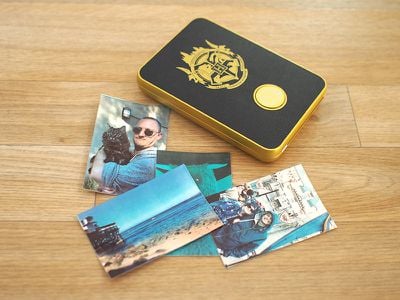
Something to be aware of when purchasing the Harry Potter printer or any printer that uses ZINK is that photo quality is not great. I've tested and owned multiple ZINK printers from a range of different companies, and the photos all come out about the same.

You are not going to get crisp, color accurate pictures using ZINK, just because of the nature of thermal paper.

lifeprintharrypotterphotoexamples
It's best to think of photos from the Harry Potter printer as similar to Polaroid pictures you might take with an instant camera. They can be a little bit fuzzy and the colors are never quite right, but they have a certain charm to them that can even be enhanced with filters and edits.

ZINK photos tend to come out much darker than they appear on your screen, so you'll get good results raising the exposure or brightness a good bit before you print. Blue tinting is also common, so it can help to tone down the blue shades in an image.

I like how ZINK photos come out, and the Harry Potter printer is, thankfully, free of some of flaws that can happen with these kinds of printers, such as lines through the photo.

Bottom Line

The Harry Potter Magic Photo and Video Printer is a lot of fun and a great way to print photos instantly, which is fun at parties and is great for scrapbooking and similar purposes because they're stickers.

Lifeprint's augmented reality feature that animates photos when scanned via the Lifeprint app is the perfect companion to the Harry Potter theme, and it's neat to see a little bit of magic added to a regular still photo.

Unfortunately, Lifeprint is charging $150 for the Harry Potter-themed printer. The regular 2x3 Lifeprint printer that does essentially the same thing is only $77 on Amazon, so that's quite a markup in price for the Harry Potter branding.

This is not the printer to get for someone who doesn't care about Harry Potter, but for a Harry Potter fan, the addition of the Harry Potter printer design, the Harry Potter stickers in the app, the Harry Potter lenses, and the other Harry Potter theming may make it worth the purchase. It's pricier, but this version is a fun gift for a major Harry Potter lover.

How to Buy

Lifeprint's Harry Potter Magic Photo and Video Printer can be purchased from Amazon.com for $150.

Note: Lifeprint provided MacRumors with a Harry Potter photo printer for the purpose of this review. No other compensation was received. MacRumors is an affiliate partner with Amazon and may earn commissions on purchases made through links in this article.

Top Rated Comments

104 months ago
Can, please, for love of us, somebody just create a simple app for iPad, which displays photo and uses front camera so when you move in front of it, it activates “live photo”?
It would be a still picture, but once you would come closer, it would start to move
Score: 1 Votes (Like | Disagree)

Popular Stories

apple pro tell logo

Apple Launching Five New Products Today

Thursday November 5, 2026 12:59 am PST by
Apple is launching five new products on Friday, November 6, following pre-orders that opened last week, including its first touchscreen MacBook Pro models. The following new products will be available from today: iPad mini with OLED display and A20 Pro chip iMac with M6 chip 14-inch MacBook Pro with M6 chip 14-inch MacBook Pro with OLED touchscreen 16-inch MacBook Pro with OLED...
Apple Store Logo

Apple Store in UK Permanently Closing Later This Month

Tuesday November 3, 2026 7:34 am PST by
Apple today announced that its Festival Place store in Basingstoke, England will be permanently closing on Saturday, November 21. Apple Festival Place Apple had already announced that the store would be closing in November, but it had not provided the public with a specific date until now. Apple's store inside the Festival Place shopping center opened in 2011, so it had a 15-year run....
hero medium 2x feature1

Apple Surveys iPhone Duo Buyers About Crease and Camera

Thursday November 5, 2026 4:22 pm PST by
Apple is sending email surveys to some iPhone Duo buyers to get feedback on display size, crease, under-display camera, and other features. The first question asks why the buyer chose the iPhone Duo now, with answers like "I wanted to try Apple's first foldable," "It was an impulse purchase," and "I expect smartphone prices to increase." Other questions ask about the size of the iPhone...
Latest Stories
Apple Shares New 'Apple Card: Apply and Use in Minutes' Ad
47 minutes ago
Apple Says More Than 100,000 Apps Optimized for iPhone Duo, Here's What's Still Missing
51 minutes ago
Early Black Friday Deals Kickoff With Steep Discounts on Apple Watch Ultras and More
1 hour ago
The MacRumors Show: iOS 27.3 Looks Like a Huge Update
2 hours ago
Best Buy's Black Friday Event Begins With Sitewide Savings on Apple, TVs, More
2 hours ago
Apple Releasing Yet Another Two New Products Next Week
3 hours ago
MacBook Air Drops to Lowest Price in Months With Amazon's $250 Discount
4 hours ago
Apple Rumored to Drop the iPhone's Action Button Next Year
4 hours ago
Apple's Extended Return Policy Now in Effect for 2026 Holiday Season
4 hours ago
Apple Music Classical Updated With New Icon and Refreshed Design
5 hours ago
OLED iPad Mini, M6 iMac, and New MacBook Pros Available From Today
7 hours ago
Apple Surveys iPhone Duo Buyers About Crease and Camera
18 hours ago
Apple's First Touchscreen Mac is Now Arriving to Customers
19 hours ago
Claude Gets Personal Finance Feature With Bank Account Linking
19 hours ago
Apple Arcade Adds Crossy Road Rush and NBA 2K27
20 hours ago
Apple's New HomeView Smart Home Hub: Here's How Much RAM It Has
20 hours ago
iPad Mini vs. iPad Air Buyer's Guide: Now Just $50 Apart
21 hours ago
First iOS 27.3 and macOS Golden Gate 27.3 Public Betas Now Available
23 hours ago
Apple Announces a New Mac Sales Record
1 day ago
Paid $200 for Logic Pro? Apple Says You Won't Get This New Feature
1 day ago
Instagram's Edits Video Editor is Now Available on Mac
1 day ago
Prevent Siri and Search From Accessing Specific iPhone Apps
1 day ago
Best Early Black Friday Deals on iPhone 18 Pro and iPhone Duo
1 day ago
MacBook Pro PROLED XDR Reviews Are In: Is the Touchscreen Worth It?
1 day ago
Early Black Friday Accessory Deals at Amazon Include TVs, Headphones, and Charging Devices
1 day ago
Apple Creator Studio App Updates Rolling Out, Starting With Logic Pro
1 day ago
Siri AI Waitlist Now Limited to Times of 'High Demand,' Says Apple
1 day ago
See Apple's Touchscreen MacBook Pro in Action
1 day ago
MacBook Neo Shipments Expected to Double in 2027
1 day ago
HomeView Code Suggests Future Support for AI Chatbot Apps, Anti-Spoofing Protection
1 day ago

🔗 Related Apple News & Rumors

Stay updated with the latest Apple ecosystem news and verified rumors