

Over the past few years, Thunderbolt 3 docks have become nearly ubiquitous, with a variety of different docks offering varying sets of ports in a few different body styles. Similar docks, albeit with more limited capabilities, exist for connecting over USB-C to machines that lack the more powerful Thunderbolt 3 standard, even in some cases including the iPad Pro.
Since the introduction of Thunderbolt 3 docks, users have typically had to choose either a Thunderbolt 3 or a USB-C dock to provide additional connectivity for their devices. Thunderbolt 3 docks offer more capabilities, but they lacked backward compatibility with machines that only offer USB-C.
A new generation of docks has started hitting the market, however, offering both Thunderbolt 3 and USB-C support for compatibility with a wider range of devices. I've had some time to test out CalDigit's recently launched USB-C Pro Dock, which does exactly that.
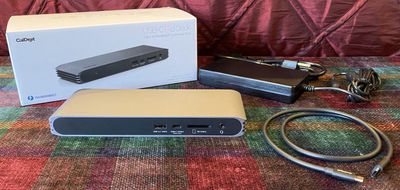
Using both a 2016 15-inch MacBook Pro with Thunderbolt 3, a 2015 MacBook with USB-C, and an 11-inch iPad Pro, I've tested the capabilities of CalDigit's dock and come away impressed with the versatility and performance that come at a rather reasonable price compared to similar docks from other manufacturers.
I'll start by noting that I've long been a fan of CalDigit, and the company's TS3 Plus Thunderbolt 3 dock has been my favorite for everyday use with my MacBook Pro among all of the many Thunderbolt 3 docks I've tested. It offers the perfect set of ports for my needs, 85-watt charging to fully support my 15-inch MacBook Pro, and a compact form factor that sits nicely under one of my external displays.
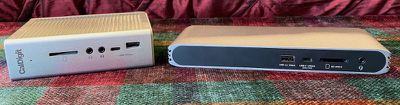
Given my experience with the TS3 Plus and some of CalDigit's other products, I was excited to test out the new USB-C Pro Dock, and for the most part it lived up to my expectations.
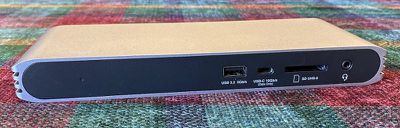
The USB-C Pro Dock has a horizontal design more typical of Thunderbolt 3 docks, as opposed to the TS3 Plus. I prefer the design of the TS3 Plus, but the USB-C Pro Dock design is certainly suitable and allows the dock to sit unobtrusively on a desk. It comes in a Space Gray aluminum that closely matches Apple's notebooks of that color, with some finning on the sides to potentially assist with heat dissipation and black plastic on the front and back.
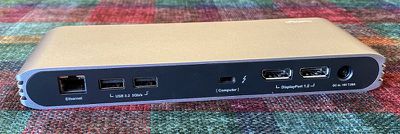
The dock weighs just under a pound and measures in at about 8.5 inches wide, an inch high, and a little over three inches deep. It's powered by a fairly large external power brick as is typical of these docks, although the brick included with this dock is a bit flatter than some others I've seen and most users should be able to tuck it away on or behind a desk.
Power Output
The USB-C Pro Dock is able to provide 85 watts of power over either Thunderbolt 3 or USB-C, providing full power a 15-inch MacBook Pro or any other Mac notebooks you might use it alongside, with the exception of the brand-new 16-inch MacBook Pro that ships with a 96-watt power adapter. Dock manufacturers are still working out the best way to support this new higher-wattage MacBook Pro, but for most users, even 85 watts will be plenty to keep that 16-inch MacBook Pro fully powered up.
To eke out a bit more power, CalDigit has an upcoming firmware update for the USB-C Pro Dock (and the TS3 Plus) that will bump charging to 87 watts, and CalDigit tells me most users won't have any problems charging their 16-inch MacBook Pros at either 85 or 87 watts. For those pushing their machines to the limit on heavy CPU/GPU usage for extended periods of time, CalDigit recommends those users charge their machines with Apple's power brick to ensure they're getting the full 96 watts.
Displays
When it comes to display compatibility, the USB-C Pro Dock includes a pair of DisplayPort 1.2 connectors, and active adapters can be used to convert to other standards like HDMI. When connected to a Thunderbolt 3-equipped Mac like a MacBook Pro or recent MacBook Air, the USB-C Pro Dock is able to drive dual 4K monitors at up to 60Hz, offering great expansion capabilities for turning your notebook into a workhorse desktop machine.
Things are little more limited when you're connecting the dock to a MacBook over USB-C, as the slower connection maxes out at supporting a single 4K display at 30Hz or dual HD displays, although those dual displays are unfortunately limited to mirrored mode rather than allowing for a full extended desktop.
The lack of a downstream Thunderbolt 3 port means I likely won't be using this as my everyday dock, as I currently use a pair of LG UltraFine 5K displays, one connected through my TS3 Plus dock and one directly to my computer. I certainly could route both 5K displays directly to the MacBook Pro and use the dock separately for its other functions, but that increases the number of cables connected to my computer from two to three and so it's overall less convenient, particularly when I've already got a TS3 Plus serving my needs.
But for someone maxing out with one or two 4K displays, particularly DisplayPort ones where you won't need any adapters, the USB-C Pro Dock should work out just fine. In fact, CalDigit intentionally opted to sacrifice the downstream Thunderbolt 3 port in order to include two DisplayPort 1.2 ports, since most people end up using the Thunderbolt port to add another display anyway.
USB Connectivity
One of the other primary purposes of a computer dock is to provide additional USB ports for connecting a variety of accessories to your computer all through a single cable. The USB-C Pro Dock includes three 5 Gbps USB-A ports (one on the front and two on the back), as well as one data-only 10 Gbps USB-C port on the front of the dock.
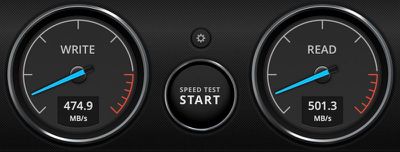
Connecting a fast CalDigit Tuff external SSD to that 10 Gbps front USB-C port and to my MacBook Pro, I found solid speeds of 475 MB/s write and 500 MB/s read, which is typical for this drive over a 10 Gbps connection. Using the same setup but connected to a 2015 MacBook over USB-C, I saw speeds dip slightly to 411 MB/s write and 415 MB/s read, but that's still solid performance.
The front-facing USB-A port on the USB-C Pro Dock supports standalone charging, so you can charge your iPhone, Apple Watch, or other devices via the dock even when your notebook isn't connected or turned on. CalDigit also provides a driver to increase the power available over USB to allow the dock to support Apple's SuperDrive.
SD, Ethernet, and Audio
Moving beyond displays and USB, the USB-C Pro Dock includes three additional features to increase the capabilities of a connected computer. One is a Gigabit Ethernet port to give you a speedy and reliable wired data connection, and the other is a UHS-II SD 4.0 card reader to make it easy to quickly transfer photos and files from a standalone camera or other devices.
Finally, there is a 3.5mm combination analog audio in/out port on the front of the dock to support speakers, headphones or combined headphone/microphone headsets.
iPad Pro Support
While Thunderbolt and USB docks have traditionally been used to expand the capabilities of Macs, the adoption of USB-C on the iPad Pro has opened the door for Apple's tablets to take advantage of USB-C docks as well, and CalDigit's USB-C Pro Dock does the job here as well.
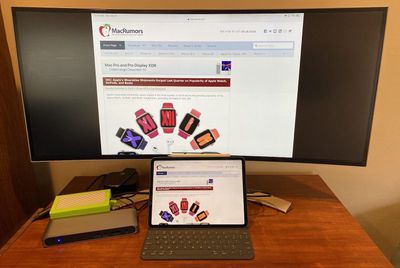
With a single cable connecting your iPad Pro to the dock, you can open support for an external display running at up to 4K and 60Hz, USB-connected drives, SD cards, ethernet, and audio in/out. The dock also lets you use external accessories like keyboards and mice, and it allows for fast charging of your iPad Pro.
Backward Compatibility
For those users with older computers, the USB-C Pro Dock can be used with Thunderbolt 1 and 2 ports with appropriate adapters, although capabilities are more limited due to the lower bandwidth and you won't be able to charge your device, for example.
You can even get some limited dock functionality out of the USB-C Pro Dock when connecting to a machine that supports only USB-A, provided you have a USB-C to USB-A adapter available. You won't be able to drive any displays or charge your computer over that connection, but you'll at least be able to take advantage of the additional USB ports, SD card reader, Gigabit Ethernet port, and audio capabilities.
Wrap-up
Overall, CalDigit's USB-C Pro Dock strikes a great balance of performance and versatility, giving you the ability to connect to a range of devices to expand your connectivity options. If you want the flexibility to connect to a Mac and an iPad with the same dock, or if you've got both Thunderbolt 3 and USB-C Macs around the house, this dock is definitely worth taking a look at.
If you're all in on Thunderbolt 3, make sure you take a look to see if this dock's capabilities will be sufficient for your needs. If you're using a Thunderbolt 3 external display, for example, you won't be able to connect it through this dock.
On the flip side, if you don't need the full capabilities offered by Thunderbolt 3, there are smaller and cheaper USB-C-only hubs out there that might do the trick for you, although many of those are bus-powered from the computer itself and require passthrough charging with your existing adapter.
With 85 watts of charging power on CalDigit's USB-C Pro Dock, nearly every portable Mac can be charged at maximum speed, with the exception of the brand-new 16-inch MacBook Pro, but even on that machine most users shouldn't run into any problems keeping up with power demands.
While many full-featured Thunderbolt 3 docks are priced at $300 more, CalDigit's USB-C Pro Dock undercuts that price point significantly, currently coming in at just $210 on Amazon and in CalDigit's online store. A 0.7-meter cable that works with both Thunderbolt 3 and USB-C connections is included.
Note: CalDigit provided MacRumors with a USB-C Pro Dock for the purpose of this review. No other compensation was received. MacRumors is an affiliate partner with Amazon. When you click a link and make a purchase, we may receive a small payment, which helps us keep the site running.















































Top Rated Comments
Who would offer these?
There are already shedloads of gaming PCs and workstations out there with dGPUs that have regular DisplayPort 1.4 outputs which could run such displays - but you can still count the available 5k 27" displays on the fingers of a boxing glove. That rather suggests that hardly anybody wants the things outside of the Mac world - and its not hard to see why: 5k is a lot of expense, extra complexity and higher GPU load (that could go towards higher frame rates etc.) for a modest quality increase. The idea that 5k is the sweet spot for a 27" display is strictly a Mac thing - caused by the lack of a fully scalable UI in MacOS.
...then bear in mind that the MBA, 13" MBP and Mini (without eGPU) still don't support DP1.4, nor does any 15" MBP or iMac pre-2018. So a big chunk of the Mac market (aka the only people who care about 5k) are going to need either TB3 or a dual DP1.2 cable solution.
How is that relevant to whether or not a USB-C dock supports DP1.4? If you've got an eGPU with a half-decent modern card in it, you've got DP1.4 and something like the illama should just work, and plenty of eGPU enclosures have USB/Ethernet/laptop charging etc. You're just back to the original problem that there aren't a lot of DP1.4 displays out there right now.
USB-C hubs are limited to the power of your BUS. 15 watts isn't enough to deliver power to support display and all the ports on the hub. For a product to be certified by Thunderbolt 3 all the ports on the dock must work contemporaneously. However, a hub is not a Thunderbolt 3 device and does not have this requirement. If you do get a hub, then be careful about using more than a few ports. Without the right amount of power you may suffer data loss, or much worse.