

WhatsApp: How to Set a Message Reminder - MacRumorsOpen MenuShow RoundupsShow Forums menuVisit ForumsOpen Sidebar
Skip to Content

WhatsApp: How to Set a Message Reminder

by

WhatsApp has rolled out a new feature on iPhone that lets you set reminder alerts for specific messages that you want to come back to later.

Whatsapp Feature
Available in version 25.25.74 of WhatsApp, the feature allows you to long press on any message in a conversation thread and select a new "Remind me" option in the popup menu. You can then choose between 2 hours, 8 hours, and 24 hours, or set a custom duration after which you will be alerted about it.

The new feature is useful for keeping track of important details that might otherwise get lost in busy chats. It's also a simple way to make sure you don't forget to reply to a message at a later time. Here's how to set your first message reminder in WhatsApp:

How to Set a Message Reminder in WhatsApp

  1. Open a WhatsApp conversation thread and long press on a message bubble that you want to be reminded about later.
  2. Tap More... in the popup menu.
  3. Select Remind Me.
  4. Select in 2 hours, in 8 hours, in 24 hours, or choose Custom to set a more specific reminder time and date.
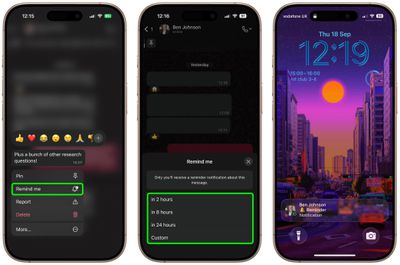
whatsapp

A bell symbol appears in the corner of the message bubble to indicate a reminder has been set. When the reminder alert comes through as a notification, depending on your message preview settings you may see the message content, the conversation in which it's located, and a preview of any accompanying media.

The ability to schedule a reminder about a message should be a lot more convenient and foolproof than, say, starring a message or taking a screenshot of it and hoping you'll remember to come back to it.

How to Cancel a WhatsApp Message Reminder

If you want to cancel a reminder that you've set, simply long press a message showing the bell symbol, tap More... then choose Cancel Reminder.


Top Rated Comments

wanha Avatar
11 months ago
pay me no mind but how cool would it be able to set a regular reminder to forget all about our phones for another hour
Score: 2 Votes (Like | Disagree)
11 months ago
Good to know about this. Will be useful for users who use the app very much. I use it occasionally only and don't think I have a need for this.
Score: 1 Votes (Like | Disagree)
calzon65 Avatar
11 months ago
Since the iPhone has allowed multiple numbers (SIM/eSIM) on the same phone for several years, I wish WhatApp would support multiple numbers on the same phone.
Score: 1 Votes (Like | Disagree)

Popular Stories

Whatsapp Feature

WhatsApp Beta Adds Green Dot to Show Who's Online

Monday July 6, 2026 3:56 am PDT by
WhatsApp appears to be introducing a new visual indicator that shows when a contact is online, according to WaBetaInfo. The feature adds a small green circle to a contact's profile photo when they're active in the app, and which disappears the moment they leave, all updated in real time. The indicator is now being tested for the WhatsApp iPhone app in TestFlight after it debuted on Android...
Whatsapp Feature

WhatsApp Beta Reveals iCloud Backup Alternative for iPhone

Tuesday July 14, 2026 3:06 am PDT by
WhatsApp is developing a first-party cloud storage option for chat backups on iPhone, providing users with an alternative to iCloud for the first time, according to app tinkerer WABetaInfo. Code found in the WhatsApp beta for iOS (version 26.28.10.16), available through TestFlight, suggests that users will eventually be able to pick their preferred backup destination directly from the app's...
Whatsapp Feature

WhatsApp Begins Rolling Out New Username Feature

Friday July 17, 2026 5:32 am PDT by
WhatsApp has started rolling out its new username feature, reports WABetaInfo. Some users who reserved their username have started receiving a notification that their username is active, and that they can now use it to send and receive messages to other users without revealing their phone number. When someone creates a username, WhatsApp will notify people who already have an active chat with...


🔗 Related Apple News & Rumors

Stay updated with the latest Apple ecosystem news and verified rumors






































