How to Use Theater Mode on the Apple Watch - MacRumorsOpen MenuShow RoundupsShow Forums menuVisit ForumsOpen Sidebar
Skip to Content

How to Use Theater Mode on the Apple Watch

by

First introduced in watchOS 3.2, Theater Mode is a simple but useful feature that's designed to prevent the Apple Watch's screen from activating when you raise your wrist.

It's useful in situations where the bright screen can be a distraction, such as a movie or a play, and it's also useful for those who like to sleep with their Apple Watches.

Activating Theater Mode

Theater Mode is available as an option in the Apple Watch Control Center, so toggling it on and off is simple.
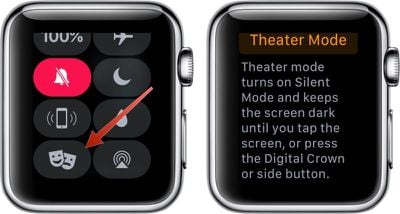
applewatchtheatermode

  1. Raise your wrist to activate the Apple Watch screen or press the Digital Crown.
  2. Swipe up from the bottom of the Apple Watch to bring up Control Center.
  3. Swipe up again to access the icon that looks like a pair of theater masks.
  4. Tap the masks.
  5. A screen will pop up explaining theater mode. Tap again to activate it.

While Theater Mode is active, you'll see an the icon at the top of the Apple Watch whenever you view the screen. To turn it off, open up the Control Center again and tap the Theater Mode button.

How Theater Mode Works

When Theater Mode is enabled, the screen will remain dark when you raise your wrist instead of lighting up. It will also stay dark when a notification is received, but you'll still know if you get an incoming text or other alert because haptic feedback remains on.

Accessing Notifications While Theater Mode is On

You'll continue to get a tap whenever there's an incoming notification when Theater Mode is turned on, and to view it, you'll need to press the Digital Crown or tap on the screen.

Tapping, pressing the Digital Crown, or pressing the side button is also how you check the time when Theater Mode is enabled.


Related Roundup: Apple Watch 11

Top Rated Comments

bigjnyc Avatar
122 months ago
This is great for when I am trying to get my 3 year old to go to sleep, I lay down with him but the watch screen keeps lighting up and distracting him from falling asleep (not that he needs much distraction)... Anyway that's what I'll be using it for since having a 3 year old doesn't allow for much time to go to the theater :(
Score: 5 Votes (Like | Disagree)
Mlrollin91 Avatar
122 months ago
Do not disturb still exist and it's different than this mode. When you activate do not disturb notifications will be stopped until it's off. Theater mode will not stop your watch to vibrate for notifications, but it will not turn on the screen by your wrist movement and notifications.
Not only that, it will also put your watch on mute and then un-mute when turning off theater mode. Very handy. I can't tell you how many times I look at my watch when at a movie when I feel a vibration, even accidentally. Then I have to quickly hide the screen under my shirt to prevent it from bothering others.
Score: 3 Votes (Like | Disagree)
Porco Avatar
122 months ago
This is a great feature, should have been in from the start I think, but better late than never.


[....] and it's also useful for those who like to sleep with their Apple Watches.
I mean I do really like my Apple Watch, but... :D
Score: 2 Votes (Like | Disagree)
CarlJ Avatar
122 months ago
Good, now I won't get beat up in theaters any more.
Score: 2 Votes (Like | Disagree)
Westside guy Avatar
122 months ago
This might be useful as a "meeting mode" toggle - we'll have to see.
Score: 1 Votes (Like | Disagree)
122 months ago
I'm happy about this feature. It's not just the movies where I don't need my watch to light up.
For me, I always had raise to wake deactivated. Either I press the digital crown or tap the screen to wake it up. Even though I see the point of theater mode, it wouldn't make much of a difference to me with the display lighting up, being I always had that deactivated.


I do certainly think this is more of a shortcut and a quicker option at that.

[doublepost=1490682591][/doublepost]
Well, seems like it does somewhat more than what that setting on its own does:
Your post is worded awkwardly. I'm not following your post here CDM. Essentially, raise to wake and silent mode are invoked with Theatre Mode, versus having to dabble through settings to disable Raise to wake. It's merely a short cut, with a new feature from the home screen.
Score: 1 Votes (Like | Disagree)

Popular Stories

3 4 24 Sport Band Refresh Feature

Sketchy Rumor Claims Apple Watch Series 12 Could Introduce Sensor in Band

Friday July 3, 2026 8:54 am PDT by
The Apple Watch Series 12 could ship with a new health sensor built directly into one of its bands, according to a sketchy rumor from a known leaker. The leaker known as "Kosutami" says the sensor will be injection-molded into a silicone band, and only a silicone band, apparently because Apple has not yet solved how to embed similar hardware in bands made from other materials. No detail was...
watchos 27

Siri AI Comes to Apple Watch in watchOS 27 Beta 3

Monday July 6, 2026 1:24 pm PDT by
With watchOS 27 beta 3, Apple added support for Siri AI and the Siri app, so Apple Watch users can now use the features right from their wrist. Apple said Siri AI would be coming to the watch back when watchOS 27 was first introduced, but the feature wasn't live until now. The Dynamic App Grid that pops up when the Digital Crown is pressed displays the Siri app in the center, and the...
Apple Watch Series 10 Jet Black

Apple Watch Series 13 Rumored to Mark the End of an Era

Wednesday July 8, 2026 1:29 pm PDT by
While the Apple Watch Series 12 is still a few months away, a new rumor suggests that next year's Apple Watch Series 13 will mark the end of an era. According to a recent post from a known leaker on the Chinese social media platform Weibo, the Apple Watch will be receiving a major redesign next year, and this will apparently include a new way of attaching bands to the watch. As a result, the ...

🔗 Related Apple News & Rumors

Stay updated with the latest Apple ecosystem news and verified rumors







































