

How to Use Web Apps on iPhone and iPad - MacRumorsOpen MenuShow RoundupsShow Forums menuVisit ForumsOpen Sidebar
Skip to Content

How to Use Web Apps on iPhone and iPad

by

Apple's mobile software has supported so-called "web apps" for years now. But what is a web app, and how do they differ from typical apps used on iPhone and iPad? Here's your short explainer.
How To Use Web Apps Feature

What is a Web App?

When Apple talks about "web apps," it's referring to "Progressive Web Apps," or PWAs for short. Apple prefers to call them web apps either because it was Google that first promoted the term "Progressive Web Apps," or because there is no official PWA specification. Regardless, generally speaking, PWA is shorthand for a flexible, adaptable app created using only web technologies.

From a user perspective, think of a PWA as a website that can be installed to your home screen without having to download it from the App Store. Some examples of popular web apps include Google Maps, Starbucks, Tinder, Uber, and Instagram.

Ironically, iOS was actually the first platform to support the concept of PWAs. When Apple originally released the iPhone, the first apps were HTML5-based, which allowed users to add them manually to the home screen for a full-screen, app-like experience. Back then, the App Store wasn't even a thing.

instagram

Instagram web app

While Apple initially let support for web apps wither on the vine after the emergence of its App Store, Google Chrome continued to help improve the associated web technologiess, and by 2018 all of the major web browsers including Safari had pledged to support web apps. Since then, Apple has continued to help evolve the web app experience, it just hasn't been very vocal about it. That's why many were surprised when Apple announced its intention to support push notifications for web apps at WWDC 2022.

Web App Pros and Cons

Unlike "web apps" that function as simple home screen bookmarks (see below), PWAs can be downloaded in advance and can work offline, as well as use regular web APIs. This allows them to provide an app-like experience while having access to things like geolocation, camera, and Apple Pay.

From a developer perspective, going down the PWA route means you avoid the potential hassle of getting your app through Apple's App Store review process. This can make web apps more discoverable than native apps that go through the App Store. It's also easier and faster to visit a website than to install an app, and users can also share web apps simply by sending a link.
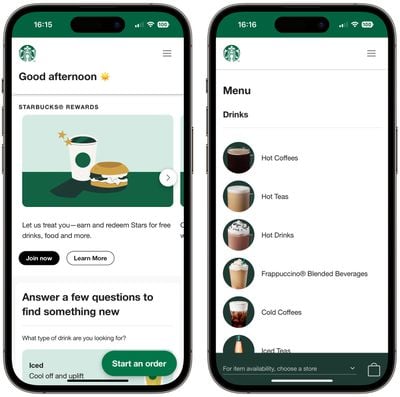
starbucks web app

Starbucks' web app is 233KB, 99.84% smaller than the 148MB size of the iOS mobile app

On the other hand, native apps enjoy better integration with iOS and provide a more seamless user experience (although that is slowly changing as the web technology behind PWAs evolves). For example, web apps can only store offline data and files totaling a maximum of 50MB. They don't have access to some hardware features, such as Bluetooth and Touch ID/Face ID, and they can't execute code while in the background. They also lack access to in-app payments and other Apple-based services.

How to Add a Web App to Your Home Screen

  1. Open Safari on your iPhone or iPad.
  2. Navigate to the website that offers a WPA/web app (many are listed here).
  3. Tap the Action button (often called the Share button).
  4. Scroll down the share sheet past the rows of contacts and apps, then select Add to Home Screen.
  5. Give the web app a name, then tap Add.
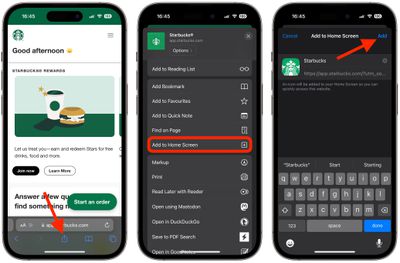
safari

Your new web app will appear in the next available space on your device's home screen. If you tap it and you're kicked back to the standard website, force quit Safari, then launch the web app again.

How to Set Up Web Push Notifications

In iOS 16.4 and iPadOS 16.4, both currently still in beta, Apple has added a new feature that allows web apps added to the home screen to send web push notifications to iPhone and iPad users.

Thanks to the new feature, web apps added to a user's home screen can request permission to receive push notifications through a "subscribe" button or another similar option in the web app's settings. Such notifications work exactly like notifications from other apps, showing up on the Lock Screen, in Notification Center, and on a paired Apple Watch.

  1. Open the web app that you added to your home screen.
  2. Find and enable the setting that turns on push notifications.
  3. When the permissions prompt appears, tap Allow to permit the web app to send you notifications, just as if it was a typical app.
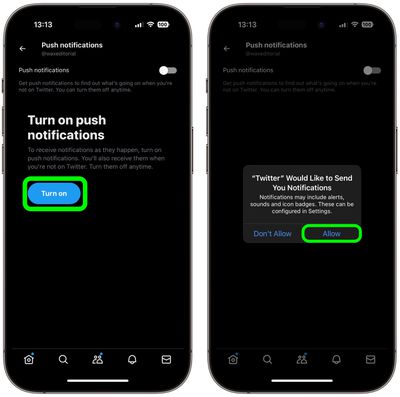
twitter

Once you've done that, you'll be able to control alerts and icon badges for the web app from within the Notifications section of the Settings app.
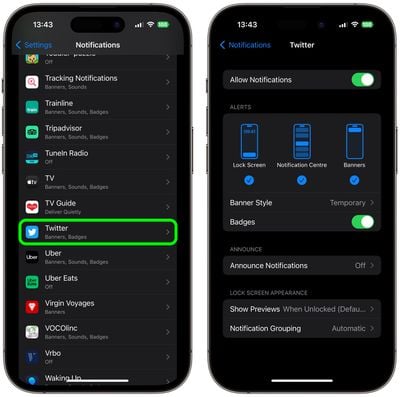
settings

Adding Website Bookmarks to Your Home Screen

For websites that don't have a dedicated mobile app or a web app for accessing their content, you can still add what is essentially a bookmark of a website to your home screen using the same Add to Home Screen option in Safari's Share menu.

Creating a bookmark on your home screen lets you use it as a one-tap portal to access specific online content, instead of having to open a browser and then select a bookmark or type in a website's URL address.
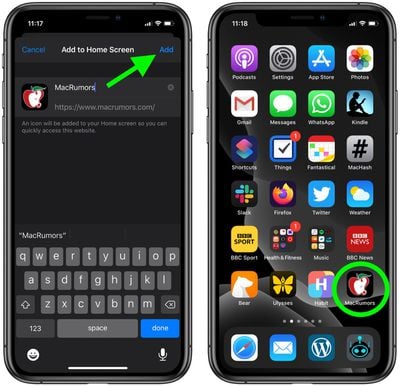
1how to add a website bookmark to your homescreen
When you tap a website bookmark on your home screen, it opens in Safari on the specific page you selected. Even though it's not a web app, if the site you're linking to has a dynamic mobile-friendly layout (MacRumors, for example), accessing it from your home screen can feel like an app-like experience.


Top Rated Comments

JuicyGoomba Avatar
47 months ago

One wonders why many things would need to have an app at all. Theoretically this is the answer to the problem of cross platform development.

Safari has access to the entire device, the current limitations could be overcome as necessary.

But then at what point is the phone just Safari managing all the apps.
Everyday I hear people complaining about things like the Amazon app being garbage, and I suggest to those people that they should just use the website and they ignore me. They seem to prefer the pain of using poorly maintained apps.

You're completely correct about most things not needing an app. They don't need an app. What they need is an extra outlet to harvest more data from your device.

Fact is, every website needs to be as functional as it can possibly be, and the app will always be an afterthought to an extent. Just look at how many apps there still are on the store that are basically just web wrappers.

As a side note, the apps do function as a pretty excellent marketing tool. Afterall, if you unlock your phone at the end of a bust day and the first icons you see are Starbucks and McDonalds, what's the first thing your brain is gonna want to do?
Score: 10 Votes (Like | Disagree)
47 months ago
“From a developer perspective, going down the PWA route means you avoid the potential hassle of getting your app through Apple's App Store review process.”

So … why the outrage over Apple’s curation of the App Store? I get that there are features that a PWA doesn’t have access to, like Bluetooth or ApplePay … but as to the former, of course it’s a giant security hole for any random Web site (or Web app) to have access to Bluetooth; and, for the latter, nothing is stopping a Web site from asking you to type in your credit card — and, presumably, AutoFill still works.

This should be Apple’s go-to-answer for all the cries for them to open up the App Store: the PWAs are every bit the wild-wild-West as the Google world, but with minimal reasonable guardrails to prevent malware from taking control of your earbuds or draining your credit card.

b&
Score: 9 Votes (Like | Disagree)
inkswamp Avatar
47 months ago

“From a developer perspective, going down the PWA route means you avoid the potential hassle of getting your app through Apple's App Store review process.”

So … why the outrage over Apple’s curation of the App Store? I get that there are features that a PWA doesn’t have access to, like Bluetooth or ApplePay … but as to the former, of course it’s a giant security hole for any random Web site (or Web app) to have access to Bluetooth; and, for the latter, nothing is stopping a Web site from asking you to type in your credit card — and, presumably, AutoFill still works.

This should be Apple’s go-to-answer for all the cries for them to open up the App Store: the PWAs are every bit the wild-wild-West as the Google world, but with minimal reasonable guardrails to prevent malware from taking control of your earbuds or draining your credit card.

b&
The irony here is that Apple's original plan was for developers to create webapps for iOS. That's why this ability to save webapps to the homescreen even exists in the first place. They had planned to build out a full range of webhooks and APIs to support webapps every bit as much as a traditional app. But Apple was accused to trying to control everything and keep developers out and ended yielding to the demands to allow native development... only now to be accused to trying to control everything and keep developers out. 🤦‍♂️


Score: 5 Votes (Like | Disagree)
47 months ago

I suppose if you have something to hide then it's a pretty useless feature yeah... ;)
Do you live in a glass house? Do you wear clothes? Do you never ask somebody to step aside for a private conversation?

No?

Then what do you have to hide?

By all rights, privacy should be the default, period, always and everywhere. It should never even occur to you that somebody might see or hear you unless you make a point of getting their attention.

Still not convinced?

Do you really want everybody everywhere to be naked all the time and hear everything everybody says? To see all their warts and have to listen to all their nonsense?

Given your posts in this thread, you likely would suggest that “the authorities” or somebody else should be able to spy on us “for our own good.” You likely envision “your people” as the ones who would do the spying. But would you trust somebody in whatever you consider the opposing political party to spy on you like that? If you’re a Republican, would you trust Biden with that power? Or a foreign country — if you’re Korean, would you trust Xi Jinping with that power?

Whenever somebody brings up the “if you have something to hide” nonsense, it’s their way of waving a red flag saying, “I’m a wannabe tinpot dictator’s sycophant.” You might think you’re showing strength, but it’s proof positive that you’re the weakest of the weak.

b&
Score: 4 Votes (Like | Disagree)
47 months ago

I suppose if you have something to hide then it's a pretty useless feature yeah... ;)
There are more reasons for clearing your cache than covering you browsing tracks. :rolleyes:
Score: 4 Votes (Like | Disagree)
47 months ago
Web push notification will be useful with the progressive web apps.
Score: 3 Votes (Like | Disagree)

Popular Stories

Home Hub Command Center with Dome Base Feature

Apple Smart Home Hub to Feature iMac G4-Style Design

Wednesday September 30, 2026 4:36 am PDT by
Apple's long-rumored smart home hub will have an iMac G4-style design and a host of unique features, Bloomberg's Mark Gurman reports. The smart home hub is said to feature a square 6-inch display, with variants that can be placed on a countertop or mounted on a wall. It features a single FaceTime camera on the front, with microphones and speakers in its connected base. Gurman described the...
HomePod minis on gradient feature 1 1

Three New Apple Smart Home Products Coming on October 13

Wednesday September 30, 2026 4:04 am PDT by
Apple plans to introduce a series of new smart home products on Tuesday, October 13, according to Bloomberg's Mark Gurman. Apple reportedly plans to debut its long-awaited smart home hub device, a new HomePod mini, and a new Apple TV on the date. The new HomePod mini and Apple TV are set to retain their existing designs, but tout faster chips to support Siri AI. The new HomePod mini will...
iPhone Duo Open

iPhone Duo Reportedly Facing Production Problems Ahead of Launch

Tuesday September 29, 2026 6:16 am PDT by
The iPhone Duo is reportedly facing production difficulties ahead of its October launch, with early output expected to be limited. A person said to be close to Foxconn's supply chain told China's Jiemian News that final assembly yields for Apple's first foldable iPhone were only slightly above 60% as of September 17. The source said that, under Apple's current quality standards, it could...
Latest Stories
AT&T Acknowledges iPhone 18 Pro Max Issues: 'Update Immediately'
4 hours ago
New 'AirFly Drive' Accessory Turns Wired CarPlay Into Wireless CarPlay
9 hours ago
Apple Shares Photos Shot on iPhone Duo
11 hours ago
Apple Says iPhone Duo Has Replaceable 'Cover Layer'
12 hours ago
Apple's Smart Home Camera Will Apparently Have 'No Video Recording'
14 hours ago
Apple TV Just Updated Its Selection of 'Bonus' Movies
15 hours ago
iPhone 18 Pro Colors Buyer's Guide: Which Should You Choose?
16 hours ago
Early Prime Big Deal Days: Best Discounts on Accessories, TVs, and More at Amazon
16 hours ago
MacBook Pro With OLED Touch Screen Rumored to Launch in October or November
17 hours ago
Apple's All-New Home Hub Rumored to Launch in These Four Colors
18 hours ago
iPhone 18 Pro Aperture Control Goes Fully Manual in Halide 3.2
19 hours ago
Apple Stores Receive 'Do Not Open' Boxes Ahead of Smart Home Products Launch
20 hours ago
iPhone 18 Pro Sales Jump in China Ahead of iPhone Duo Launch
20 hours ago
Apple TV Still Down for Some Users Following Apple Services Outage
21 hours ago
PSA: Apple Mail on Mac May Stop Syncing Microsoft 365 Accounts Today
21 hours ago
Apple's Smart Home Hub: Everything We Know So Far
1 day ago
Apple's Home Hub Borrows From the iPhone Duo's StandBy Mode
1 day ago
Apple Invites App Updated With Three New Features
2 days ago
Apple Event on October 13?
2 days ago
Apple Watch SE 3 vs. Series 12 Buyer's Guide: Which Should You Buy?
2 days ago
iPad Mini 8 to Offer These 10 New Features
2 days ago
DoorDash Unveils AI Food Ordering Through Apple's Messages App
2 days ago
Amazon Takes Up to $150 Off Select M5 MacBook Air Models
2 days ago
Apple Still Plans to Release a New Full-Sized HomePod
2 days ago
Apple Working to Expand HomeKit
2 days ago
Apple Smart Home Hub to Feature iMac G4-Style Design
2 days ago
Three New Apple Smart Home Products Coming on October 13
2 days ago
Apple Pay Now Available in India With Axis Bank Cards
2 days ago
OpenAI Launches Always-On 'Dots' Agents to Rival Meta's Muse
2 days ago
AirPods 5 Teardown: Batteries Removable, Case Still Tough
2 days ago

🔗 Related Apple News & Rumors

Stay updated with the latest Apple ecosystem news and verified rumors





































