

iOS 26: Use Visual Intelligence With iPhone Screen Content - MacRumorsOpen MenuShow RoundupsShow Forums menuVisit ForumsOpen Sidebar
Skip to Content

iOS 26: Use Visual Intelligence With iPhone Screen Content

by

In iOS 26, Apple has extended Visual Intelligence to work with content that's on your iPhone, allowing you to ask questions about what you're seeing, look up products, and more.
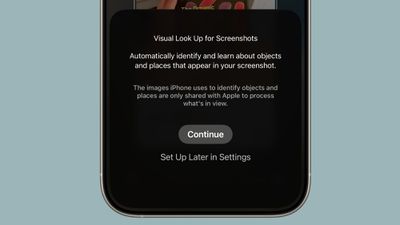
visual lookup ios 26
Visual Intelligence started out in iOS 18.2 as a Camera Control button function that can describe what you are looking at, get details about a restaurant or business, translate text, and the like.

But in iOS 26, Visual Intelligence is no longer just for learning more about your physical surroundings. You can also use the feature to analyze content on your iPhone screen, simply by pressing the same buttons you use to take a screenshot.

You can search across apps, go straight to relevant websites, add an event to your calendar, and more. Keep reading to learn what you can do with it. Note that Visual Intelligence is an Apple Intelligence feature of iOS 26 that's exclusive to the iPhone 15 Pro, iPhone 16 series, and iPhone 17 series (including iPhone Air).

Use Visual Intelligence With Screen Content

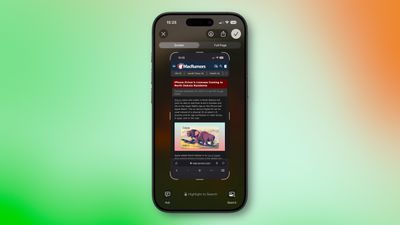
Start by taking a screenshot: Quickly press and release the iPhone's Side button and the Volume Up button at the same time.
screenshot ios 26
Once the screenshot interface appears, you'll see Visual Intelligence options along the bottom. The options offered up will depend on the content, but they let you interact with what you've just captured in several ways.

  • Search for Similar Items: Tap Search to look up the selected item on the web. This is useful when you want to find matching products, related images, or more information about what's in the screenshot.
  • Highlight and Search a Specific Item: If only part of the screenshot interests you, swipe your finger over that area to highlight it, then tap Search. The search will focus on the highlighted object rather than the whole image.
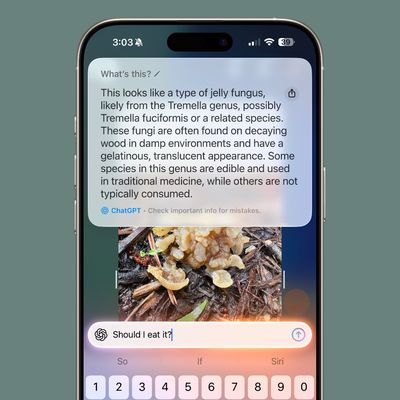
  • Ask a Question About What's Onscreen: Tap Ask to open a text box where you can pose a question to ChatGPT about the screenshot's contents. For example, you can ask for an explanation of a term or details about an object.
  • Add an Event to Your Calendar: If the screenshot includes a date or event information, tap Add to Calendar to create a new calendar entry without leaving the screenshot view.
  • Open a Website: When the screenshot contains a web link, you'll see tappable links at the bottom that will take you straight to the relevant site.
  • Summarize Text: Tap Summarize to generate a concise summary of the visible text.
  • Listen to Text: Tap Read Aloud to have the text in the screenshot spoken to you.
  • Identify Plants or Animals: If the screenshot contains a plant or animal, tapping its tag will reveal its name and further information about it.

When you're done with the screenshot, you can either tap ✖ to discard it or ✔ to keep it in your Photos library.
Top Rated Comments

cbaca51 Avatar
11 months ago
Wish there was a dedicated app to access this and having to screenshot a screenshot if I wanna search a screenshot. Very annoying

Score: 3 Votes (Like | Disagree)
Fraserpatty Avatar
11 months ago
I know this is a dumb question please bear with me. Is this an iPad feature also?
Score: 2 Votes (Like | Disagree)
nikhsub1 Avatar
11 months ago
Wow, just made a discovery! If your language in Siri is Britain, You can NOT turn apple intelligence on - the toggle disappears! Once I set the language to US English, the toggle slider appeared. Wild.
Score: 1 Votes (Like | Disagree)
nikhsub1 Avatar
11 months ago

settings > camera > camera control .. scroll down and toggle off launch visual intelligence and anything else you don't want
Hmm seems I don’t have that option.


Attachment Image
Score: 1 Votes (Like | Disagree)
11 months ago
Very poor implementation of “Apple Intelligence”. This is literally google reverse image search that has been around for AGES, or you can upload it to a competent AI (ChatGPT) and get an actual response.

I’ve tried it probably a dozen times already and every single time it has either been completely inaccurate, or completely irrelevant. This is just another Apple Intelligence gimmick, locking basic computing behind AI. For those of you that don’t have Apple Intelligence, I promise, you aren’t missing out on anything.
Score: 1 Votes (Like | Disagree)
11 months ago
Will be useful. Have not tried it out. But for this full screen previews have to be turned on. Don't know whether I prefer to have this. Will try soon after updating.
Score: 1 Votes (Like | Disagree)

Popular Stories

Apple Event Logo

Apple Working on All-New Operating System

Wednesday July 29, 2026 11:39 am PDT by
Apple is developing an all-new operating system that is essentially a mix of tvOS, watchOS, and iOS, according to Bloomberg's Mark Gurman. In a report this week, he said the operating system will feature a grid of icons, widgets, and apps, along with customizable clock faces. The new software platform is intended for Apple's long-rumored smart home hub. With built-in facial recognition,...
imac video apple feature

Apple Made Its Second-Biggest Acquisition Ever This Year

Wednesday July 29, 2026 12:03 pm PDT by
Apple this year acquired Israeli startup Q.ai for close to $2 billion, according to the Financial Times. That would make this Apple's second-biggest acquisition ever, after it paid $3 billion for the popular headphone maker Beats in 2014. This is also the largest known Apple acquisition since the company purchased Intel's smartphone modem business and patents for $1 billion in 2019. Q.ai...
Dynamic Island iPhone 18 Pro Feature

iPhone 18 Pro: Twelve Changes Coming to Apple's Next Flagship

Thursday July 30, 2026 3:43 am PDT by
We're less than two months out from the launch of Apple's premium next-generation smartphone lineup, and while we're not expecting a dramatic change in terms of functionality, there are still several enhancements rumored to be coming to the iPhone 18 Pro and iPhone 18 Pro Max. One thing worth noting is that Apple is reportedly planning a major change to its iPhone release cycle this year,...

🔗 Related Apple News & Rumors

Stay updated with the latest Apple ecosystem news and verified rumors











































