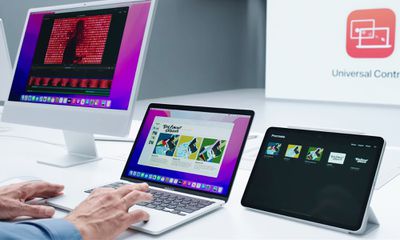
As of iPadOS 15.4 and macOS Monterey 12.3, Apple has introduced support for Universal Control, the long-awaited feature that's designed to allow multiple Macs and iPads to be controlled with a single mouse and keyboard.
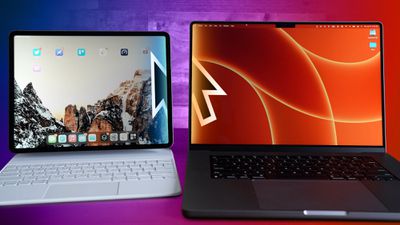
Thanks to Universal Control, you can use the same cursor and keyboard on any nearby Mac or iPad that's signed into your iCloud account. So, for example, if you have a MacBook Pro and an iPad next to it, your Mac's trackpad and keyboard can be used to navigate the iPad. The same is true of the iPad if you have a keyboard attached.
Universal Control should work automatically once you've installed macOS Monterey 12.3 and iPadOS 15.4 because the features are enabled by default, unless of course your devices don't support the feature.
System Requirements
As well as requiring iPadOS 15.4 on an iPad and macOS Monterey 12.3 on a Mac, Universal Control requires the following models of iPad and Mac for it to work. Older devices are not supported.
- MacBook Pro (2016 and later)
- MacBook (2016 and later)
- MacBook Air (2018 and later)
- iMac (2017 and later)
- iMac (5K Retina 27-inch, Late 2015)
- iMac Pro, Mac mini (2018 and later)
- Mac Pro (2019)
- All iPad Pro models
- iPad Air (3rd generation and later)
- iPad (6th generation and later)
- iPad mini (5th generation and later)
Before You Try Universal Control
Before you attempt to use Universal Control, ensure that all devices are signed into the same iCloud account and two-factor authentication is enabled.
In addition, Bluetooth, WiFi, and Handoff must be enabled for wireless use, and the devices must be within 30 feet of one another. The iPad and Mac cannot be sharing a cellular and internet connection (so the Mac can't be tethered to the iPad), and over USB, the Mac must be trusted on the iPad.
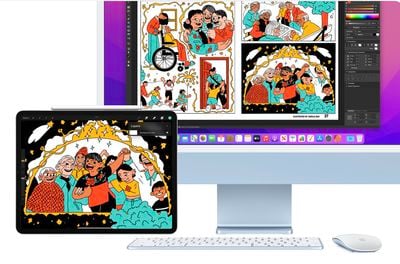
The last thing to bear in mind is that although Universal Control can be used with two or more Macs and no iPad, at least one Mac is required for use on the iPad.
In other words, two iPads without a Mac cannot take advantage of Universal Control, but if at least one Mac is in the mix, you can use the feature with multiple iPads.
Using Universal Control
When you first come to navigate between nearby devices, you'll want to move the cursor against the side of your Mac's screen. You should see an animation indicating that the cursor can be pushed through the side of the screen to the adjacent device.
After that, it should be smooth sailing and you'll be able to move the cursor at will between the two screens, and keyboard input will be automatically linked to whichever device the cursor is currently located.
You can then use the one keyboard to type into text input fields, such as in Notes or Safari, effectively allowing you to use a single set of peripherals with all of your Apple devices.
You can also drag and drop files between two devices, but note that if you're using an iPad and a Mac, you need to have an app open that's compatible with the file type. If you want to drag a photo from the Mac to the iPad, for example, make sure you open up the Photos app on the iPad first. Or if you have a document you want to move, open up the Files app on the iPad.
Dragging something from the iPad to the Mac is simpler because the Mac's desktop supports different file types, unlike the iPad's Home Screen. macOS gestures like three-finger swipe between pages are compatible on the iPad as well, since these are features supported by the Magic Keyboard.
Bear in mind that some multitouch gestures like Mission Control are not available on an iPad, and some are a little bit different. If you open up an app on the iPad and then want to exit out using the Mac's trackpad, you can use a three-finger swipe to do so. Alternatively, with a mouse, you can mouse down over the dock to bring it up to swap apps.
You can copy and paste content from one device to another using one keyboard as long as it's an app that supports text input, but this feature does not yet appear to be working properly with apps like Safari. Features like copy/paste will likely see some refinement during the beta testing process.
That's all there is to it. For more information on customizing Universal Control, be sure to check out our set-up guide. And if you have more questions about Universal Control not answered here, check out our dedicated article on everything you need to know about the feature.