Time to Walk is a feature for Apple Fitness+ subscribers that offers audio stories from influential people that Apple Watch users can listen to with AirPods or other wireless headphones while walking.
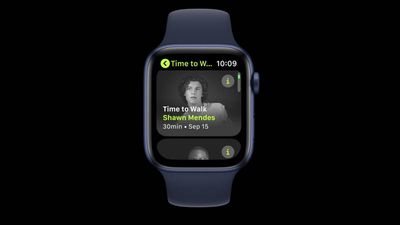
During Time to Walk episodes, you can listen to stories from guests, hear songs they've chosen, and see photos that are meaningful to them on your Apple Watch. The following explains how Time to Walk works and how to get the most out of it.
What You'll Need for Time to Walk
- Apple Watch Series 3 or later
- AirPods or other Bluetooth headphones
- Fitness+ subscription
- Cellular watch model or Wi-Fi connection
Time to Walk episodes appear in the Workout app on Apple Watch Series 3 or later. These episodes can be streamed on Apple Watch models with cellular, or downloaded to your watch over a Wi-Fi connection.
As long as you're a Fitness+ subscriber, five of the latest episodes download automatically whenever your Apple Watch is charging and connected to Wi-Fi, although bear in mind that how many Time to Walk episodes you can download will depend on the amount of available storage on your Apple Watch.
The good news is that episodes you've listened to are automatically removed, and new episodes download as they're released, so you don't have to do anything to get going with the feature, but that doesn't mean you can't choose which episodes to download. Here's how to pick Time to Walk episodes manually.
How to Manually Download Time to Walk Episodes to Apple Watch
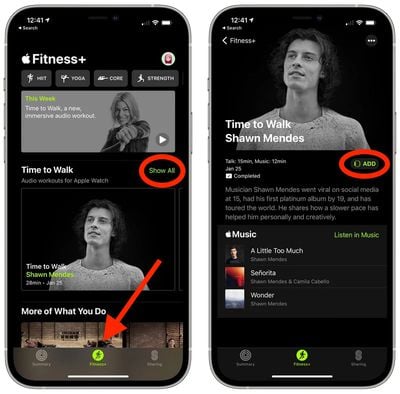
- On your iPhone, launch the Fitness app.
- Launch the central Fitness+ tab at the bottom of the screen.
- In the "Time to Walk" section, tap Show All.
- Tap the episode you'd like to download, then tap the Add button.
How to Start a Time to Walk Episode
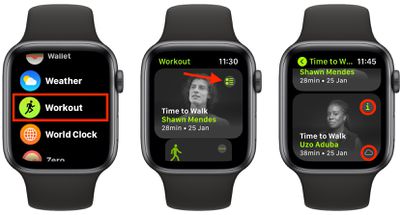
- Launch the Workout app on your Apple Watch.
- Tap the Time to Walk card to start the featured episode, or tap the sub-menu button in the top-right corner of the card to reveal other episodes.
- Tap the "i" button on an episode card to learn more about it, or simply tap the card to start the episode. (Note that episodes showing a cloud in their card will need to be downloaded, over either Wi-Fi or cellular.)
If the GPS in your Apple Watch detects any distance traveled during a Time to Walk episode, the workout will be recorded as an Outdoor Walk. If not, it will be recorded as an Indoor Walk.
Just like regular workouts, when following a Time to Walk episode you can swipe to the left and lock, end, or pause the workout. Likewise, you can swipe to the right to pause the audio or skip forward/back in the episode or to the next song.
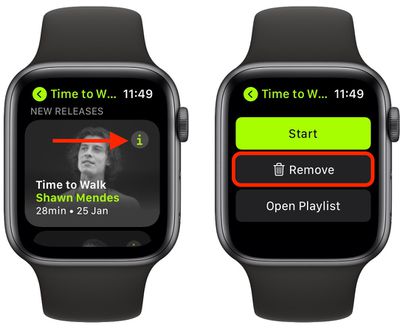
Once you've completed a Time to Walk episode, it will be automatically removed from your Apple Watch. If you want to remove an episode manually, simply tap the info button on the workout, scroll down to the bottom, then tap Remove.